
Garmin Dash Cam 67W Review: 180° View in a Pocket-Sized Camera
Affiliate disclosure: ReviewsWhiz is reader-supported. When you buy through links on this page, we may earn a commission from Amazon at no extra cost to you. Learn more.
The Garmin Dash Cam 67W is a pocket-sized camera with one standout feature: a 180-degree lens. That extra width can capture cars running a red light from the side or a fender-bender at an intersection that a narrower lens would miss.
In this Garmin 67W review, we cover its video, alerts, connected features and who it suits best.

Garmin Dash Cam 67W
4.5 / 5 ReviewsWhiz Score- 1440p with a 180° field of view
- GPS plus collision and lane departure alerts
- Memory card included in the box
✅ Pros
- Very wide 180° coverage
- Sharper 1440p video than the Mini 2
- Helpful driver alerts
- Compact with a small screen
- Memory card included
❌ Cons
- Wide lens adds edge distortion
- Front-only camera
- Parking Guard needs constant power and Wi-Fi
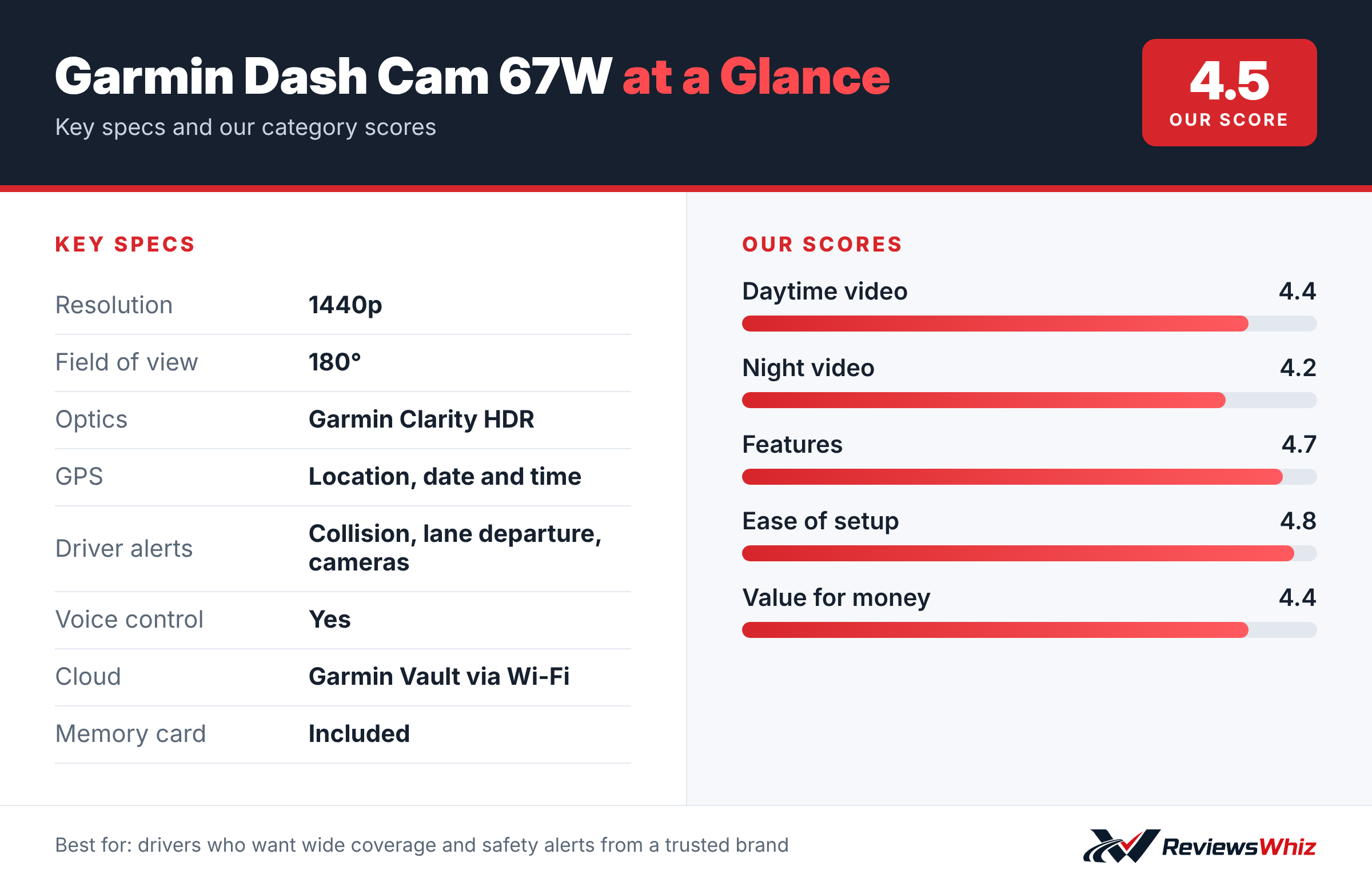
Garmin Dash Cam 67W Key Specifications
| Resolution | 1440p |
| Field of view | 180° |
| Optics | Garmin Clarity HDR |
| GPS | Location, date and time |
| Driver alerts | Collision, lane departure, cameras |
| Voice control | Yes |
| Cloud | Garmin Vault via Wi-Fi |
| Memory card | Included |
Video Quality and Field of View
The 67W records 1440p video through an extra-wide 180° lens with Garmin Clarity HDR optics. The wide view catches activity across several lanes and at intersections. The trade-off is a little distortion at the edges and slightly less detail at long distances than a narrower 4K lens.
Driver Alerts
Forward collision warnings, lane departure warnings and speed camera alerts can help you drive more safely. Garmin notes that some conditions can affect alerts, so treat them as helpers, not guarantees.
Connected Features
- Voice control to save video and take photos
- Automatic uploads to Garmin Vault over Wi-Fi
- Parking Guard alerts and remote Live View (need constant power and Wi-Fi)
- Works with up to four Garmin dash cams in one app
Ready Out of the Box
Unlike many dash cams, the 67W comes with a memory card, so you can install and start recording right away. GPS stamps each video with location, date and time.
Setting Up the Garmin 67W
The 67W comes with a memory card, a magnetic mount and a car power adapter, so you can install it straight out of the box. Mount it high on the windshield behind the mirror, run the cable along the headliner and down the A-pillar, and power it from the 12V socket. The small screen on the back helps you aim the lens without needing your phone.
Pair it with the Garmin Drive app to download clips, change settings and connect to Garmin Vault. The setup wizard explains each step in plain language.
- Aim the lens so the horizon sits near the middle of the frame.
- Turn on driver alerts you find useful and switch off the rest.
- Keep the included card formatted every few weeks.
- Tuck cables under trim for a clean look.
What the 180-Degree Lens Means in Practice
The ultra-wide 180-degree lens captures the whole road ahead plus a large slice of each side. That can show cars cutting in from adjacent lanes, pedestrians at crosswalks and vehicles running a red light from the side, which narrower cameras can miss.
The trade-off is that objects far ahead appear smaller, and the edges of the image curve slightly. For reading plates of cars several lengths ahead, a narrower lens with higher resolution does better. For seeing everything that happened around an intersection, the 67W’s wide view is a real strength.
Garmin 67W vs Alternatives
| Model | Main strength | Trade-off | Best for |
|---|---|---|---|
| Garmin Dash Cam 67W | 180° view, alerts, card included | Edge distortion, front only | Wide coverage with easy setup |
| Garmin Dash Cam Mini 2 | Tiny and discreet | 1080p, no screen | Minimalist installs |
| Garmin Dash Cam X310 | 4K with touchscreen | Higher price | Best detail from Garmin |
| VIOFO A229 Plus | Front and rear 1440P | More settings to learn | Dual-channel value |
Driver Alerts: Helpful or Annoying?
The 67W can warn you about forward collisions, lane departures, red light and speed cameras, and when traffic ahead starts moving. Many drivers find the forward collision and go alerts helpful in stop-and-go traffic. Lane departure warnings are useful on highways but can trigger often on narrow city streets.
Every alert can be turned on or off in the settings, so you can keep only what helps you.
Cloud Storage and Parking Features
Garmin Vault lets you save important clips to the cloud and share them by link, which is handy when an insurer needs footage. Parking Guard and Live View need constant power and an in-car Wi-Fi hotspot, so they are extras for most drivers. Garmin offers a one-year warranty and strong customer support, which is part of what you pay for compared with lower-cost brands.
Memory Card and Settings Tips
- The included card is fine to start, but a high-endurance card lasts longer with constant recording.
- Set automatic incident detection to medium so potholes do not save too many clips.
- Turn on GPS so every clip records date, time and location.
- Update firmware through the Garmin Drive app every few months.
- Clean the inside of the windshield so the wide lens stays sharp.
Is the 67W a Good Value?
The 67W costs more than some rival dash cams with similar resolution, but you get a polished app, a screen, an included memory card, driver alerts and Garmin’s support. For drivers who want a reliable camera that works out of the box and do not want to tinker with settings, that premium makes sense.
Who Should Buy the Garmin Dash Cam 67W?
Buy it if you want wide coverage, driver alerts and the simplicity of Garmin’s app.
Skip it if you need rear recording or the best possible plate detail. Look at the VIOFO A229 Plus or Garmin X310.
Alternatives to Consider
- Garmin Dash Cam Mini 2: Smaller, but only 1080p.
- Garmin Dash Cam X310: 4K with a 140° lens.
- VIOFO A229 Plus: 2K front and rear for similar money.
Final Verdict
The Garmin Dash Cam 67W is a great all-round front camera. Its 180° lens, driver alerts and included memory card make it one of the easiest dash cams to live with. If you want the widest possible view in a small package, it is a strong pick.
Helpful Free Car Tools
- Dash Cam SD Card Recording Time Calculator: Hours of video by card size, resolution and channels.
- Browse all free car tools and calculators
Related Reviews
Frequently Asked Questions
What is the field of view of the Garmin 67W?
180 degrees.
What resolution does it record?
1440p HD.
Does the 67W have GPS?
Yes. It records location, date and time with each video.
Does it include a memory card?
Yes. A memory card is included in the box.
Does the Garmin 67W have a rear camera?
No. It is front-only, but you can add other Garmin cameras.
How we evaluated: this review is based on the manufacturer’s published specifications, the product’s feature set, and how it compares with competing products in the same price range. Product details and images are provided by Amazon and may change. Prices and availability are accurate as of the time shown on Amazon and are subject to change.