
Garmin Dash Cam Mini 2 Review: The Smallest Dash Cam Worth Buying?
Affiliate disclosure: ReviewsWhiz is reader-supported. When you buy through links on this page, we may earn a commission from Amazon at no extra cost to you. Learn more.
The Garmin Dash Cam Mini 2 is about the size of a car key. There is no screen, so it hides behind the rearview mirror where you and everyone else will forget it is there.
In this Garmin Dash Cam Mini 2 review, we cover its video quality, connected features and the trade-offs that come with its tiny size.

Garmin Dash Cam Mini 2
4.3 / 5 ReviewsWhiz Score- Car key-sized design with no screen
- 1080p with Garmin Clarity HDR
- Voice control and cloud Vault uploads
✅ Pros
- Extremely small and discreet
- Simple, reliable Garmin app
- Voice commands to save clips
- Cloud uploads to Garmin Vault
- Built for heat and direct sun
❌ Cons
- Only 1080p
- No GPS speed and location logging like larger models
- No screen for on-the-spot review
- Parking Guard needs constant power and Wi-Fi
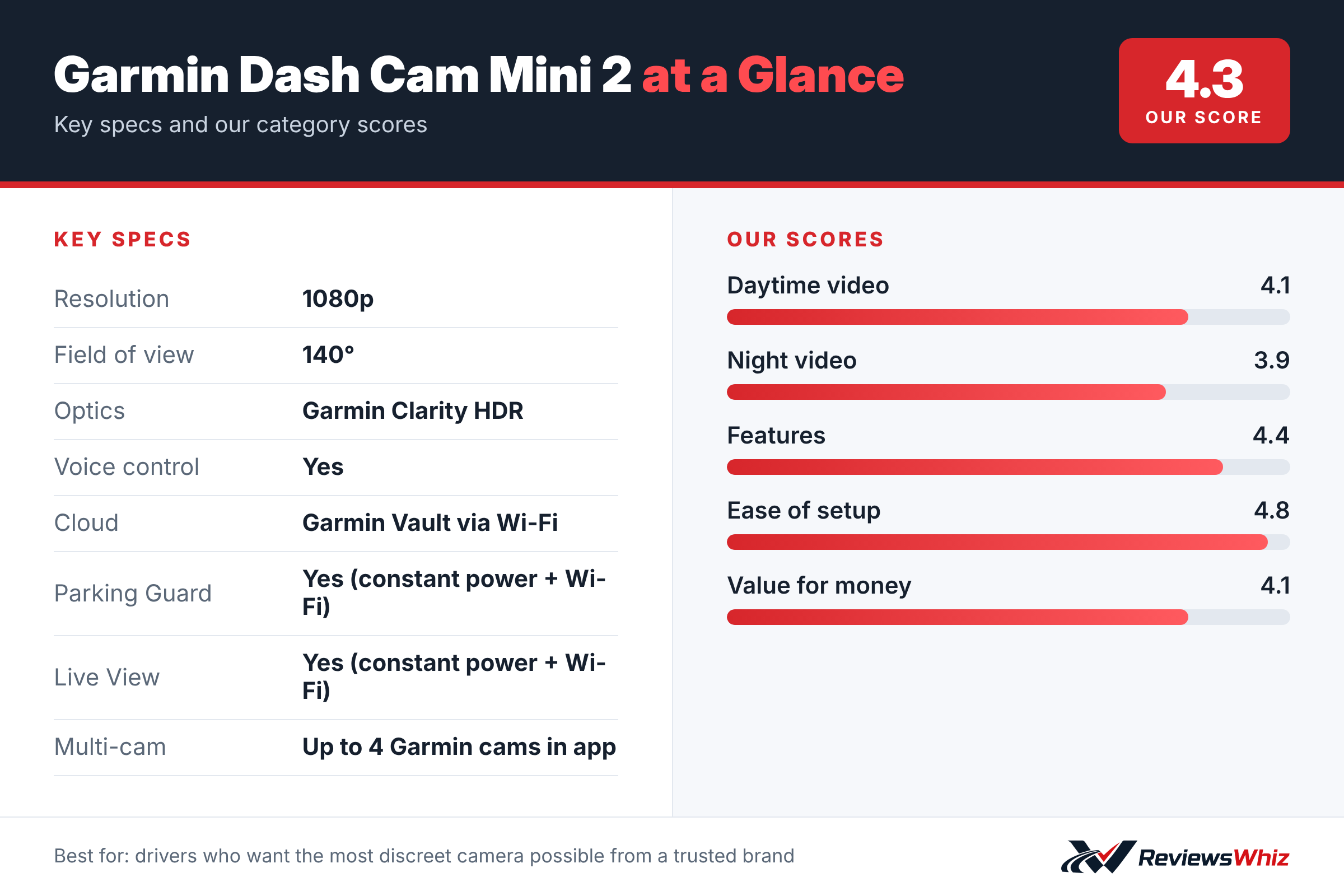
Garmin Dash Cam Mini 2 Key Specifications
| Resolution | 1080p |
| Field of view | 140° |
| Optics | Garmin Clarity HDR |
| Voice control | Yes |
| Cloud | Garmin Vault via Wi-Fi |
| Parking Guard | Yes (constant power + Wi-Fi) |
| Live View | Yes (constant power + Wi-Fi) |
| Multi-cam | Up to 4 Garmin cams in app |
Video Quality
The Mini 2 records 1080p video through a 140° lens with Garmin’s Clarity HDR optics. That is fine for capturing what happened in a collision, but it has less detail than 2K and 4K cameras for reading plates at a distance.
Design
The biggest selling point is size. With no screen, the Mini 2 is easy to hide and does not distract you. Garmin says it is built to withstand harsh vehicle conditions, including direct sunlight and high heat.
Connected Features
- Voice control to save video, take photos and toggle audio
- Automatic uploads of saved clips to Garmin Vault over Wi-Fi
- Parking Guard alerts and remote Live View (need constant power and Wi-Fi)
- View up to four Garmin dash cams in one app
Front Only, but Expandable
The Mini 2 records only the road ahead. If you want rear coverage, you can add more Garmin cameras and view them together in the Garmin Drive app, although each one is sold separately.
Installing the Garmin Mini 2
The Dash Cam Mini 2 is about the size of a car key, so it disappears behind the rear-view mirror. It uses a small magnetic mount with an adhesive base, which lets you pop the camera off when you park. Stick the mount on clean glass, run the slim cable along the headliner and down the A-pillar, and plug it into the included dual-USB car adapter.
Pair it with the Garmin Drive app to set the angle, adjust settings and download clips. The app walks you through setup step by step, which is why this camera is popular with people who have never owned a dash cam.
- Place it behind the mirror so it does not block your view.
- Check the live preview in the app to set the angle.
- Use a high-endurance microSD card, since one may not be included depending on the bundle.
- Leave Wi-Fi on so the app can connect quickly.
Who the Mini 2 Is For
This camera is aimed at drivers who want simple, discreet protection without a big device on the windshield. It suits leased cars, company cars and owners who care about a clean interior. Voice commands let you save video or take a still photo without touching anything.
It is also a good first dash cam for teens and new drivers, or for parents adding protection to a second car. Because Garmin’s app can manage several cameras, you can add a Mini 2 as a rear-window camera to another Garmin model later and view them together.
Mini 2 vs Other Small Dash Cams
| Model | Main strength | Trade-off | Best for |
|---|---|---|---|
| Garmin Dash Cam Mini 2 | Tiny, very simple, Garmin app | 1080p, no GPS logging | Discreet everyday protection |
| VIOFO A119 Mini 2 | Sharper 1440P at 60fps, GPS | Bigger, more settings to learn | Best image quality per dollar |
| Garmin Dash Cam 67W | 1440p, 180° lens, driver alerts | Larger with screen | More features from Garmin |
| Garmin Dash Cam X310 | 4K and touchscreen | Higher price | Maximum detail in Garmin’s range |
Garmin Vault, Parking Guard and Live View
Garmin Vault stores saved clips in the cloud so you can view and share them from anywhere. A basic level of storage is included, with paid plans for longer storage. Parking Guard alerts your phone if an incident is detected while the car is parked, and Live View lets you check the camera remotely.
Both features need the camera to have constant power through a Garmin constant-power cable and a Wi-Fi hotspot in the car. Many drivers do not have an always-on hotspot, so treat these as extras rather than reasons to buy.
Settings and Memory Card Tips
- Use a 64GB to 128GB high-endurance microSD card; 1080p files are small, so you get long loop times.
- Keep audio recording on unless your state or passengers object.
- Turn on automatic incident detection so collisions save themselves.
- Update the camera through the Garmin Drive app.
- Clean the windshield regularly; small lenses are sensitive to haze.
Is 1080p Enough for a Dash Cam?
1080p is the minimum resolution we would recommend in a modern dash cam, and Garmin’s processing makes the most of it. It records clear footage of what happened, the color of vehicles and road conditions. Where it falls short is reading license plates on cars that are moving fast or several lengths away, especially at night. If plate detail is your top priority, a 1440P or 4K model such as the VIOFO A119 Mini 2 or Garmin 67W will do better. If you value a tiny, hidden camera and simple setup, the Mini 2’s trade-off is reasonable.
Who Should Buy the Garmin Dash Cam Mini 2?
Buy it if you want a tiny, trustworthy camera and prefer simplicity over maximum resolution.
Skip it if you want 2K or 4K detail. The Garmin 67W or VIOFO A119 Mini 2 offer sharper video.
Alternatives to Consider
- Garmin Dash Cam 67W: 1440p with a 180° lens and driver alerts.
- VIOFO A119 Mini 2: 2K 60fps with STARVIS 2 for less money.
- Garmin Dash Cam X310: 4K in a compact Garmin body.
Final Verdict
The Garmin Dash Cam Mini 2 is the camera for people who do not want to see a dash cam. Its resolution is basic by today’s standards, but its size, reliability and Garmin software make it a solid choice for simple, set-and-forget recording.
Helpful Free Car Tools
- Dash Cam SD Card Recording Time Calculator: Hours of video by card size, resolution and channels.
- Browse all free car tools and calculators
Related Reviews
Frequently Asked Questions
What resolution is the Garmin Mini 2?
1080p with a 140° field of view.
Does the Garmin Mini 2 have a screen?
No. You view and manage footage through the Garmin Drive app.
Does it have parking mode?
Yes, Parking Guard, but it needs constant power and a Wi-Fi connection.
Can I add a rear camera?
You can add other Garmin dash cams and view up to four in the app.
Does it support voice control?
Yes, in English and several other languages.
How we evaluated: this review is based on the manufacturer’s published specifications, the product’s feature set, and how it compares with competing products in the same price range. Product details and images are provided by Amazon and may change. Prices and availability are accurate as of the time shown on Amazon and are subject to change.