
Garmin Dash Cam Live Review: An Always-Connected LTE Dash Cam
Affiliate disclosure: ReviewsWhiz is reader-supported. When you buy through links on this page, we may earn a commission from Amazon at no extra cost to you. Learn more.
The Garmin Dash Cam Live has built-in LTE, so you can see a live view from your car, track its location and get theft alerts from anywhere through the Garmin Drive app.
In this Garmin Dash Cam Live review, we look at its features and the subscription that powers them.

Garmin Dash Cam Live
4.4 / 5 ReviewsWhiz Score- Always-on LTE for 24/7 live view
- Location tracking and theft alerts
- 1440p with Garmin Clarity HDR
✅ Pros
- Remote live view from anywhere
- Theft alerts and location tracking
- Automatic cloud uploads
- Driver safety alerts
- Simple Garmin app
❌ Cons
- LTE requires an active subscription
- 1440p rather than 4K
- Front-only camera
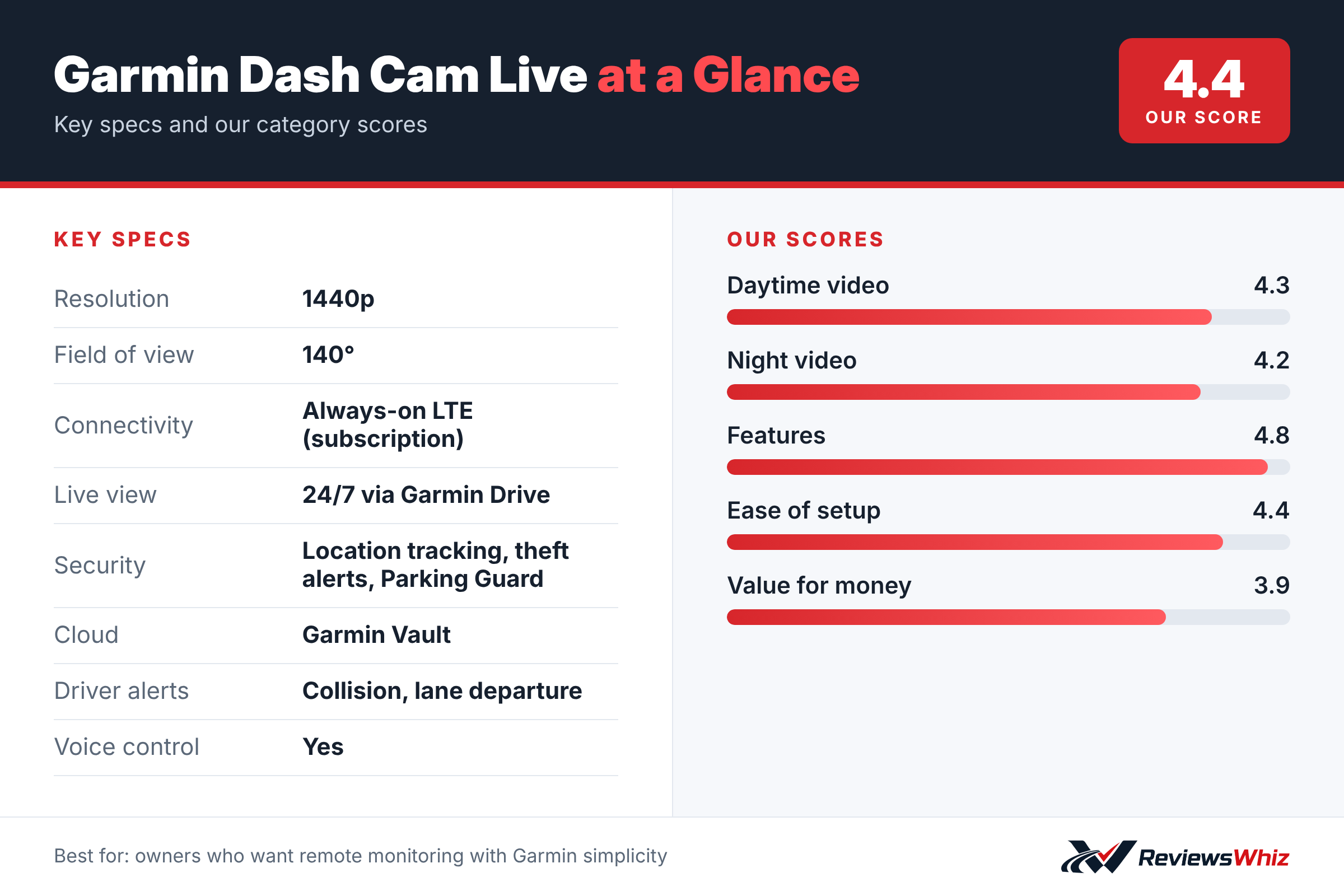
Garmin Dash Cam Live Key Specifications
| Resolution | 1440p |
| Field of view | 140° |
| Connectivity | Always-on LTE (subscription) |
| Live view | 24/7 via Garmin Drive |
| Security | Location tracking, theft alerts, Parking Guard |
| Cloud | Garmin Vault |
| Driver alerts | Collision, lane departure |
| Voice control | Yes |
Always Connected
With an active LTE subscription, you can open a live view of your car at any time, share saved videos and receive alerts. Location tracking helps if your car is stolen.
Video Quality
The camera records 1440p through a 140° lens with Garmin Clarity HDR optics, and stamps every clip with GPS location, date and time.
Safety and Convenience
Forward collision and lane departure warnings help you drive more safely. Voice control saves clips hands-free, and the app can view up to four Garmin cameras.
Installing the Garmin Dash Cam Live
The Dash Cam Live mounts behind the rear-view mirror like other Garmin dash cams. Because it is designed to stay connected 24/7, it needs constant power. Garmin includes a constant-power cable that connects to your car’s fuse box, so the camera stays on when the car is parked while protecting your battery from being drained.
Activate the LTE subscription in the Garmin Drive app, then follow the steps to connect the camera. Once set up, you can view the camera live from anywhere with mobile coverage.
- Install the constant-power cable at the fuse box.
- Activate the LTE plan in Garmin Drive.
- Check live view from your phone before finishing.
- Use a high-endurance microSD card.
What Always-On LTE Gives You
With built-in LTE, the Dash Cam Live can send alerts to your phone if it detects an incident while parked, show you a live view of the car at any time, share the car’s location and alert you if the car is moved. Clips are uploaded to Garmin Vault so they are safe even if the camera is stolen.
That makes it valuable for people who park on the street, parents of teen drivers, and small business owners who want to keep an eye on vehicles.
Dash Cam Live vs Other Connected Dash Cams
| Model | Main strength | Trade-off | Best for |
|---|---|---|---|
| Garmin Dash Cam Live | Built-in LTE, Garmin app | Subscription required | Remote monitoring |
| BlackVue DR970X LTE Plus II | 4K, rear camera | Higher price | Full coverage |
| Nexar Beam 2 | Lower cost | Fewer features | Budget connected |
| Garmin Dash Cam 67W | No subscription | No LTE | Standard recording |
Understanding the Subscription
The LTE features require an active Garmin subscription. Without it, the camera works as a standard dash cam with Wi-Fi. Factor the subscription into the total cost before buying.
Video Quality
The Dash Cam Live records 1440p with a 140-degree field of view. That gives a good balance of detail and coverage, and Garmin’s HDR helps at night.
Driver Alerts
The camera includes forward collision and lane departure warnings, and voice control for saving clips hands-free. You can turn alerts on or off in the settings.
Who It Is For
The Dash Cam Live is for drivers who want to check on their car remotely and get alerts in real time. If you only need recording while driving, a standard dash cam is cheaper.
Tips
- Check LTE coverage where you usually park.
- Set the battery cutoff to protect the car battery.
- Review alerts settings to avoid notifications from minor bumps.
Value
For remote monitoring with Garmin’s polished app, the Dash Cam Live is one of the easiest options. The subscription adds cost, but it delivers features most dash cams cannot.
Parking Guard and Theft Alerts
When the car is parked, Parking Guard records and sends an alert if the camera detects an impact. Location tracking lets you see where the car is, and theft alerts notify you if the car moves unexpectedly. For people who park on busy streets or in public garages, getting a notification right away gives you a chance to respond, check the live view and save footage before you even reach the car.
What Is in the Box
The Dash Cam Live includes the camera, a magnetic mount, a constant-power cable for the fuse box and a quick start guide. Activating LTE requires a subscription through the Garmin Drive app.
Who Should Buy the Garmin Dash Cam Live?
Buy it if you want to monitor your car remotely and prefer Garmin’s ecosystem.
Skip it if you do not want a monthly subscription. The Garmin 67W offers similar video without LTE.
Alternatives to Consider
- BlackVue DR970X LTE Plus II: 4K connected dash cam.
- Nexar Beam 2: LTE dash cam with cloud storage.
- Garmin Dash Cam 67W: Garmin without LTE.
Final Verdict
The Garmin Dash Cam Live is a polished connected dash cam. If you value 24/7 remote access and theft alerts, it is worth the subscription.
Helpful Free Car Tools
- Dash Cam SD Card Recording Time Calculator: Hours of video by card size, resolution and channels.
- Dash Cam Field of View Calculator: Road width covered at a distance.
- Browse all free car tools and calculators
Related Reviews
Frequently Asked Questions
Does the Garmin Dash Cam Live need a subscription?
Yes, always-on LTE features require an active subscription.
What resolution does it record?
1440p.
Can I see a live view remotely?
Yes, through the Garmin Drive app.
Does it have theft alerts?
Yes, with location tracking.
Does it have driver alerts?
Yes, including forward collision and lane departure warnings.
Does the Garmin Dash Cam Live work without a subscription?
Yes, it still records like a normal dash cam and connects to your phone over Wi-Fi. The LTE features, including live view from anywhere, remote alerts and location tracking, require an active Garmin subscription.
Will the Dash Cam Live drain my car battery?
It uses a constant-power cable with battery protection, which cuts power to the camera if the car battery voltage drops too low. That helps make sure the car still starts. Set the cutoff carefully, especially in cold weather.
Does it have a rear camera?
No. The Dash Cam Live is a front-facing camera. If you need rear coverage with LTE, look at a model like the BlackVue DR970X LTE Plus II.
How we evaluated: this review is based on the manufacturer’s published specifications, the product’s feature set, and how it compares with competing products in the same price range. Product details and images are provided by Amazon and may change. Prices and availability are accurate as of the time shown on Amazon and are subject to change.