
Veepeak OBDCheck BLE+ Review: A Budget Adapter That Works With Many Apps
Affiliate disclosure: ReviewsWhiz is reader-supported. When you buy through links on this page, we may earn a commission from Amazon at no extra cost to you. Learn more.
The Veepeak OBDCheck BLE+ is an affordable Bluetooth adapter that works with iPhone and Android. Like other adapters, it needs a third-party app, but it supports a wide range of popular ones.
In this Veepeak OBDCheck BLE+ review, we explain what it does and which apps work best.

Veepeak OBDCheck BLE+
4.3 / 5 ReviewsWhiz Score- Dual-mode Bluetooth for iOS and Android
- Works with Car Scanner, OBD Fusion, Torque and more
- Generic OBD2 codes, freeze frame and live data
✅ Pros
- Affordable
- Works on both iPhone and Android
- Compatible with many apps
- Supports some vehicle-specific apps
- Reliable connection
❌ Cons
- Needs a third-party app
- Advanced systems require paid apps
- BimmerCode support has model limits
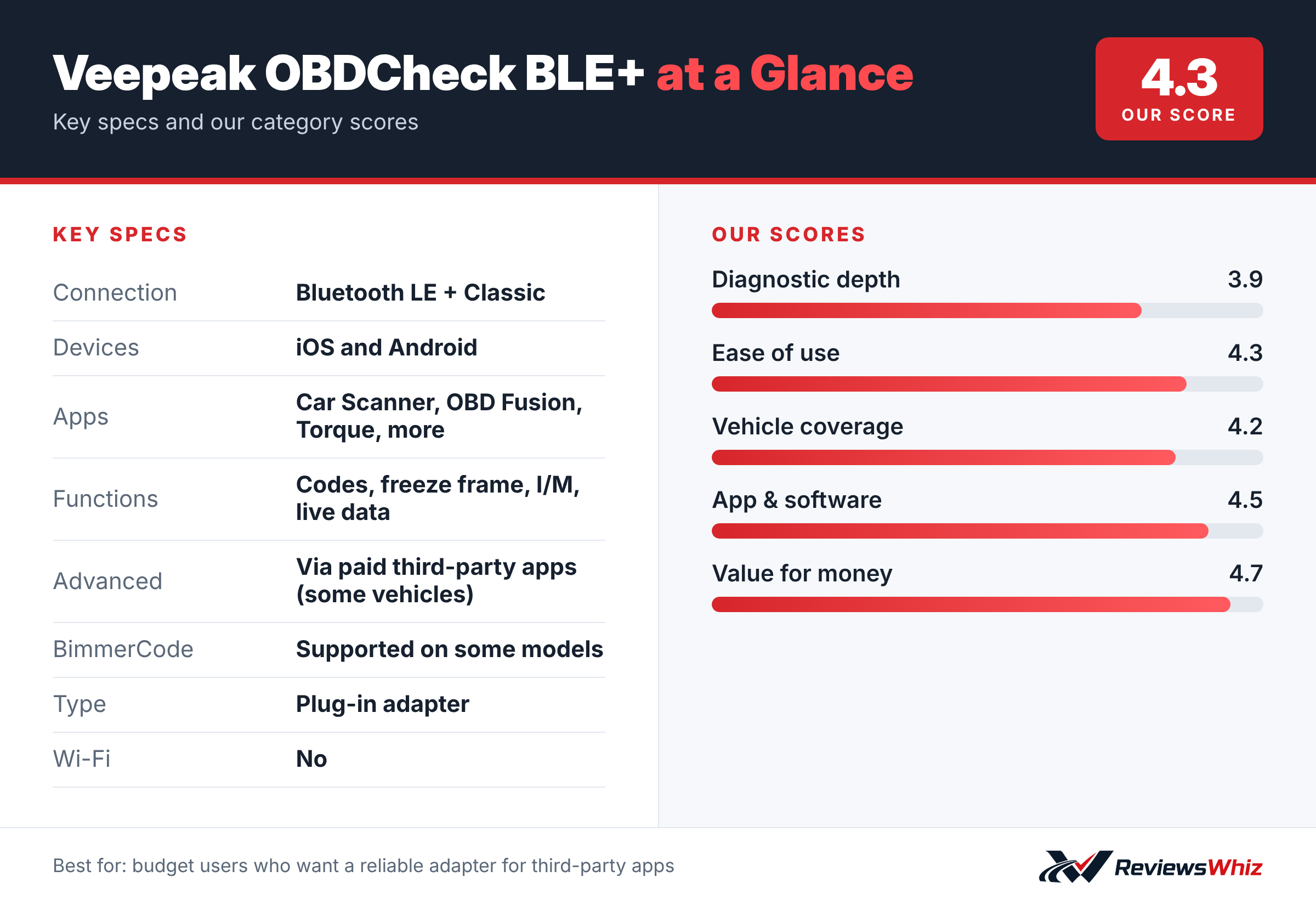
Veepeak OBDCheck BLE+ Key Specifications
| Connection | Bluetooth LE + Classic |
| Devices | iOS and Android |
| Apps | Car Scanner, OBD Fusion, Torque, more |
| Functions | Codes, freeze frame, I/M, live data |
| Advanced | Via paid third-party apps (some vehicles) |
| BimmerCode | Supported on some models |
| Type | Plug-in adapter |
| Wi-Fi | No |
What It Does
Out of the box, it handles generic OBD2 functions: reading and clearing check engine codes, freeze frame data, I/M readiness and live sensor data.
App Compatibility
Veepeak lists compatibility with Car Scanner ELM OBD2, Torque (Android), OBD Fusion and vehicle-specific apps like BimmerCode, BimmerLink, OBD JScan and Dr. Prius. Note that BimmerCode does not support pre-2008 models or BMW G and U series with this adapter.
Advanced Diagnostics
ABS, SRS, TPMS and body module diagnostics may be available on certain vehicles through paid third-party apps. Check your car’s compatibility first.
How the Veepeak BLE+ Works
The OBDCheck BLE+ is a small adapter that plugs into the OBD2 port and connects to your phone over Bluetooth. It supports both Bluetooth Low Energy for iPhones and classic Bluetooth for Android, so it works with almost any phone. It does not include its own app; you choose from popular third-party apps such as Car Scanner, OBD Fusion and Torque.
With a free app, you can read and clear check engine codes, view freeze frame data, check emissions readiness and watch live sensor data.
Getting Started
- Plug the adapter into the OBD2 port under the dashboard.
- Install a compatible app, such as Car Scanner.
- Pair the adapter inside the app.
- Run a scan and explore live data.
Choosing the Right App
Car Scanner is a good starting point because it offers many free features and supports both iOS and Android. OBD Fusion is popular on iOS and offers paid enhanced packages for some brands. Torque Pro is a long-time Android favorite. Many apps offer free trials, so try one before paying.
BLE+ vs Other Adapters
| Model | Main strength | Trade-off | Best for |
|---|---|---|---|
| Veepeak OBDCheck BLE+ | Low price, iOS and Android | Needs third-party app | Budget DIY |
| Vgate iCar Pro | Low sleep draw | Similar limits | Leaving plugged in |
| OBDLink MX+ | Fast, stable, more features | Higher price | Enthusiasts |
| BlueDriver Pro | All-in-one app with repair reports | Higher price | Guided diagnosis |
Advanced Diagnostics
Some paid apps can read manufacturer-specific systems like ABS and airbags on certain vehicles with the BLE+. Results vary by car and app. If you need those systems reliably, a dedicated scanner is a better choice.
BimmerCode Support
The BLE+ works with BimmerCode on some BMW and MINI models, but compatibility has limits. Check BimmerCode’s adapter list before buying for coding. For reliable coding, the OBDLink CX is the recommended choice.
Useful Live Data
- Coolant temperature to watch for overheating.
- Fuel trims to spot vacuum leaks.
- Oxygen sensor voltage.
- Battery voltage and charging status.
Tips
- Unplug the adapter if the car will sit for weeks.
- Do not use the app while driving.
- Update the app regularly.
Value
For a small price, the BLE+ turns your phone into a capable code reader. It is a great first OBD2 tool for curious drivers.
What Is in the Box
You get the adapter and a short quick start guide. There is no dedicated Veepeak app; you download a compatible app from the App Store or Google Play. Many apps offer free versions with code reading and live data, and paid upgrades for extra features.
Who Should Choose Something Else
If you do not want to choose and configure a third-party app, an all-in-one product like BlueDriver or FIXD is easier. If you plan to code a BMW or use FORScan on a Ford, a faster adapter such as the OBDLink CX or MX+ is a safer choice, because a stable connection matters during coding. For simple code reading and live data, though, the BLE+ does the job well for very little money.
Using It When Buying a Used Car
Bring the BLE+ to a test drive and run a quick scan. Look for stored or pending codes and check the readiness monitors. If several monitors are not ready, the seller may have cleared codes recently. That is a good reason to ask questions or get a professional inspection before you buy.
Who Should Buy the Veepeak OBDCheck BLE+?
Buy it if you want a cheap, dependable adapter for phone-based diagnostics.
Skip it if you want an all-in-one solution. BlueDriver includes its own full-featured app.
Alternatives to Consider
- Vgate iCar Pro: Even cheaper BLE adapter.
- OBDLink MX+: Premium adapter with enhanced OEM data.
- BlueDriver Pro: All-in-one with repair reports.
Final Verdict
The Veepeak OBDCheck BLE+ is a solid budget adapter. Pair it with a good app like Car Scanner or OBD Fusion and you have a capable diagnostic setup for very little money.
Helpful Free Car Tools
- VIN Decoder: Make, model, year and specs from a VIN.
- Browse all free car tools and calculators
Related Reviews
Frequently Asked Questions
Does the Veepeak OBDCheck BLE+ work with iPhone?
Yes, via Bluetooth LE.
Does it need an app?
Yes, a compatible third-party app.
Can it read ABS codes?
On some vehicles, through paid third-party apps.
Does it work with BimmerCode?
Yes on many models, but not pre-2008 or G and U series.
Does it use Wi-Fi?
No, it uses Bluetooth.
Does the Veepeak OBDCheck BLE+ work with iPhone?
Yes. It supports Bluetooth Low Energy, which iPhones require, as well as classic Bluetooth for Android. You pair it inside a compatible app such as Car Scanner or OBD Fusion rather than in the phone's Bluetooth settings.
Can I leave the BLE+ plugged in all the time?
Many owners leave it plugged in for daily driving. If the car will sit unused for more than a week or two, unplug it to avoid any chance of draining a weak battery.
Can it read ABS and airbag codes?
Not with free apps. Some paid third-party apps can access ABS, airbag and other systems on certain vehicles through the BLE+, but coverage varies by app and car. A dedicated scanner is more reliable for those systems.
How we evaluated: this review is based on the manufacturer’s published specifications, the product’s feature set, and how it compares with competing products in the same price range. Product details and images are provided by Amazon and may change. Prices and availability are accurate as of the time shown on Amazon and are subject to change.