
Autel MaxiAP AP200 Review: Full-System Diagnostics for Under $100
Affiliate disclosure: ReviewsWhiz is reader-supported. When you buy through links on this page, we may earn a commission from Amazon at no extra cost to you. Learn more.
The Autel MaxiAP AP200 is a small Bluetooth adapter that brings many features of Autel’s popular MK808 tablet to your phone. It offers full-system diagnostics and service resets at a fraction of the price of a tablet scanner.
In this Autel AP200 review, we look at what it can do, how the app works and the catches you should know about.

Autel MaxiAP AP200
4.4 / 5 ReviewsWhiz Score- Full-system diagnostics on your phone
- 19 service and reset functions
- Automatic VIN scan and fast pairing
✅ Pros
- Very affordable for full-system scans
- Tiny and easy to store
- 19 service functions
- Auto VIN and one-step scans
- Works with iOS and Android
❌ Cons
- Only works with Autel’s MaxiAP200 app
- Some features and brands may require paid add-ons
- Phone screen is smaller than a tablet
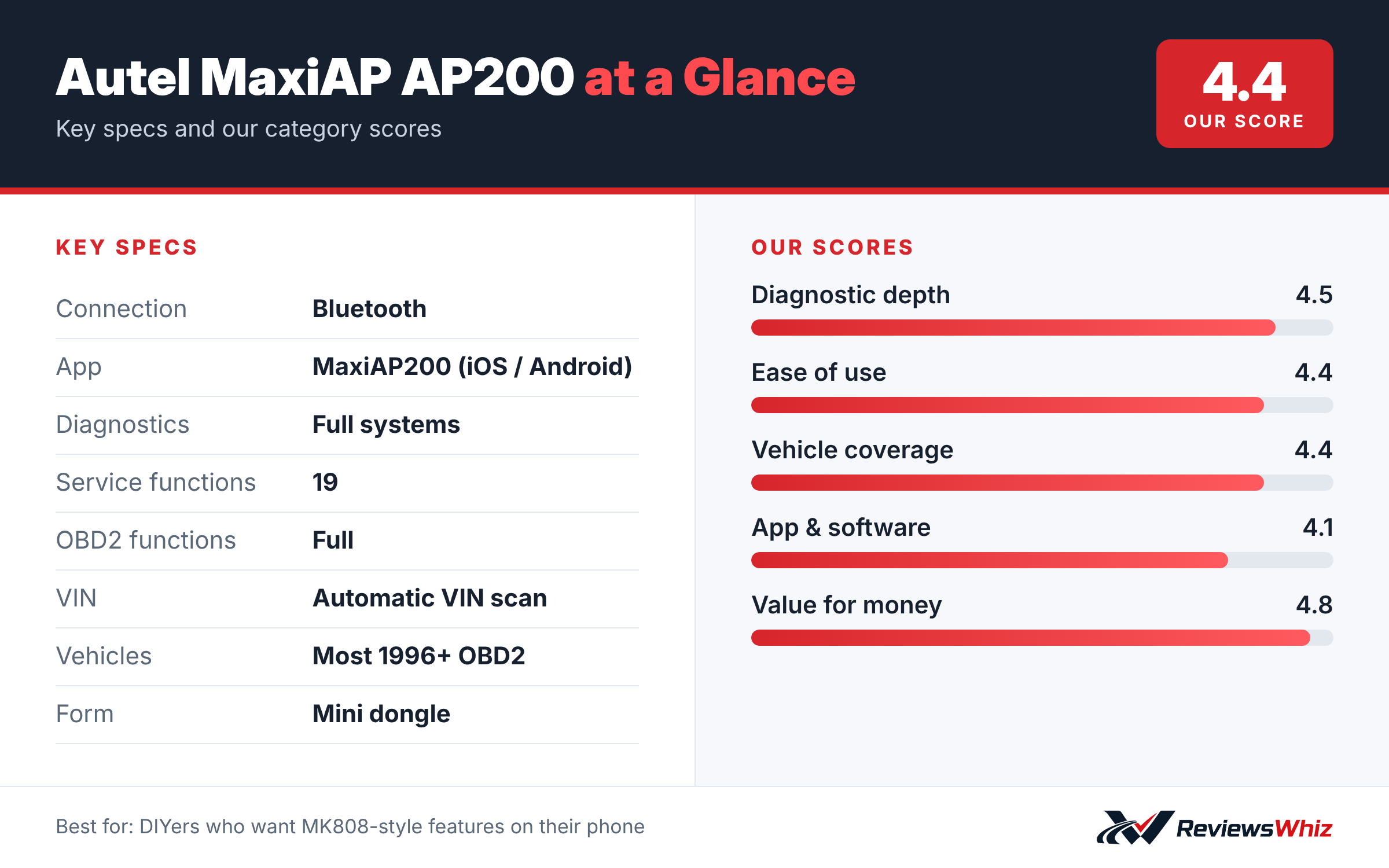
Autel MaxiAP AP200 Key Specifications
| Connection | Bluetooth |
| App | MaxiAP200 (iOS / Android) |
| Diagnostics | Full systems |
| Service functions | 19 |
| OBD2 functions | Full |
| VIN | Automatic VIN scan |
| Vehicles | Most 1996+ OBD2 |
| Form | Mini dongle |
Full-System Diagnostics
Unlike basic engine-only readers, the AP200 can scan all available systems, such as engine, transmission, ABS and airbag, on supported vehicles. Autel describes it as a mini version of the MK808 with the same core functions.
Service Functions
The AP200 includes 19 service functions, which typically cover common jobs like oil reset, EPB, SAS and battery registration. Check Autel’s list for your vehicle before you buy.
Easy Workflow
Fast Bluetooth pairing, automatic VIN scan and one-step full-system diagnosis make it quick to use. You can clear codes after a repair from the same screen.
Things to Know
The adapter only works with Autel’s own MaxiAP200 app, not third-party apps. Some functions or vehicle brands may need to be activated separately, so read the product details carefully.
Setting Up the MaxiAP AP200
The AP200 is a small Bluetooth dongle that plugs into your car’s OBD2 port and connects to the MaxiAP200 app on iPhone or Android. Download the app, create an Autel account, pair the dongle and let Auto VIN identify your car. The app then guides you to the systems and functions available for your vehicle.
Because it uses your phone as the screen, there is no tablet to charge or store. The dongle itself is small enough to leave in the glove box.
- Plug the dongle in with the ignition off.
- Pair through the MaxiAP200 app.
- Activate the free vehicle brand included with your purchase.
- Run a full system scan first to see all stored codes.
What the AP200 Can Diagnose
Unlike basic code readers, the AP200 can access all available systems on supported vehicles, including engine, transmission, ABS, airbags, body control and more. You can read and clear codes, view live data and freeze frame, and check emissions readiness. That gives DIY owners a much fuller picture of what is happening in the car.
Coverage depends on the vehicle brands you activate in the app. The purchase usually includes one brand for free, with others available as paid add-ons, so check what your car needs.
Service Functions Explained
- Oil reset: clears the service reminder after an oil change.
- Electronic parking brake: retracts rear calipers for pad replacement.
- Battery registration: tells the car a new battery was installed.
- Steering angle sensor calibration: after an alignment.
- Throttle body relearn: after cleaning or replacing it.
- ABS bleeding: on supported vehicles, for brake work.
The AP200 offers 19 service functions, depending on the vehicle. These jobs often require a dealer or specialist tool, so they can save you money.
AP200 vs Other Options
| Model | Main strength | Trade-off | Best for |
|---|---|---|---|
| Autel MaxiAP AP200 | Full systems and resets at a low price | Paid brand add-ons | DIY owners with one or two brands |
| Autel MaxiCOM MK808S | Tablet with active tests | Higher price | Serious DIY and shops |
| BlueDriver Pro | Repair reports, no add-ons | Fewer service functions | Guided diagnosis |
| ThinkCar Thinkdiag 2 | Wide coverage via app | Subscription model | Multi-brand users |
Who It Is Best For
The AP200 is ideal for home mechanics who want dealer-style functions for one or two family cars without buying a big tablet. If you work on many different brands, the cost of add-ons can add up, and a tablet scanner may be better value in the long run.
Tips and Limitations
- Check your vehicle’s coverage in the app before buying add-ons.
- Keep the car on a battery maintainer during long service procedures.
- Phone screens are small, so a larger phone or tablet makes it easier to read data.
- Autel’s app needs an internet connection for activation and updates.
Is the AP200 Worth It?
For owners of one or two car brands, the AP200 is one of the cheapest ways to get full-system diagnostics and real service functions. You pay for the dongle once and add brands as needed. If you only ever work on your own car, the total cost stays low. If you help friends with many different cars, the add-on fees can make a tablet scanner a better long-term buy.
Final Buying Tips
- Confirm that your vehicle brand is supported before buying.
- Compare the price of add-on brands with a tablet scanner.
- Use a phone with a large screen for easier reading.
- Keep the dongle in the glove box so it is always handy.
Who Should Buy the Autel MaxiAP AP200?
Buy it if you want full-system scans and resets on a budget and do not mind using your phone.
Skip it if you want bidirectional tests or a dedicated screen. The Autel MK808S is the step up.
Alternatives to Consider
- Autel MaxiCOM MK808S: Tablet scanner with bidirectional tests.
- BlueDriver Pro: No-subscription Bluetooth scanner with repair reports.
- ThinkCar Thinkdiag 2: Another Bluetooth full-system scanner.
Final Verdict
The Autel AP200 is a lot of diagnostic power in a small package. If you are comfortable with phone apps and check that your car’s features are covered, it is one of the best-value full-system scanners available.
Helpful Free Car Tools
Related Reviews
Frequently Asked Questions
Does the Autel AP200 work with iPhone?
Yes, through the MaxiAP200 app on iOS and Android.
Can the AP200 read ABS and airbag codes?
Yes, it supports full-system diagnostics on supported vehicles.
Does it work with Torque or other apps?
No. It only works with Autel's MaxiAP200 app.
How many service functions does it have?
19.
Is the AP200 the same as the MK808?
Autel calls it a mini version with similar functions, but it uses your phone instead of a tablet.
How we evaluated: this review is based on the manufacturer’s published specifications, the product’s feature set, and how it compares with competing products in the same price range. Product details and images are provided by Amazon and may change. Prices and availability are accurate as of the time shown on Amazon and are subject to change.