
OBDLink MX+ Review: The Best OBD2 Adapter for Enthusiasts?
Affiliate disclosure: ReviewsWhiz is reader-supported. When you buy through links on this page, we may earn a commission from Amazon at no extra cost to you. Learn more.
The OBDLink MX+ is not a scanner with its own screen. It is a small Bluetooth adapter that turns your phone, tablet or Windows PC into a powerful diagnostic tool. Its real strength is compatibility: it is a recommended adapter for many of the best third-party car apps.
In this OBDLink MX+ review, we look at what you can do with it and who will get the most from it.

OBDLink MX+
4.6 / 5 ReviewsWhiz Score- Works with iPhone, Android and Windows
- Recommended adapter for FORScan, BimmerCode and more
- Enhanced OEM data on many major brands
✅ Pros
- Works with many popular third-party apps
- Fast, stable Bluetooth connection
- Enhanced data for major brands
- Battery drain protection when left plugged in
- Free firmware updates
❌ Cons
- No screen of its own
- Some advanced features need paid third-party apps
- Overkill for basic check engine checks
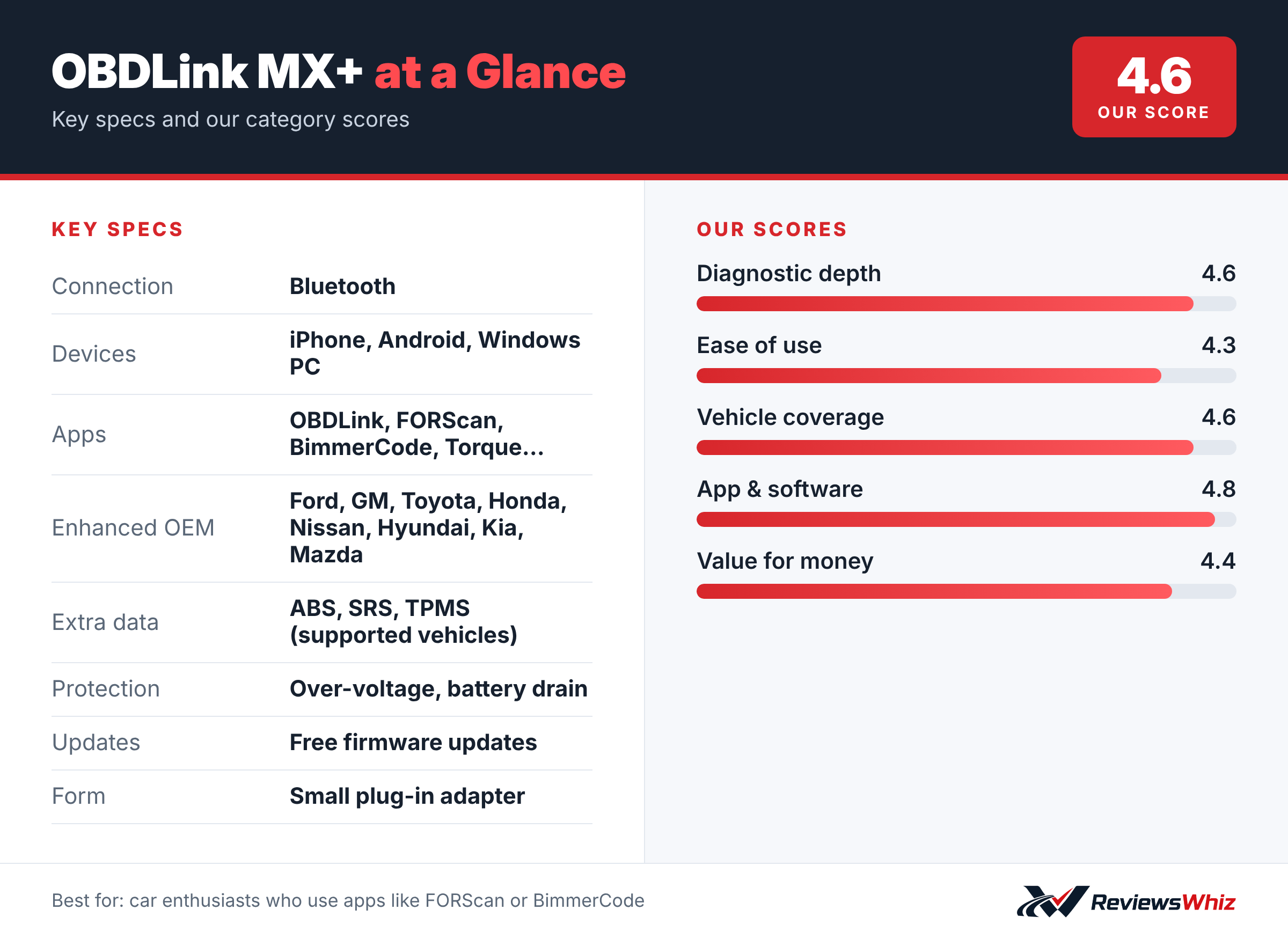
OBDLink MX+ Key Specifications
| Connection | Bluetooth |
| Devices | iPhone, Android, Windows PC |
| Apps | OBDLink, FORScan, BimmerCode, Torque… |
| Enhanced OEM | Ford, GM, Toyota, Honda, Nissan, Hyundai, Kia, Mazda |
| Extra data | ABS, SRS, TPMS (supported vehicles) |
| Protection | Over-voltage, battery drain |
| Updates | Free firmware updates |
| Form | Small plug-in adapter |
Why Enthusiasts Like It
The MX+ is a recommended adapter for FORScan, Torque, BimmerCode, DashCommand, AlfaOBD and Carista. That means one adapter can unlock dealer-level diagnostics on a Ford with FORScan, coding on a BMW with BimmerCode or custom gauges with Torque.
Enhanced OEM Support
With the OBDLink app, the MX+ offers enhanced support for Ford, GM, Mazda, Nissan/Infiniti, Toyota/Lexus/Scion, Honda, Hyundai and Kia. On supported vehicles, it can show more live parameters, including ABS, SRS and TPMS data.
Safe to Leave Plugged In
Over-voltage and battery drain protection mean you can leave the MX+ plugged in without worrying about draining your battery, which is handy if you use it for live gauges.
Check Compatibility First
Features depend on your vehicle and the app you use. OBDLink provides a troubleshooting and compatibility guide, and it is worth checking before you buy.
Setting Up the OBDLink MX+
The MX+ is a small adapter that plugs into your car’s OBD2 port and connects to your phone, tablet or Windows laptop over Bluetooth. Install the free OBDLink app, pair the adapter inside the app and let it detect your vehicle. Within a couple of minutes you can read codes, view live data and check emissions readiness.
The real strength is flexibility. Beyond OBDLink’s own app, the MX+ works with popular third-party apps such as FORScan for Ford and Lincoln, BimmerCode for BMW coding and Torque Pro on Android. That turns one adapter into a tool for many jobs.
- Plug into the OBD2 port under the dashboard.
- Pair inside the app you plan to use, not the phone’s Bluetooth menu.
- Run a first scan with the engine running to see live sensor data.
- Check the app’s compatibility list for your car before buying add-ons.
What You Can Do With It
- Read and clear check engine codes with descriptions.
- Watch live data such as fuel trims, temperatures and boost on a customizable dashboard.
- Log data on a drive and review it later to spot intermittent faults.
- Read enhanced codes from ABS, airbag and other modules on supported brands.
- Use FORScan on Ford vehicles to change hidden settings and run service procedures.
- Use BimmerCode on BMW and MINI to enable or disable comfort features.
Some of these features need paid enhanced diagnostics add-ons in the OBDLink app or a paid third-party app. The adapter itself has no subscription.
MX+ vs Other Bluetooth Adapters
| Model | Main strength | Trade-off | Best for |
|---|---|---|---|
| OBDLink MX+ | Works with many pro-level apps, battery protection | Advanced features may cost extra | Enthusiasts and DIY tuners |
| OBDLink CX | Low-energy Bluetooth, made for BimmerCode | Fewer platform options | BMW and MINI owners |
| BlueDriver Pro | Repair reports, all-in-one app | Locked to BlueDriver’s app | Owners who want guidance |
| Veepeak OBDCheck BLE+ | Very affordable | Basic features | Budget code reading |
Is It Safe to Leave Plugged In?
Many cheap OBD2 adapters stay awake when the car is off and slowly drain the battery. The MX+ has battery protection that puts it into a low-power sleep mode, and over-voltage protection that guards against electrical spikes. Many owners leave it plugged in for months so it is always ready.
If you plan to store a car for several weeks, it is still wise to unplug any device from the OBD2 port, especially on older or weaker batteries.
Who Should Choose the MX+
The MX+ is the right pick for drivers who enjoy understanding their car, want to log performance data, or plan to use brand-specific apps like FORScan. It is also popular with track-day drivers who want to monitor oil and coolant temperatures in real time.
If you only want to know why your check engine light is on, a simpler scanner or BlueDriver will be easier. If you want deep, dealer-style service functions, a tablet scan tool is a better fit.
Tips for Better Results
- Keep the OBDLink app and adapter firmware updated.
- Use a short drive with logging turned on to capture intermittent problems.
- Back up your car’s coding before changing any settings in BimmerCode or FORScan.
- Keep the phone on a charger during long logging sessions.
Value and Warranty
The MX+ costs more than generic adapters, but its speed, stability and broad app support make it one of the most trusted Bluetooth adapters among enthusiasts. OBDLink offers a warranty, US-based support and free firmware updates. For a single small tool that can grow with your skills, it is good value.
Who Should Buy the OBDLink MX+?
Buy it if you are an enthusiast who wants to use FORScan, BimmerCode, Torque or similar apps.
Skip it if you want a simple all-in-one tool with repair advice. BlueDriver or FIXD is easier.
Alternatives to Consider
- OBDLink CX: A BimmerCode-focused adapter for BMW and Mini.
- BlueDriver Pro: All-in-one scanner with repair reports.
- Veepeak OBDCheck BLE+: A cheaper Bluetooth adapter.
Final Verdict
The OBDLink MX+ is the adapter many enthusiasts end up with. It is fast, safe to leave plugged in and works with a wide range of apps. If you like to dig into your car’s data, it is one of the best tools you can buy.
Helpful Free Car Tools
Related Reviews
Frequently Asked Questions
Does the OBDLink MX+ work with iPhone?
Yes. It works with iPhone, Android and Windows.
Does the MX+ work with FORScan?
Yes. It is a recommended adapter for FORScan.
Can the MX+ read ABS codes?
On supported vehicles, yes, through enhanced OEM support.
Can I leave it plugged in?
Yes. It has battery drain protection.
Does it have a screen?
No. It uses your phone, tablet or PC as the display.
How we evaluated: this review is based on the manufacturer’s published specifications, the product’s feature set, and how it compares with competing products in the same price range. Product details and images are provided by Amazon and may change. Prices and availability are accurate as of the time shown on Amazon and are subject to change.