
Foxwell NT301 Review: A Budget OBD2 Scanner With Live Data Graphs
Affiliate disclosure: ReviewsWhiz is reader-supported. When you buy through links on this page, we may earn a commission from Amazon at no extra cost to you. Learn more.
The Foxwell NT301 has been one of the most recommended budget OBD2 scanners for years. It reads and clears engine codes like any basic reader, but adds live data graphing and extra OBD2 test modes that cheaper tools skip.
In this Foxwell NT301 review, we look at its features, limits and who it is best for.

Foxwell NT301
4.4 / 5 ReviewsWhiz Score- Reads and clears check engine codes
- Graphs and logs live sensor data
- One-click smog readiness with LED indicator
✅ Pros
- Live data graphing at a budget price
- Red-yellow-green readiness LEDs
- O2 sensor and EVAP tests
- Bright color screen
- No subscription and lifetime updates
❌ Cons
- Engine and emissions codes only
- No ABS, airbag or service resets
- Wired cable
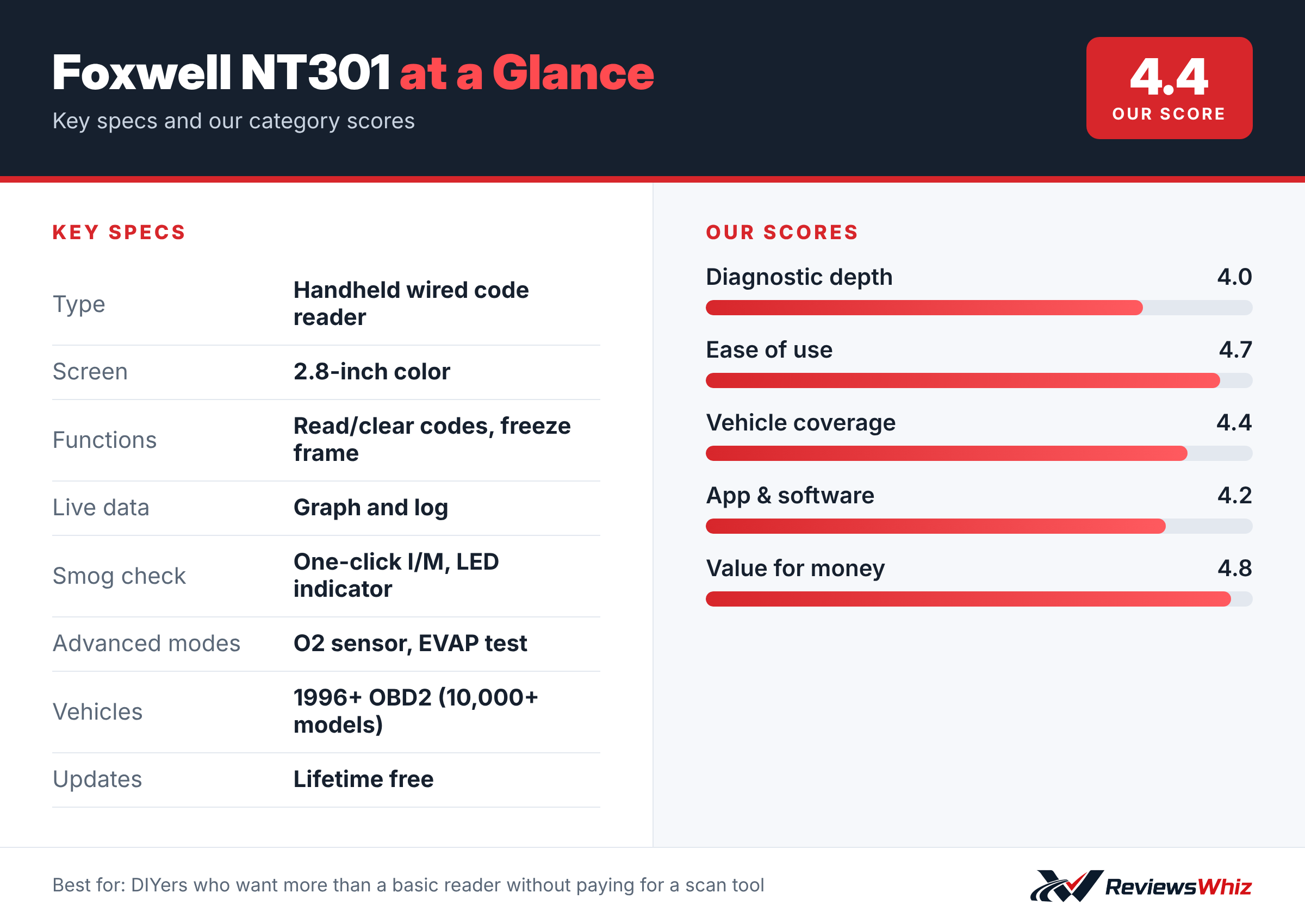
Foxwell NT301 Key Specifications
| Type | Handheld wired code reader |
| Screen | 2.8-inch color |
| Functions | Read/clear codes, freeze frame |
| Live data | Graph and log |
| Smog check | One-click I/M, LED indicator |
| Advanced modes | O2 sensor, EVAP test |
| Vehicles | 1996+ OBD2 (10,000+ models) |
| Updates | Lifetime free |
Reading and Clearing Codes
Plug the NT301 into the 16-pin port under your dashboard, turn the ignition on and it reads engine trouble codes in seconds. Foxwell is upfront that clearing a code only turns off the light if the problem has been fixed, which is how all honest code readers work.
Live Data Graphing
This is where the NT301 stands out from bargain readers. You can watch and graph live data such as oxygen sensors, fuel trims, coolant temperature and RPM. Graphs make it easier to spot a lazy O2 sensor or a temperature that never reaches normal.
Smog Check Helper
Dedicated I/M readiness hotkeys and a red-yellow-green LED tell you if your car is ready for an emissions test. That can save you from failing an inspection right after clearing codes or replacing a battery.
Coverage
It supports all five OBD2 protocols and works with most 1996-and-newer gasoline cars, light trucks and SUVs sold in the US, plus many 2000-and-newer European and Asian models.
Getting Started With the Foxwell NT301
Using the NT301 takes only a minute. Plug it into the OBD2 port under the dashboard with the ignition off, then turn the key to ON. The scanner powers on from the car and walks you through a short menu. Choose Read Codes to see stored and pending codes, each with a definition, then use Freeze Frame to see the conditions the car was in when the fault happened.
The 2.8-inch color screen is easy to read, and the menu uses plain words instead of cryptic abbreviations. Hotkeys for I/M readiness and code reading make common jobs a single button press.
- Turn the ignition off before plugging in.
- Read and write down codes before you clear anything.
- Check Freeze Frame data to understand when the fault occurred.
- Use I/M readiness before an emissions test.
Live Data: Why It Matters
Live data turns the NT301 from a code reader into a basic diagnostic tool. You can watch readings such as engine speed, coolant temperature, short and long-term fuel trims, and oxygen sensor voltage in real time. Graphing them shows trends that numbers alone can hide, like an oxygen sensor that switches slowly or fuel trims that climb at idle.
Those patterns help you narrow a problem before buying parts. A large positive fuel trim at idle that improves at higher RPM, for example, often points to a vacuum leak rather than a failing sensor. Being able to record and play back data also helps when a problem only appears on the road.
NT301 vs Other Budget Code Readers
| Model | Main strength | Trade-off | Best for |
|---|---|---|---|
| Foxwell NT301 | Live data graphing, O2 and EVAP tests | Engine systems only | DIYers who want more data |
| Autel AutoLink AL319 | Simple, one-click readiness | Fewer data tools | Beginners and glove boxes |
| Ancel AD310 | Very affordable and compact | No live data graphs | Basic code reading |
| Foxwell NT614 Elite | ABS, SRS and transmission plus resets | Higher price | Owners who need more systems |
Tips for Interpreting Codes
A trouble code is a starting point. The NT301 tells you which system reported a fault, but not always which part failed. A P0171 lean code, for instance, can be caused by a vacuum leak, a dirty mass airflow sensor, low fuel pressure or an exhaust leak ahead of the oxygen sensor.
Pair the code with live data and a visual inspection. Check hoses, connectors and the air intake before replacing expensive parts. If the code returns after you clear it, the fault is still present.
- Pending codes are early warnings that have not yet turned on the light.
- Permanent codes clear only after the car confirms the fix by itself.
- Write down Freeze Frame data before clearing, because clearing erases it.
Durability and Updates
The NT301 has a rubberized case and a sturdy cable, so it survives being tossed in a toolbox. It needs no batteries because it runs from the car. Foxwell provides free lifetime updates through a computer, which keeps code definitions current. For a home mechanic, it is the kind of tool you buy once and keep for many years.
Is the NT301 Worth It Over a Phone App Scanner?
Phone-based scanners can show more data and repair tips, but they depend on an app, a phone battery and sometimes a subscription. The NT301 works the moment you plug it in, in any car, without pairing or logging in. That makes it a reliable tool to share between family cars or keep in a garage drawer. If you want a self-contained scanner with useful live data at a low price, it is one of the best-value choices. If you prefer step-by-step repair guidance, a tool like BlueDriver is a better match.
Who Should Buy the Foxwell NT301?
Buy it if you want a reliable code reader with live data graphs and smog readiness for the lowest cost.
Skip it if you need ABS, airbag or transmission codes. BlueDriver or a tablet scanner will serve you better.
Alternatives to Consider
- Autel AL319: A slightly cheaper basic code reader.
- Ancel AD310: A classic budget reader with a simple screen.
- Foxwell NT614 Elite: Adds ABS, SRS and transmission diagnostics.
Final Verdict
The Foxwell NT301 offers a lot for a small price. Live data graphs, readiness LEDs and extra test modes make it more useful than most entry-level readers. If engine codes are all you need, it is an easy pick.
Helpful Free Car Tools
Related Reviews
Frequently Asked Questions
Can the Foxwell NT301 read ABS codes?
No. It covers engine and emissions codes only.
Does the NT301 show live data?
Yes, and it can graph and log sensor readings.
Does it need batteries?
No. It is powered by the car's OBD2 port.
Will it work on my car?
It works with most 1996+ OBD2 vehicles sold in the US.
Does the NT301 have a subscription?
No. Updates are free for life.
How we evaluated: this review is based on the manufacturer’s published specifications, the product’s feature set, and how it compares with competing products in the same price range. Product details and images are provided by Amazon and may change. Prices and availability are accurate as of the time shown on Amazon and are subject to change.