
XTOOL D7S Review: Bidirectional Scan Tool With ECU Coding and 39 Resets
Affiliate disclosure: ReviewsWhiz is reader-supported. When you buy through links on this page, we may earn a commission from Amazon at no extra cost to you. Learn more.
The XTOOL D7S is an upgraded version of the popular D7. It adds more storage, AI assistance and FCA AutoAuth, while keeping ECU coding and 39 service functions.
In this XTOOL D7S review, we look at how it compares to Autel and Launch tools.

XTOOL D7S
4.6 / 5 ReviewsWhiz Score- All-system bidirectional diagnostics
- ECU coding for specific brands
- 39 resets and three years of updates
✅ Pros
- ECU coding at a mid-range price
- 39 service functions
- Graph 8 PIDs at once
- FCA AutoAuth and VAG support
- No IP restrictions
❌ Cons
- Coding coverage limited to specific brands
- Updates cost extra after three years
- Steeper learning curve
XTOOL D7S Key Specifications
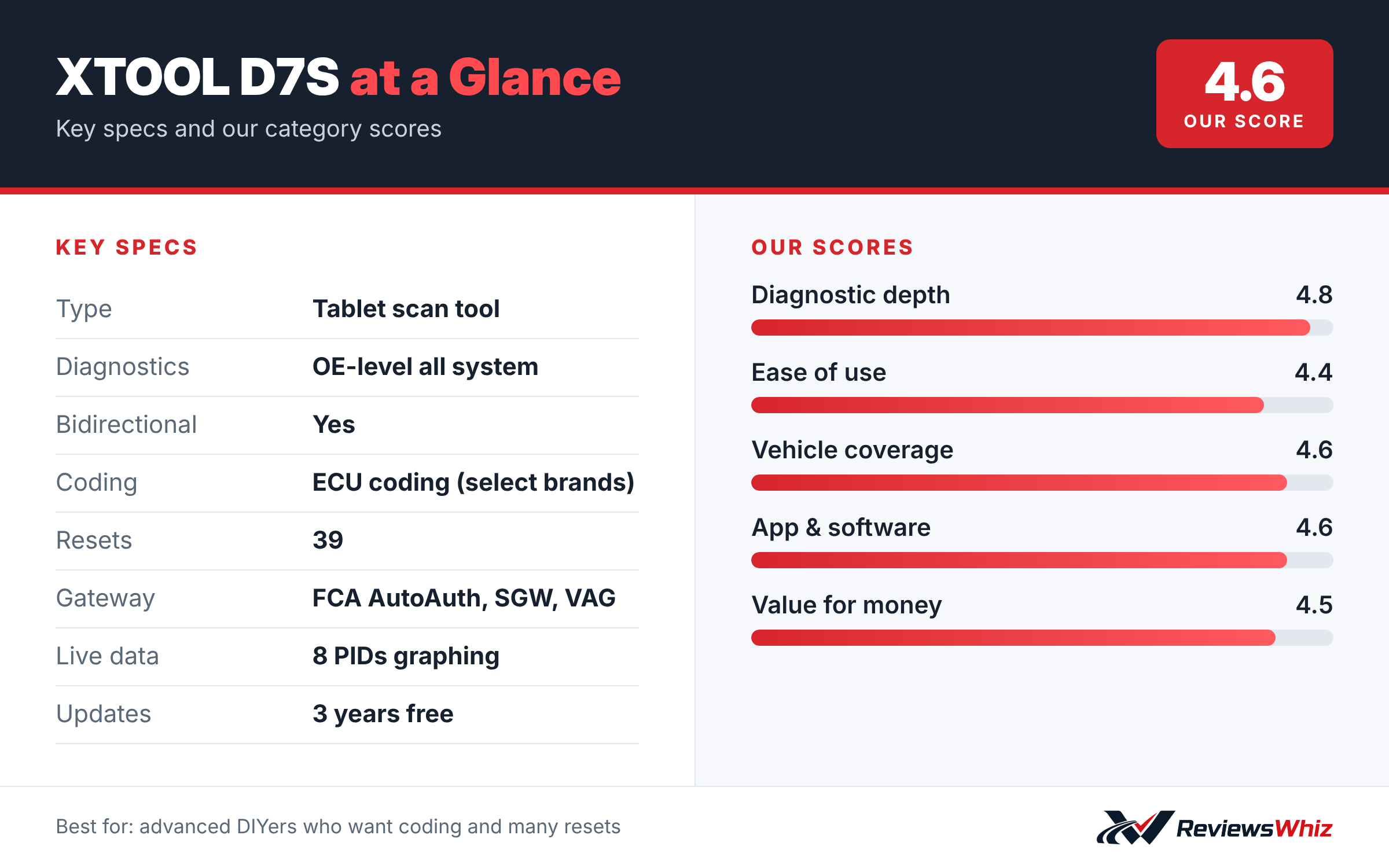
| Type | Tablet scan tool |
| Diagnostics | OE-level all system |
| Bidirectional | Yes |
| Coding | ECU coding (select brands) |
| Resets | 39 |
| Gateway | FCA AutoAuth, SGW, VAG |
| Live data | 8 PIDs graphing |
| Updates | 3 years free |
Diagnostics and Bidirectional Tests
The D7S provides OE-level all-system diagnostics and full bidirectional control, letting you test components directly. You can graph up to eight PIDs at once.
ECU Coding
Coding lets you adapt or enable features on supported brands, something many tools at this price do not offer. Check XTOOL’s coverage list for your vehicle.
Service Functions
With 39 reset services, including crank sensor relearn, it covers most maintenance jobs a DIYer or small shop will face.
Hardware and Updates
XTOOL upgraded storage to 1GB RAM and 64GB storage. You get three years of software updates and 22+ languages with no IP restrictions.
Who the D7S Is For
The XTOOL D7S is a tablet scan tool aimed at advanced DIYers and small shops. It offers OE-level all-system diagnostics, bidirectional tests, ECU coding on select brands and 39 service functions. Three years of free updates make it attractive for users who want pro-level features with lower ongoing costs.
It is more than a casual driver needs, but for someone who works on several cars, it can replace multiple tools.
Getting Started
Charge the tablet, connect to Wi-Fi and register the tool. Plug the VCI into the OBD2 port and use Auto VIN to identify the vehicle. Run a full system scan to see all modules and codes.
- Update before the first job.
- Save scan reports.
- Use a battery maintainer during long procedures.
Bidirectional Tests
Active tests let you command parts like fans, pumps, valves and lights to check they work. This speeds up diagnosis and avoids unnecessary parts.
ECU Coding
The D7S supports ECU coding on select brands, which is needed when replacing modules like injectors or throttle bodies. Check XTOOL’s coverage list for your vehicle.
D7S vs Other Tablets
| Model | Main strength | Trade-off | Best for |
|---|---|---|---|
| XTOOL D7S | 39 resets, coding, 3 years updates | Coding limited by brand | Value pro features |
| Autel MaxiCheck MX900 | Strong coverage | Higher price | Advanced DIY |
| Launch X431 PRO3 V+ Elite | J2534, 60+ services | Expensive | Shops |
| Topdon AD800BT 2 | Lifetime updates | Narrower coverage | DIY bidirectional |
Service Functions
- Oil reset.
- EPB service.
- Battery registration.
- SAS calibration.
- Injector coding.
- DPF regeneration.
Gateway Access
The D7S supports FCA AutoAuth, secure gateway access and VAG functions, which helps with newer vehicles.
Updates
Three years of free updates is generous. After that, updates require a paid plan.
Value
For advanced DIYers who want many service functions at a good price, the D7S is a strong value.
Hardware and Build
The D7S tablet has a large, clear screen and a durable case built for garage use. Wi-Fi lets it download updates and print reports. The included VCI connects to the vehicle’s OBD2 port. Live data graphing of up to eight PIDs at once helps compare sensors and spot faults.
Tips for New Owners
- Practice on your own car before tackling complex jobs.
- Read each service function’s instructions fully.
- Keep notes on procedures for vehicles you see often.
- Register the tool to activate the three years of updates.
- Check coding coverage for your brands before buying.
Who Should Choose Something Else
If you only need to read codes and do a few resets, a handheld tool like the Launch CRP129E V2.0 costs much less. If you need J2534 programming, the Launch X431 PRO3 V+ Elite is designed for that.
Who Should Buy the XTOOL D7S?
Buy it if you want coding and lots of resets without paying for a top-tier tablet.
Skip it if you only need code reading. A basic or Bluetooth scanner is enough.
Alternatives to Consider
- Autel MaxiCheck MX900: Larger screen with CAN FD.
- Launch X431 PRO3 V+ Elite: Pro-level with J2534.
- Topdon AD800BT 2: Lifetime updates.
Final Verdict
The XTOOL D7S offers coding and an impressive list of resets at a competitive price. For advanced DIYers, it is one of the best value tablets available.
Helpful Free Car Tools
- VIN Decoder: Make, model, year and specs from a VIN.
- Browse all free car tools and calculators
Related Reviews
Frequently Asked Questions
Is the XTOOL D7S bidirectional?
Yes.
Does it support ECU coding?
Yes, for specific brands.
How many resets does it have?
39.
How long are updates free?
Three years.
What is the difference between the D7 and D7S?
The D7S adds more storage, FCA AutoAuth and AI-assisted features.
Does the XTOOL D7S need a subscription?
It includes three years of free updates. After that, the tool still works with the software it has, but you need a paid plan to get updates for newer vehicles and new functions.
Can the D7S do ECU coding?
Yes, on select brands. It supports coding after replacing some modules and parts. Check XTOOL's coverage list for your vehicle before buying.
Does it work on FCA vehicles with a secure gateway?
Yes. The D7S supports FCA AutoAuth, so you can unlock the secure gateway on newer Chrysler, Dodge, Jeep and Ram vehicles with a registered account.
Is the D7S good for beginners?
It can be used by beginners for basic scans, but its advanced functions have a learning curve. It suits DIYers who plan to grow into active tests and coding.
How we evaluated: this review is based on the manufacturer’s published specifications, the product’s feature set, and how it compares with competing products in the same price range. Product details and images are provided by Amazon and may change. Prices and availability are accurate as of the time shown on Amazon and are subject to change.