
Wolfbox G840S Review: A 12-Inch 4K Mirror Dash Cam and Backup Camera
Affiliate disclosure: ReviewsWhiz is reader-supported. When you buy through links on this page, we may earn a commission from Amazon at no extra cost to you. Learn more.
The Wolfbox G840S replaces your rearview mirror view with a 12-inch screen. It records 4K up front, records 1080P at the rear and works as a backup camera when you reverse.
In this Wolfbox G840S review, we look at the benefits and trade-offs of a mirror dash cam.

Wolfbox G840S
4.3 / 5 ReviewsWhiz Score- 12-inch mirror display with 4K front recording
- Rear camera doubles as a backup camera
- GPS, 5.8GHz Wi-Fi and 32GB card
✅ Pros
- Huge 12-inch rear view
- Removes blind spots from headrests and cargo
- Backup camera function
- Low-reflection display
- 32GB card included
❌ Cons
- Installation is more involved
- Some drivers need time to adjust to a screen mirror
- Rear camera only 1080P
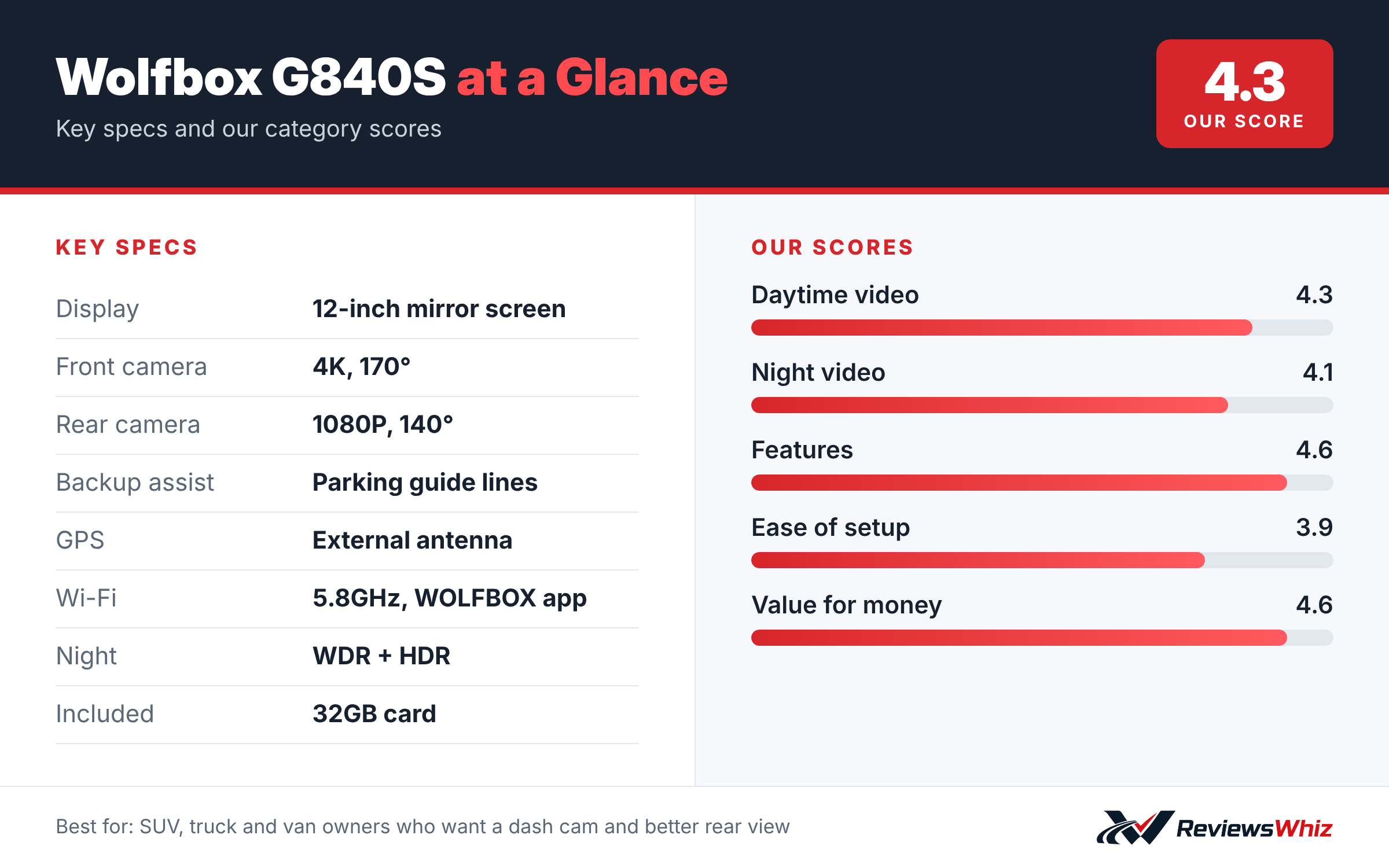
Wolfbox G840S Key Specifications
| Display | 12-inch mirror screen |
| Front camera | 4K, 170° |
| Rear camera | 1080P, 140° |
| Backup assist | Parking guide lines |
| GPS | External antenna |
| Wi-Fi | 5.8GHz, WOLFBOX app |
| Night | WDR + HDR |
| Included | 32GB card |
The Mirror Display
The 12-inch screen gives about 1.5 times the viewing area of a standard mirror. Because the rear view comes from a camera, passengers, headrests and cargo no longer block your view. An upgraded low-reflectivity LCD reduces glare in daylight.
Recording
The front camera records 4K through a 170° lens and the rear records 1080P at 140°. WDR and HDR help balance bright and dark areas. Split-screen viewing lets you see both feeds.
Backup Camera and GPS
When you reverse, the G840S shows the rear camera with parking guidance. An external GPS antenna logs speed and location, and 5.8GHz Wi-Fi connects to the WOLFBOX app.
Parking Monitor
A 24-hour time-lapse parking mode records at a low frame rate to save power and storage. It needs constant power from a hardwire kit.
Installing the Wolfbox G840S
The G840S straps over your existing rear-view mirror with rubber bands, so there is no adhesive mount on the windshield. The front camera sits on the back of the mirror and looks through the windshield. The rear camera mounts at the back of the car, either inside on the rear glass or outside near the license plate when used as a backup camera.
For backup guidelines, the rear camera’s red wire connects to your reverse light circuit, so the mirror switches to the rear view when you shift into reverse. That step takes more time and some basic wiring knowledge. The external GPS antenna sticks to the windshield.
- Test the mirror fit before routing cables.
- Decide early whether the rear camera goes inside or outside.
- Use a circuit tester to find the reverse light wire.
- Seal any holes drilled for an exterior camera.
Living With a Mirror Dash Cam
The 12-inch display replaces your mirror view with a live stream from the rear camera. That gives a wider, clearer view behind you, especially in SUVs and vans where headrests, passengers or cargo block the normal mirror. You can switch back to a plain mirror view with a tap.
Some drivers need a few days to get used to focusing on a screen instead of a reflection, but many end up preferring it.
G840S vs Other Dual Dash Cams
| Model | Main strength | Trade-off | Best for |
|---|---|---|---|
| Wolfbox G840S | 12-inch mirror display, backup assist | More complex install | SUVs, vans, trucks |
| Redtiger F7N | Compact, supercapacitor | Small screen | Traditional setups |
| Rove R2-4K Dual | Easy install, card included | No backup lines | First-time buyers |
| VIOFO A229 Plus | STARVIS 2 front and rear | No screen | Night footage |
Recording Quality
The front camera records in 4K with a wide 170-degree view, and the rear camera records 1080P. WDR and HDR help balance light and shadow. Daytime footage is clear and detailed, and night footage is solid for the price.
Because the rear camera often doubles as a backup camera, its main job is giving a clear view while reversing and recording what happens behind you.
Parking Monitor
Parking monitoring needs constant power through a hardwire kit. When set up, the camera can record if it senses a bump while parked. This helps protect against hit-and-run damage in parking lots.
Tips for the Best Experience
- Adjust screen brightness for night driving to avoid glare.
- Use the included 32GB card to start, then upgrade to a high-endurance 128GB card.
- Clean the rear camera lens regularly if mounted outside.
- Check the reverse trigger works before finishing the install.
Who Should Buy It
The G840S is ideal for drivers of SUVs, pickups, vans and cars without a factory backup camera. It combines a dash cam, rear camera and digital mirror in one. If you want the simplest installation or the most discreet camera, a wedge-style dash cam is a better fit.
Is a Mirror Dash Cam Right for You?
Mirror dash cams work best in vehicles where the normal rear view is blocked, like SUVs with tall headrests, vans, pickup trucks with a camper shell and cars that often carry cargo. They also help drivers of older cars add a backup camera without replacing the stereo. If your car already has a good factory backup camera and a clear rear window, a traditional dash cam may be simpler.
Final Tips
- Use the touchscreen to adjust the rear view angle.
- Turn down screen brightness at night.
- Keep the GPS antenna clear of tinted strips.
- Upgrade the included card to a high-endurance model.
Who Should Buy the Wolfbox G840S?
Buy it if you drive an SUV, truck or van and want a dash cam plus a better rear view and backup camera.
Skip it if you want a simple, discreet camera. A wedge-style dash cam is easier to install.
Alternatives to Consider
- Redtiger F7N: Traditional 4K front and rear dash cam.
- Rove R2-4K Dual: Front and rear kit with STARVIS 2.
- VIOFO A229 Plus: Discreet 2K front and rear.
Final Verdict
The Wolfbox G840S is a useful upgrade for larger vehicles. You get a dash cam, a giant rear view and a backup camera in one. Expect a longer installation, but the payoff is worth it for many drivers.
Helpful Free Car Tools
- Dash Cam SD Card Recording Time Calculator: Hours of video by card size, resolution and channels.
- Browse all free car tools and calculators
Related Reviews
Frequently Asked Questions
Is the Wolfbox G840S a backup camera?
Yes. It shows the rear camera with parking guidance when you reverse.
What resolution does it record?
4K front and 1080P rear.
Does it include a memory card?
Yes, a 32GB card.
Does it have GPS?
Yes, via an external GPS antenna.
How big is the screen?
12 inches.
How we evaluated: this review is based on the manufacturer’s published specifications, the product’s feature set, and how it compares with competing products in the same price range. Product details and images are provided by Amazon and may change. Prices and availability are accurate as of the time shown on Amazon and are subject to change.