
Rexing S1 Pro Review: A Budget 3-Channel Dash Cam With Built-in Storage
Affiliate disclosure: ReviewsWhiz is reader-supported. When you buy through links on this page, we may earn a commission from Amazon at no extra cost to you. Learn more.
The Rexing S1 Pro is a budget three-channel dash cam that records the road ahead, the road behind and the cabin, all in 1080p. It even has 64GB of built-in memory.
In this Rexing S1 Pro review, we look at what it offers and where it falls short.

Rexing S1 Pro
4.0 / 5 ReviewsWhiz Score- Front, rear and cabin recording
- Built-in 64GB memory
- Infrared cabin night vision and GPS
✅ Pros
- Three channels on a budget
- Built-in storage
- IR cabin night vision
- 3-inch screen
- GPS logging
❌ Cons
- All channels only 1080p
- Older sensor technology
- Built-in memory can’t be swapped
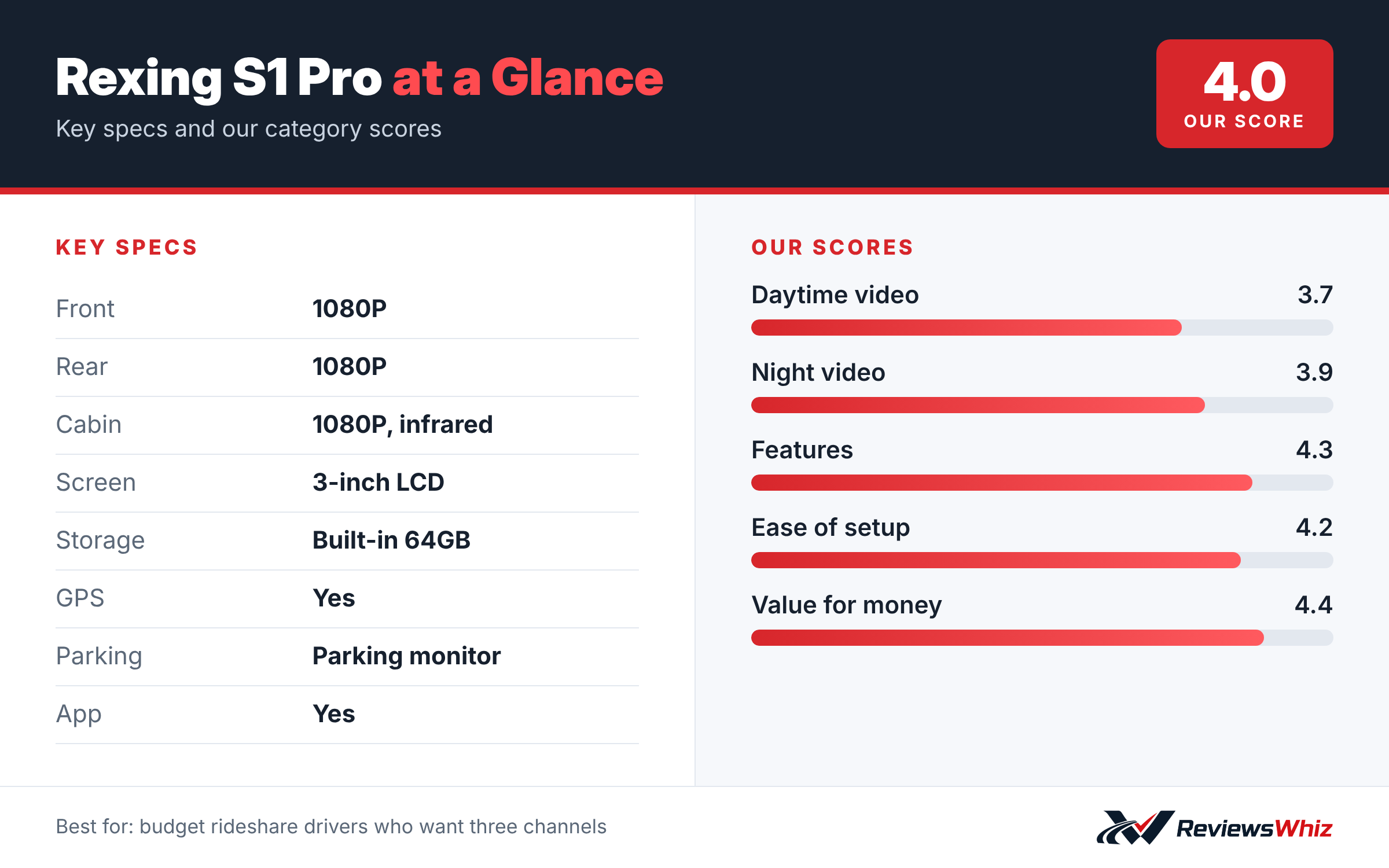
Rexing S1 Pro Key Specifications
| Front | 1080P |
| Rear | 1080P |
| Cabin | 1080P, infrared |
| Screen | 3-inch LCD |
| Storage | Built-in 64GB |
| GPS | Yes |
| Parking | Parking monitor |
| App | Yes |
Three-Channel Recording
The S1 Pro records 1080p on the front, rear and cabin cameras at the same time. Infrared night vision lets the cabin camera see passengers in the dark.
Built-in Memory
With 64GB of built-in storage, you can start recording without buying a card. The trade-off is that you cannot easily swap storage if it wears out.
Features
A 3-inch LCD, GPS, parking monitor and an app round out the package.
Installing the Rexing S1 Pro
The S1 Pro records three channels: front, cabin and rear. The main unit with the front and infrared cabin cameras mounts behind the mirror, and the rear camera connects with a long cable to the back window. The 3-inch screen helps you aim all three cameras. Plan cable routes before starting and hide them under the headliner and trim.
Because it has 64GB of built-in memory, you do not need to buy a microSD card.
- Check all three views on the screen.
- Hide cables carefully.
- Use a hardwire kit for parking monitoring.
- Download important clips promptly, since memory cannot be swapped.
Who It Is For
The S1 Pro suits rideshare drivers and families on a budget who want three-channel coverage. Infrared cabin recording shows passengers clearly at night.
S1 Pro vs Other Three-Channel Dash Cams
| Model | Main strength | Trade-off | Best for |
|---|---|---|---|
| Rexing S1 Pro | Built-in memory, low price | 1080p on all channels | Budget rideshare |
| Vantrue N4S | Sharper STARVIS 2 cameras | Higher price | Better footage |
| Azdome M550 Max | Budget 3-channel | Less support | Tight budgets |
| Garmin Dash Cam Tandem | Single unit | No rear road camera | Simple setup |
Built-In Memory Pros and Cons
Built-in 64GB memory means there is no card to buy, format or lose, and no card failures. The downside is that you cannot swap or upgrade it, and three channels fill 64GB quickly, so loop history is shorter.
Tips
- Lock important clips right away.
- Download events to your phone soon after they happen.
- Turn off audio if passengers object.
- Check local laws on cabin recording.
Final Thoughts
The S1 Pro is an affordable entry into three-channel recording. If image quality matters most, spend more on a STARVIS 2 camera.
Image Quality Expectations
All three channels record at 1080P. That is enough to show what happened, the color and type of vehicles and the behavior of passengers inside. Reading plates on cars farther away or at night is harder than with 2K or 4K STARVIS 2 cameras. For rideshare use, where the cabin record is often the most important, 1080P with infrared night vision does the job.
Privacy and Passenger Notice
Many rideshare drivers place a small sign in the car letting passengers know they are being recorded. Some states require consent for audio recording. Check your state’s rules and your rideshare platform’s policy, and turn off audio if needed.
Who Should Buy the Rexing S1 Pro?
Buy it if you want a cheap three-channel camera for rideshare.
Skip it if you want sharper video. The Vantrue N4S offers higher resolution with STARVIS 2.
Alternatives to Consider
- Vantrue N4S: Three-channel with STARVIS 2.
- Azdome M550 Max: 4K three-channel.
- Garmin Dash Cam Tandem: Road and cabin in one unit.
Final Verdict
The Rexing S1 Pro is an affordable way to get three-channel recording. Video quality is basic, but it covers the essentials for budget-minded rideshare drivers.
Helpful Free Car Tools
- Dash Cam SD Card Recording Time Calculator: Hours of video by card size, resolution and channels.
- Dash Cam Field of View Calculator: Road width covered at a distance.
- Browse all free car tools and calculators
Related Reviews
Frequently Asked Questions
How many cameras does the Rexing S1 Pro have?
Three: front, rear and cabin.
What resolution does it record?
1080p on all three.
Does it need a memory card?
It has 64GB built in.
Does the cabin camera have night vision?
Yes, infrared.
Does it have GPS?
Yes.
Does the Rexing S1 Pro need a memory card?
No. It has 64GB of built-in memory, so you can start recording without buying a card.
Can I upgrade the memory?
No. The built-in memory cannot be swapped or upgraded, so download important clips promptly.
Does the cabin camera work at night?
Yes. It uses infrared to record clear black-and-white footage of the cabin in the dark.
Is the S1 Pro good for Uber and Lyft?
It is a budget-friendly option for rideshare drivers who want front, cabin and rear coverage. Check local laws and platform rules on recording passengers.
Does it support parking mode?
Yes, it has a parking monitor. For reliable parking coverage, use a hardwire kit that protects your battery.
Does the S1 Pro have GPS?
Yes. Built-in GPS records location and speed data with your footage.
How we evaluated: this review is based on the manufacturer’s published specifications, the product’s feature set, and how it compares with competing products in the same price range. Product details and images are provided by Amazon and may change. Prices and availability are accurate as of the time shown on Amazon and are subject to change.