
OTTOCAST ScreenFlow Review: An 11.4-inch CarPlay Screen With Streaming
Affiliate disclosure: ReviewsWhiz is reader-supported. When you buy through links on this page, we may earn a commission from Amazon at no extra cost to you. Learn more.
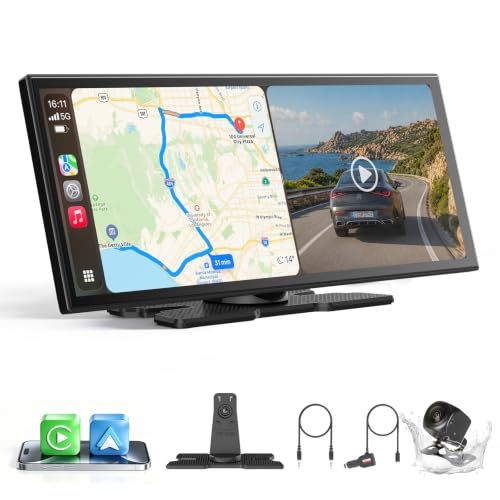
The OTTOCAST ScreenFlow is an 11.4-inch dash screen that adds wireless CarPlay and Android Auto to any car. Dual Bluetooth avoids the usual audio conflicts.
In this ScreenFlow review, we look at display, audio and installation.
OTTOCAST ScreenFlow
4.4 / 5 ReviewsWhiz Score- Sharp 11.4-inch 60fps IPS screen
- Dual Bluetooth for clean audio
- 1080p backup camera included
✅ Pros
- Large, smooth display
- Split-screen mode
- Dual Bluetooth
- Night-vision backup camera
- Free OTA updates
❌ Cons
- Visible cables on the dash
- Streaming needs a hotspot
- Large screen may block vents
OTTOCAST ScreenFlow Key Specifications
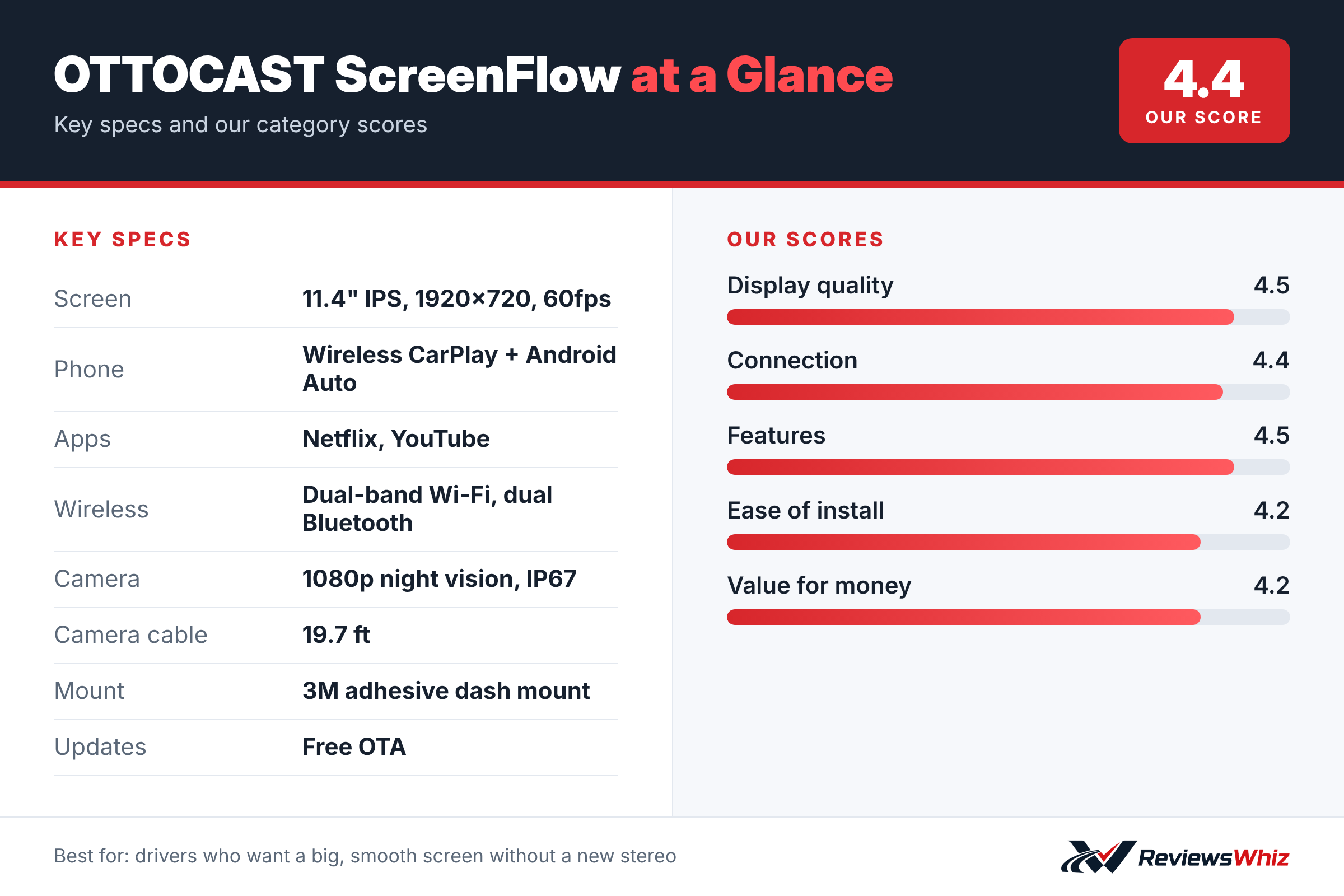
| Screen | 11.4" IPS, 1920×720, 60fps |
| Phone | Wireless CarPlay + Android Auto |
| Apps | Netflix, YouTube |
| Wireless | Dual-band Wi-Fi, dual Bluetooth |
| Camera | 1080p night vision, IP67 |
| Camera cable | 19.7 ft |
| Mount | 3M adhesive dash mount |
| Updates | Free OTA |
Display
The 11.4-inch IPS panel runs 1920×720 at 60fps with wide viewing angles. Split-screen lets you see maps and music together.
Audio
Dual Bluetooth lets the screen connect to your phone and your car’s sound system at the same time, so you do not have to choose. Dual-band Wi-Fi keeps CarPlay stable.
Camera and Install
A 1080p IP67 night-vision camera with a 19.7-foot cable is included. The screen mounts with 3M adhesive, and no stereo removal is needed.
Who the OTTOCAST ScreenFlow Is For
The ScreenFlow is an 11.4-inch portable screen that adds wireless CarPlay and Android Auto to cars without them. It suits drivers of older cars, trucks and RVs who want a large, smooth display without replacing the stereo. Its 60fps IPS screen and a 1080p night-vision backup camera make it one of the more premium portable options.
How to Install It
- Clean the dashboard and attach the 3M adhesive mount.
- Power it from the 12V socket.
- Connect audio through Bluetooth, AUX or FM.
- Run the 19.7-foot camera cable to the rear and mount the IP67 camera.
- Pair your phone.
ScreenFlow vs Other Portable Screens
| Model | Main strength | Trade-off | Best for |
|---|---|---|---|
| OTTOCAST ScreenFlow | Smooth 60fps screen, premium camera | Price | Premium upgrade |
| Carpuride 11.26-inch | Similar size | Different design | Value |
| OttoScreen AI Pro | AI features | Price | Tech fans |
| Lamtto 9.26-inch | Smaller, cheaper | Smaller screen | Budget |
Streaming Apps
Netflix and YouTube are built in, but they need an internet connection, such as a phone hotspot. Use streaming only when parked.
Placement Tips
Place the screen where it does not block air vents or your view of the road. Use a sunshade on bright days to reduce glare.
Tips
- Use AUX for the best sound.
- Update firmware over the air.
- Hide the camera cable under trim.
Getting the Best Audio
For the best sound, connect the ScreenFlow to your car’s AUX input if it has one. Bluetooth is the next best choice if your car stereo supports Bluetooth audio. The FM transmitter works in any car with a radio, but choose an empty frequency to reduce static. The built-in speaker is fine for navigation prompts but not ideal for music.
Is It Worth the Premium?
The ScreenFlow’s smooth 60fps display, higher-quality night vision camera and long camera cable set it apart from cheaper portable screens. If you want a polished experience and a reliable backup camera in one, it is worth the extra cost. If price matters most, the Carpuride or Lamtto screens offer similar basic features for less.
Who Should Choose Something Else
If your car already has wired CarPlay, a wireless adapter like the U2Air Neo is much cheaper and keeps your dash clean.
Who Should Buy the OTTOCAST ScreenFlow?
Buy it if you want a large, modern screen and backup camera for an older car.
Skip it if you want AI features and Google Play. The OttoScreen AI Pro adds them.
Alternatives to Consider
- Carpuride 11.26-inch: Similar size.
- OttoScreen AI Pro: Android 15 with apps.
- Lamtto 9.26-inch: Smaller, cheaper.
Final Verdict
The OTTOCAST ScreenFlow is one of the best-equipped portable CarPlay screens. The dual Bluetooth and camera make it an easy all-in-one upgrade.
Helpful Free Car Tools
- Car Phone Charger Speed Calculator: Time to charge a phone from car USB ports.
- Browse all free car tools and calculators
Related Reviews
Frequently Asked Questions
Does the ScreenFlow support Android Auto?
Yes, wirelessly.
Is a backup camera included?
Yes, a 1080p night-vision camera.
Can it play Netflix?
Yes, with Wi-Fi, while parked.
How is it mounted?
With a 3M adhesive dash mount.
Does it get updates?
Yes, free OTA updates.
Does the ScreenFlow support Android Auto?
Yes. It supports wireless CarPlay and Android Auto.
Is a backup camera included?
Yes, a 1080p night vision camera with a 19.7-foot cable.
Can I watch Netflix?
Yes, when parked and connected to a hotspot.
How is it mounted?
With a 3M adhesive dash mount.
Is the camera waterproof?
Yes, it is rated IP67.
Does it get updates?
Yes, free over-the-air updates.
How we evaluated: this review is based on the manufacturer’s published specifications, the product’s feature set, and how it compares with competing products in the same price range. Product details and images are provided by Amazon and may change. Prices and availability are accurate as of the time shown on Amazon and are subject to change.