
OTTOCAST Mini Cube 3.0 Review: A Tiny 2-in-1 Wireless Adapter
Affiliate disclosure: ReviewsWhiz is reader-supported. When you buy through links on this page, we may earn a commission from Amazon at no extra cost to you. Learn more.
The OTTOCAST Mini Cube 3.0 is a small adapter that makes factory wired CarPlay or Android Auto wireless.
In this Mini Cube 3.0 review, we look at speed, size and value.
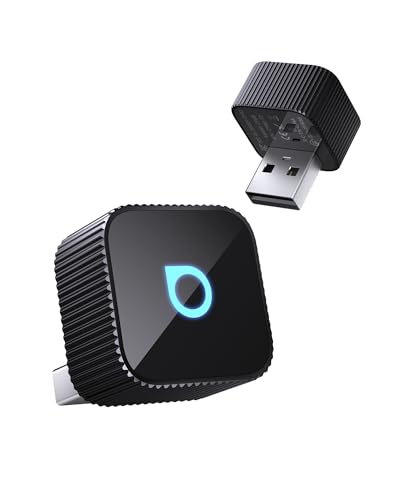
OTTOCAST Mini Cube 3.0
4.3 / 5 ReviewsWhiz Score- Tiny, discreet design
- 2-in-1 CarPlay and Android Auto
- Fast auto-reconnect
✅ Pros
- Very small
- Supports both systems
- Quick setup
- USB-A and USB-C
- Good price
❌ Cons
- Needs factory wired CarPlay or Android Auto
- Bluetooth 4.2 is older
- Wireless drains phone battery faster
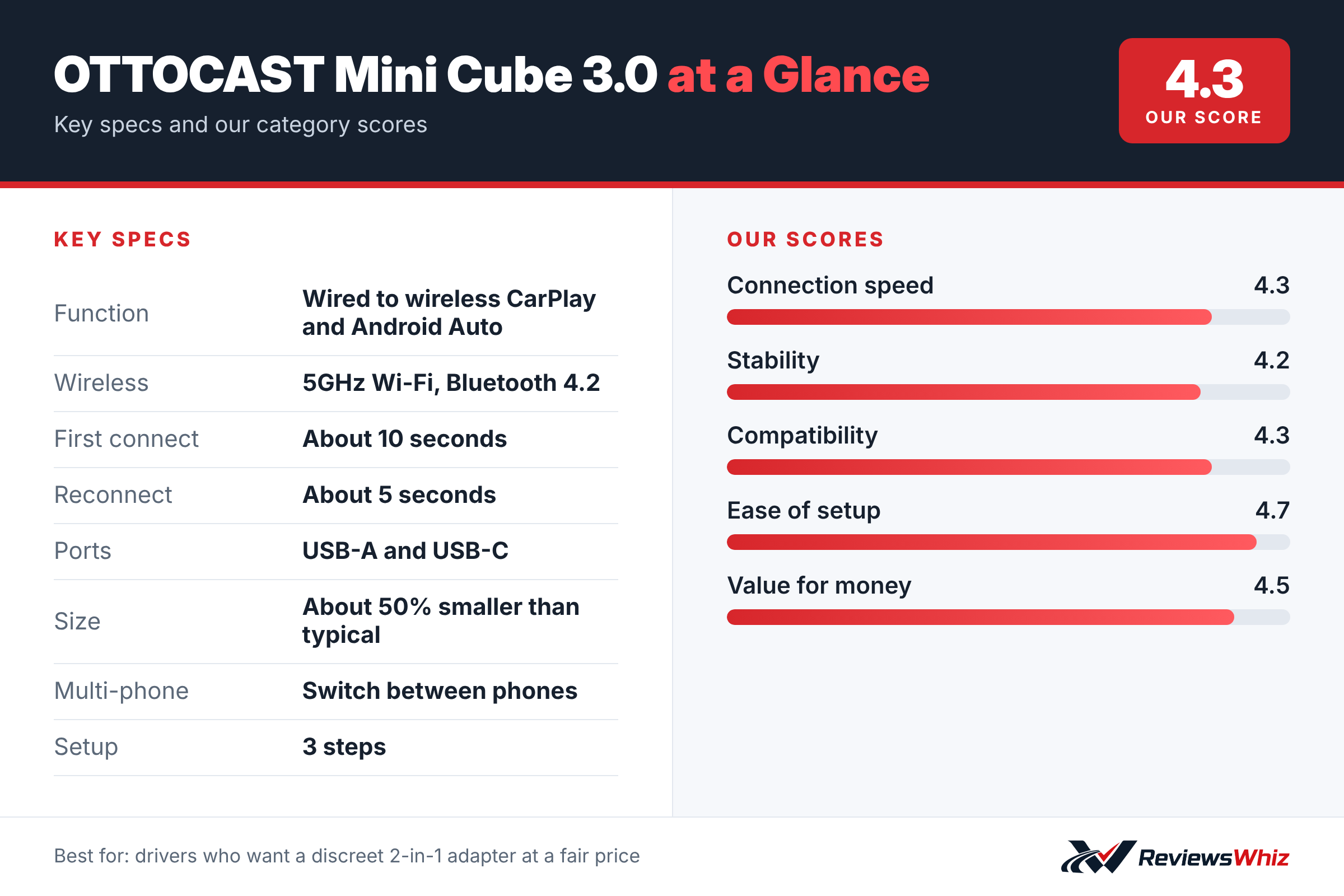
OTTOCAST Mini Cube 3.0 Key Specifications
| Function | Wired to wireless CarPlay and Android Auto |
| Wireless | 5GHz Wi-Fi, Bluetooth 4.2 |
| First connect | About 10 seconds |
| Reconnect | About 5 seconds |
| Ports | USB-A and USB-C |
| Size | About 50% smaller than typical |
| Multi-phone | Switch between phones |
| Setup | 3 steps |
Setup
Plug it in, turn on Bluetooth and Wi-Fi, and pair. No app is needed.
Speed
Ottocast says it connects in about 10 seconds and reconnects in about 5 over 5GHz Wi-Fi.
Design
It is about half the size of typical adapters and includes USB-A and USB-C options. Multiple phones can be switched for shared cars.
Who the Mini Cube 3.0 Is For
The Mini Cube 3.0 is a compact wireless adapter for both CarPlay and Android Auto. It is about half the size of typical adapters, so it fits neatly in tight USB areas. It suits households with mixed phones.
How to Set It Up
- Plug into the car’s CarPlay or Android Auto USB port.
- Pair your phone over Bluetooth.
- Accept the prompt.
- Reconnects automatically after.
Mini Cube 3.0 vs Other Adapters
| Model | Main strength | Trade-off | Best for |
|---|---|---|---|
| OTTOCAST Mini Cube 3.0 | Very small, two systems | Bluetooth 4.2 | Tight spaces |
| OTTOCAST U2Air Neo | Newer Bluetooth | Bigger | Fast reconnect |
| Carlinkit 5.0 2Air | Value | Setup varies | Budget |
| Carlinkit Mini Ultra 3 | Compact | Check features | Alternatives |
Speed
Ottocast says first connection takes about 10 seconds and reconnection about 5 seconds.
Multi-Phone Switching
You can switch between phones, which helps when two drivers share a car.
Common Mistakes to Avoid
- Using a car without factory wired CarPlay or Android Auto.
- Forgetting to turn on Wi-Fi on the phone.
- Ignoring firmware updates.
Troubleshooting Tips
- Forget the device in Bluetooth and pair again if it stops connecting.
- Turn on the phone’s Wi-Fi.
- Try another USB port.
- Restart the phone after updates.
- Update the adapter firmware.
Most connection problems are solved by re-pairing.
Battery Tips for Wireless Projection
Wireless CarPlay and Android Auto use more battery than wired connections. Use a wireless charging pad or a charging mount on long drives to keep your phone topped up.
What Is in the Box
The Mini Cube 3.0 includes the adapter and cables for USB-A and USB-C ports.
Who Should Choose Something Else
If you only use an iPhone, a CarPlay-only adapter costs less. If you want the newest Bluetooth, the U2Air Neo uses Bluetooth 5.4.
Who Should Buy the OTTOCAST Mini Cube 3.0?
Buy it if you want a small, affordable 2-in-1 adapter.
Skip it if you want the newest Bluetooth and a switch button. The U2Air Neo has both.
Alternatives to Consider
- OTTOCAST U2Air Neo: Button switching.
- Carlinkit 5.0 2Air: Popular rival.
- Carlinkit Mini Ultra 3: Tiny alternative.
Final Verdict
The OTTOCAST Mini Cube 3.0 is a compact, good-value way to go wireless with CarPlay or Android Auto.
Helpful Free Car Tools
- Car Phone Charger Speed Calculator: Time to charge a phone from car USB ports.
- Browse all free car tools and calculators
Related Reviews
Frequently Asked Questions
Does the Mini Cube 3.0 support Android Auto?
Yes, and CarPlay.
How fast does it reconnect?
About 5 seconds.
Does it fit USB-C ports?
Yes, USB-A and USB-C are supported.
Does it need an app?
No.
Will it add CarPlay to my car?
No, your car needs factory wired CarPlay or Android Auto.
Does the Mini Cube 3.0 support Android Auto?
Yes, CarPlay and Android Auto.
How small is it?
About 50 percent smaller than typical adapters.
Does it work with USB-C?
Yes, USB-A and USB-C.
How fast does it connect?
About 10 seconds first time, 5 seconds after.
Can I switch phones?
Yes.
Does it need wired CarPlay?
Yes.
How we evaluated: this review is based on the manufacturer’s published specifications, the product’s feature set, and how it compares with competing products in the same price range. Product details and images are provided by Amazon and may change. Prices and availability are accurate as of the time shown on Amazon and are subject to change.