
Kingslim D4 Pro Review: 4K Dash Cam With a Rotating Lens
Affiliate disclosure: ReviewsWhiz is reader-supported. When you buy through links on this page, we may earn a commission from Amazon at no extra cost to you. Learn more.
The Kingslim D4 Pro is an affordable front and rear dash cam with a twist: its front lens rotates 270°, so you can point it at the road or into the cabin.
In this Kingslim D4 Pro review, we look at the video, features and limits.

Kingslim D4 Pro
4.2 / 5 ReviewsWhiz Score- 4K front and 2K rear
- Rotating lens for cabin recording
- Built-in Wi-Fi, GPS and voice control
✅ Pros
- Flexible rotating lens
- 4K + 2K at a mid price
- Built-in GPS
- Hands-free voice commands
- USB-C power
❌ Cons
- Cabin recording at night needs extra light
- Not a three-channel camera
- No card included in some bundles
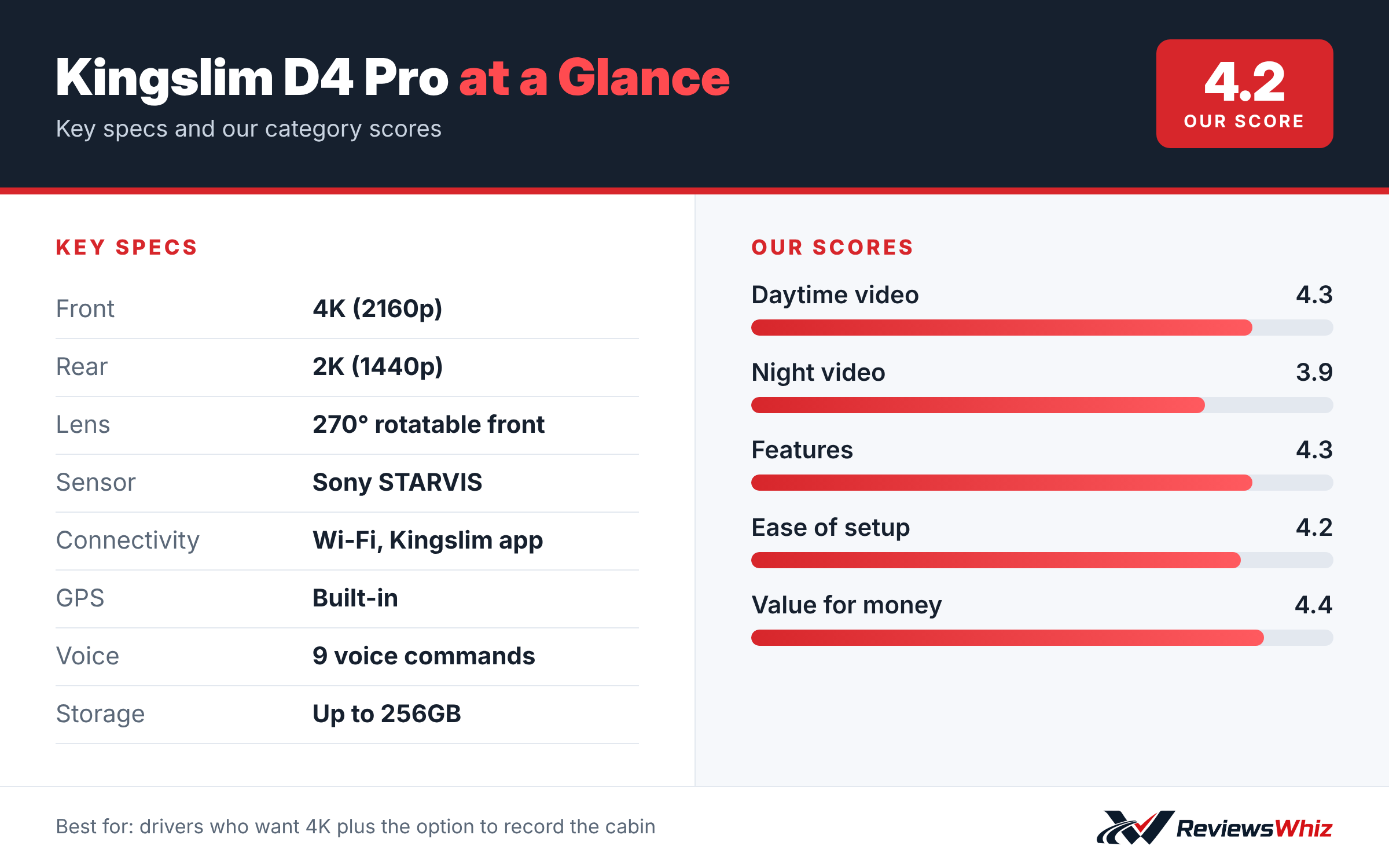
Kingslim D4 Pro Key Specifications
| Front | 4K (2160p) |
| Rear | 2K (1440p) |
| Lens | 270° rotatable front |
| Sensor | Sony STARVIS |
| Connectivity | Wi-Fi, Kingslim app |
| GPS | Built-in |
| Voice | 9 voice commands |
| Storage | Up to 256GB |
Video
The front camera records 4K with a Sony STARVIS sensor and HDR, and the rear records 2K with WDR. You can also choose 2K + 2K for longer recording time.
Rotating Lens
The front lens turns 270°, so you can record the road ahead or the cabin. This suits rideshare drivers who switch views. Kingslim notes that cabin video at night needs extra lighting, since there is no infrared.
Smart Features
Built-in Wi-Fi lets you view and download clips in the Kingslim app, and GPS logs speed and location. Nine voice commands handle photos, audio, screen and locking clips. Parking monitor, time-lapse and G-sensor locking are included.
Installing the Kingslim D4 Pro
The D4 Pro has a 4K front camera with a 270-degree rotating lens and a 2K rear camera. Mount the front unit behind the mirror and route the rear cable to the back window. The rotating lens lets you turn the front camera toward the cabin or the side window when needed, for example to record an interaction at a traffic stop or with a passenger.
Pair it with the Kingslim app over Wi-Fi.
- Use a high-endurance card up to 256GB.
- Check the rotating lens angle before driving.
- Use voice commands for hands-free control.
- Hardwire it if you want parking coverage.
Who It Is For
The D4 Pro suits drivers who want 4K front and 2K rear coverage plus the flexibility of turning the front lens toward the cabin. It works for rideshare drivers who want occasional cabin footage without buying a three-channel camera.
Kingslim D4 Pro vs Other Dash Cams
| Model | Main strength | Trade-off | Best for |
|---|---|---|---|
| Kingslim D4 Pro | Rotating 4K lens, 2K rear | Not a 3-channel camera | Flexible coverage |
| Azdome M550 Max | True 3 channels | More wiring | Rideshare |
| Rove R2-4K Dual Pro | Native 4K, card included | No rotating lens | Complete kits |
| VIOFO A229 Pro | Image quality | No rotation | Value |
Cabin Recording at Night
Because the front lens is designed for the road, it does not have infrared lights for the cabin. At night, cabin footage needs some interior light to be useful. For regular night cabin recording, a camera with an IR cabin lens is better.
Tips
- Return the lens to face the road after cabin use.
- Turn on GPS for location data.
- Update firmware in the app.
Settings and Memory Card Tips
- Use a 128GB or 256GB high-endurance card for 4K plus 2K.
- Set loop recording to 1 or 3 minutes.
- Turn on GPS speed and location stamps.
- Lower G-sensor sensitivity for daily driving.
- Format the card monthly in the camera.
Who Should Choose Something Else
If you need cabin footage every night, a three-channel camera with an infrared cabin lens, such as the AZDOME M550 Max or Vantrue N4 Pro S, is a better choice. If you only want road coverage, a fixed-lens camera like the VIOFO A229 Pro offers excellent quality and a mature app.
Using the Rotating Lens
Rotate the lens toward the side window to record an interaction during a traffic stop, or toward the cabin when carrying passengers. Remember to rotate it back to face the road, since the camera only records one direction at a time with the front lens.
Who Should Buy the Kingslim D4 Pro?
Buy it if you want 4K and occasional cabin recording without a three-camera setup.
Skip it if you need front, rear and cabin at once. The Azdome M550 Max records all three.
Alternatives to Consider
- Azdome M550 Max: Three channels with IR.
- Rove R2-4K Dual Pro: 4K + 2K with GPS.
- VIOFO A229 Pro: Better night video.
Final Verdict
The Kingslim D4 Pro is a flexible, well-equipped dash cam for the money. The rotating lens is a genuinely useful idea for drivers who sometimes need cabin footage.
Helpful Free Car Tools
- Dash Cam SD Card Recording Time Calculator: Hours of video by card size, resolution and channels.
- Dash Cam Field of View Calculator: Road width covered at a distance.
- Browse all free car tools and calculators
Related Reviews
Frequently Asked Questions
Can the Kingslim D4 Pro record inside the car?
Yes, the front lens rotates to face the cabin.
Does it have GPS?
Yes, built-in.
What resolution is the rear camera?
2K (1440p).
Does it have voice control?
Yes, 9 commands.
What is the max card size?
256GB.
Can the Kingslim D4 Pro record the cabin?
Yes, by rotating the front lens toward the cabin. Without IR lights, it needs some interior light at night.
What resolution is the rear camera?
The rear camera records 2K (1440p).
Does it have GPS?
Yes, GPS is built in.
How many voice commands does it support?
Nine voice commands for hands-free control.
What is the maximum card size?
It supports microSD cards up to 256GB.
Is a memory card included?
It depends on the bundle, so check the listing before buying.
How we evaluated: this review is based on the manufacturer’s published specifications, the product’s feature set, and how it compares with competing products in the same price range. Product details and images are provided by Amazon and may change. Prices and availability are accurate as of the time shown on Amazon and are subject to change.