
LAMTTO 9.26-inch CarPlay Screen Review: Affordable Wireless CarPlay for Any Car
Affiliate disclosure: ReviewsWhiz is reader-supported. When you buy through links on this page, we may earn a commission from Amazon at no extra cost to you. Learn more.
The LAMTTO 9.26-inch screen adds wireless CarPlay and Android Auto to almost any car. It mounts with a suction cup and plugs into the 12V socket.
In this LAMTTO review, we look at the screen, audio and camera.

LAMTTO 9.26" CarPlay Screen
4.2 / 5 ReviewsWhiz Score- Wide 9.26-inch IPS screen
- Backup camera included
- Very easy setup
✅ Pros
- Affordable
- No wiring for the screen
- Backup camera
- Bluetooth audio option
- US support
❌ Cons
- Smaller than 11-inch screens
- FM audio can be noisy
- Some streaming content will not mirror
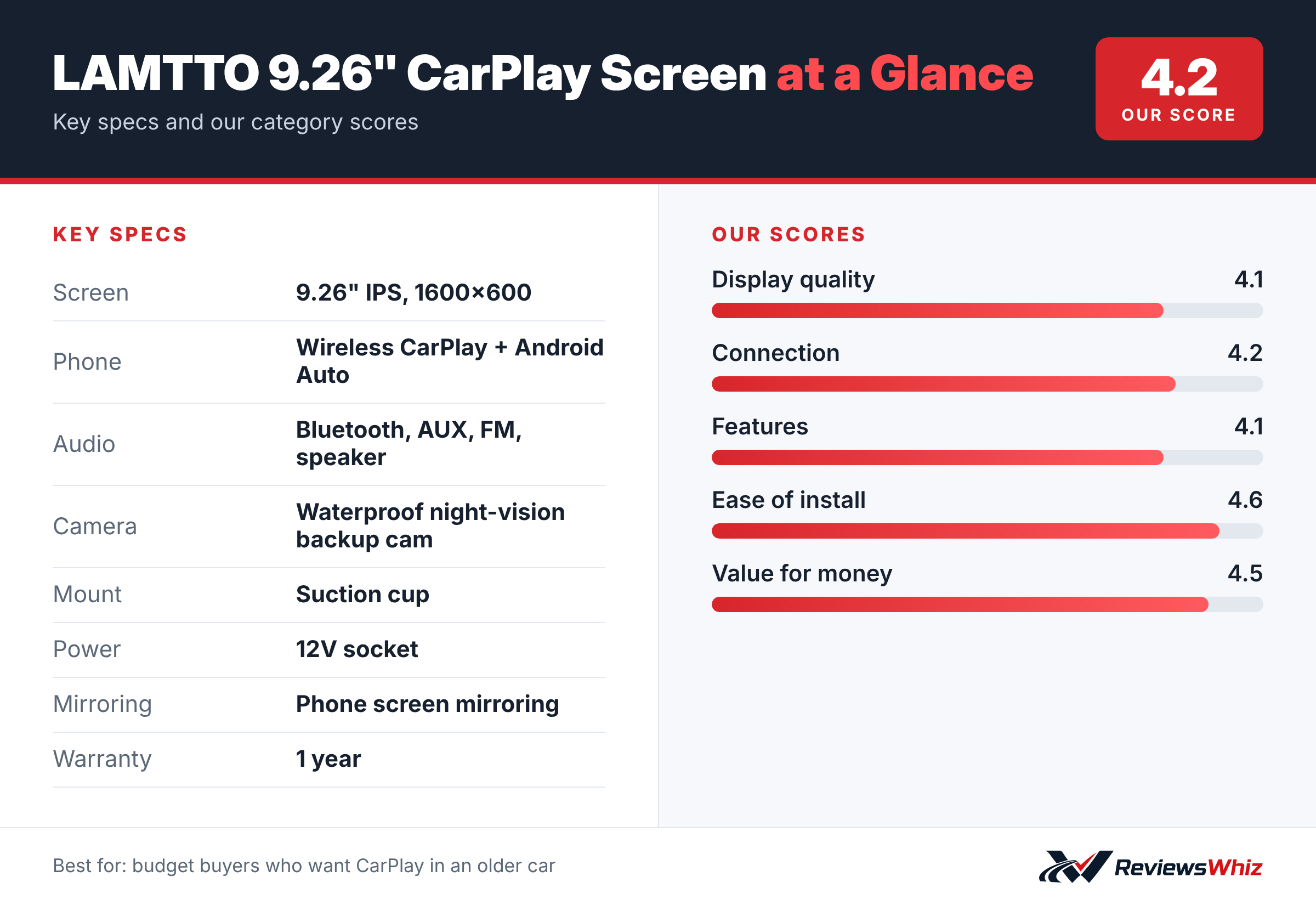
LAMTTO 9.26" CarPlay Screen Key Specifications
| Screen | 9.26" IPS, 1600×600 |
| Phone | Wireless CarPlay + Android Auto |
| Audio | Bluetooth, AUX, FM, speaker |
| Camera | Waterproof night-vision backup cam |
| Mount | Suction cup |
| Power | 12V socket |
| Mirroring | Phone screen mirroring |
| Warranty | 1 year |
Display
The 9.26-inch IPS touchscreen runs at 1600×600, with extra horizontal space for maps.
Audio
Use Bluetooth, AUX, FM or the built-in speaker. LAMTTO recommends Bluetooth for the cleanest sound if your stereo supports it.
Camera
A waterproof night-vision backup camera is included. Note that the camera needs wiring to the back of the car.
Who the LAMTTO 9.26-Inch Screen Is For
The LAMTTO is a 9.26-inch portable screen with wireless CarPlay and Android Auto. It suits drivers of older cars who want navigation and music on a screen that is not too large. A suction cup mount and 12V power make it easy to install and move between vehicles. It includes a night-vision backup camera.
How to Install It
- Attach the suction mount to the dash or windshield.
- Power it from the 12V socket.
- Connect audio through Bluetooth, AUX or FM.
- Mount the backup camera at the rear.
- Pair your phone.
LAMTTO vs Other Portable Screens
| Model | Main strength | Trade-off | Best for |
|---|---|---|---|
| LAMTTO 9.26-inch | Compact, affordable, camera | Smaller screen | Budget |
| OTTOCAST ScreenFlow | Smooth 11.4-inch | Price | Premium |
| Carpuride 11.26-inch | Large screen | Bigger | Wide view |
| Carpuride W903S3 | Alternative | Check specs | Comparisons |
Audio Options
AUX gives the best sound. Bluetooth is easy if your car supports it. FM works in any car but may pick up static.
Mirroring
Phone screen mirroring lets you show some apps on the screen. Some streaming services block mirroring for copyright reasons.
Tips
- Mount it where it does not block your view.
- Use a clean FM frequency.
- Hide the camera cable under trim.
Who Should Choose Something Else
If you want a larger screen, look at 11-inch models like the Carpuride or ScreenFlow.
Installing the LAMTTO Screen
Installation takes a few minutes. Clean the dashboard spot with an alcohol wipe, attach the suction mount, and press it firmly so it locks. Plug the power cable into the 12V socket and route it neatly along the dash seam so it does not hang into the driver’s view. Pair the phone through the screen’s menu for wireless CarPlay or Android Auto. For sound, choose Bluetooth to a car with Bluetooth audio, AUX for a car with a 3.5mm input, or FM for older cars without either; pick an empty FM frequency for the cleanest sound.
The backup camera needs more work. It mounts near the license plate and needs power, usually from the reverse light circuit so it turns on when you shift into reverse. If you are not comfortable with car wiring, a shop can do it quickly. The camera is optional; you can use the screen without it.
Is This Better Than a New Head Unit?
A new head unit with CarPlay can cost several hundred dollars plus installation, and some cars have dashboards that make swaps hard. A portable screen costs less, moves between cars, and does not change the factory radio. The trade-off is a screen on the dash rather than built into it, and audio that depends on how your car accepts it.
Tips
- Keep the screen low enough not to block the road view.
- Check local laws on windshield and dash mounts.
- Use AUX over FM when your car has an input.
- Unplug in extreme heat to protect the screen.
Who Should Buy the LAMTTO 9.26" CarPlay Screen?
Buy it if you want CarPlay and a backup camera for under $100.
Skip it if you want a larger, smoother screen. The OTTOCAST ScreenFlow is bigger.
Alternatives to Consider
- OTTOCAST ScreenFlow: 11.4-inch, 60fps.
- Carpuride 11.26-inch: Larger display.
- Carpuride W903S3: Built-in dash cams.
Final Verdict
The LAMTTO 9.26-inch screen is a good-value way to add CarPlay to an older car.
Helpful Free Car Tools
- Car Phone Charger Speed Calculator: Time to charge a phone from car USB ports.
- Browse all free car tools and calculators
Related Reviews
Frequently Asked Questions
Does the LAMTTO screen support Android Auto?
Yes, wirelessly.
Is a backup camera included?
Yes.
How is it mounted?
With a suction cup.
How do I get sound through my speakers?
Bluetooth, AUX or FM.
What is the warranty?
1 year.
Does the LAMTTO screen support Android Auto?
Yes, wireless CarPlay and Android Auto.
Is a backup camera included?
Yes, a waterproof night-vision camera.
How is it mounted?
With a suction cup mount.
What is the resolution?
1600×600.
Can I mirror Netflix?
Some streaming apps block mirroring.
What warranty does it have?
One year.
Will it work in a car without Bluetooth?
Yes. Use AUX or the FM transmitter to send audio to the car's speakers.
Can I mirror Netflix or YouTube?
Some streaming apps block mirroring, so video content may not show. Navigation and music apps work through CarPlay and Android Auto.
How we evaluated: this review is based on the manufacturer’s published specifications, the product’s feature set, and how it compares with competing products in the same price range. Product details and images are provided by Amazon and may change. Prices and availability are accurate as of the time shown on Amazon and are subject to change.