
Carlinkit 5.0 2Air Review: A Popular 2-in-1 Wireless Adapter
Affiliate disclosure: ReviewsWhiz is reader-supported. When you buy through links on this page, we may earn a commission from Amazon at no extra cost to you. Learn more.
The Carlinkit 5.0 2Air is one of the most popular wireless CarPlay and Android Auto adapters. It plugs into your car’s USB port and works automatically after setup.
In this Carlinkit 2Air review, we look at compatibility, setup and updates.

Carlinkit 5.0 2Air
4.2 / 5 ReviewsWhiz Score- Supports both CarPlay and Android Auto
- Dual-band Wi-Fi
- OTA firmware updates
✅ Pros
- Good value
- Works with iPhone and Android
- Auto-connect
- Firmware updates
- Small
❌ Cons
- Not for BMW, Nissan or Tesla
- Updates can be fiddly
- Huawei phones may not work
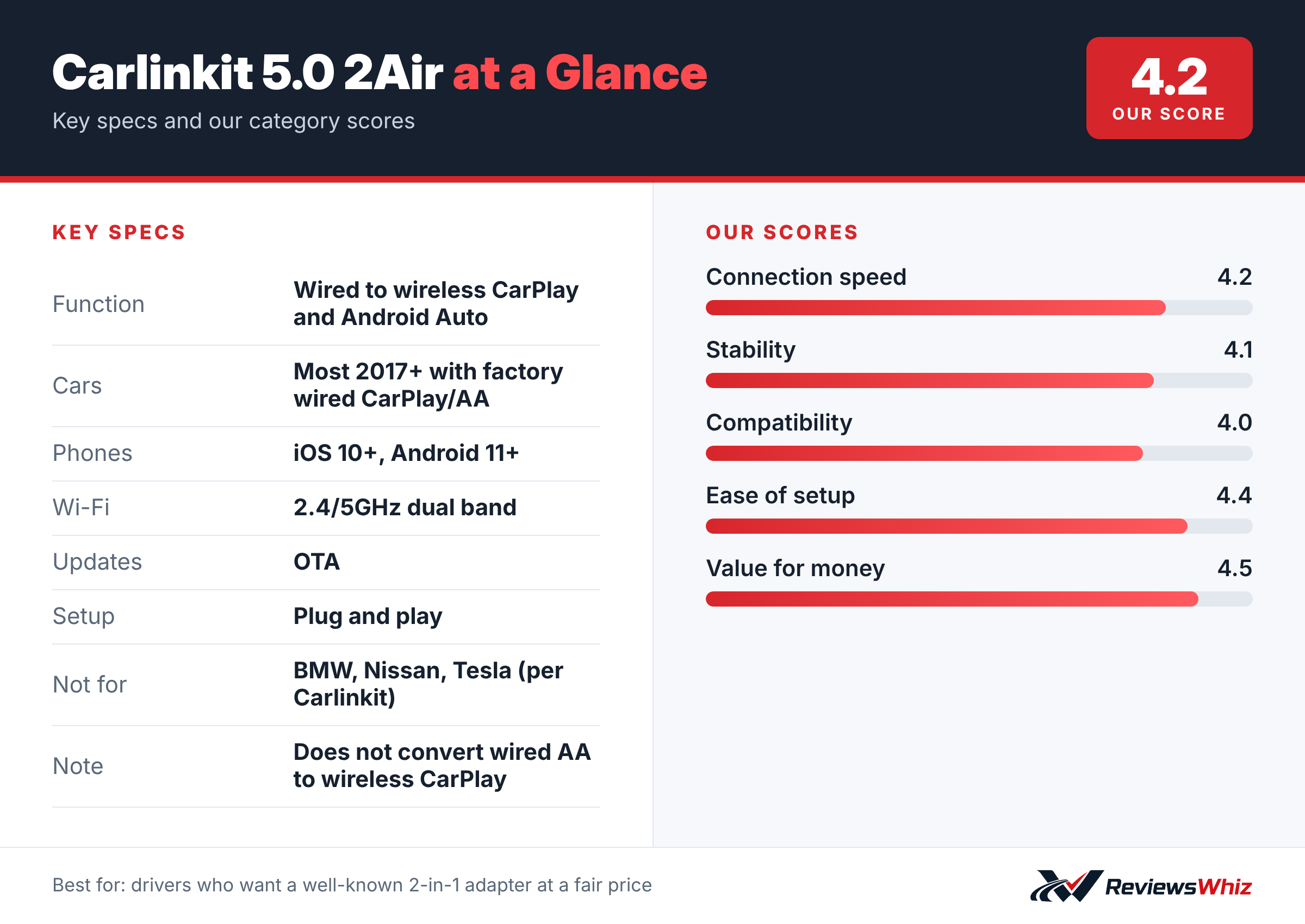
Carlinkit 5.0 2Air Key Specifications
| Function | Wired to wireless CarPlay and Android Auto |
| Cars | Most 2017+ with factory wired CarPlay/AA |
| Phones | iOS 10+, Android 11+ |
| Wi-Fi | 2.4/5GHz dual band |
| Updates | OTA |
| Setup | Plug and play |
| Not for | BMW, Nissan, Tesla (per Carlinkit) |
| Note | Does not convert wired AA to wireless CarPlay |
Compatibility
Carlinkit says it works with about 98% of 2017-2024 cars that have factory wired CarPlay or Android Auto. It supports iPhone 6 and later and Android 11 and later. It does not turn wired Android Auto into wireless CarPlay.
Setup
Plug it in and pair your phone. After the first setup it starts CarPlay or Android Auto automatically.
Updates
Firmware can be updated over the air through the adapter’s web page, which can fix compatibility issues.
Who the Carlinkit 5.0 2Air Is For
The Carlinkit 5.0 2Air turns factory wired CarPlay into wireless CarPlay, and factory wired Android Auto into wireless Android Auto. It suits households with both iPhones and Android phones and drivers of most 2017 and newer cars with factory wired systems. Its price is usually lower than premium brands, which makes it a good value pick.
How to Set It Up
- Check your car is supported and has factory wired CarPlay or Android Auto.
- Plug the adapter into the car’s CarPlay or Android Auto USB port.
- Pair your phone over Bluetooth.
- Accept the prompt.
- Update firmware over the air if prompted.
Compatibility Notes
Carlinkit lists BMW, Nissan and Tesla vehicles as not supported. Huawei phones may not work. The adapter does not convert a car with only wired Android Auto into wireless CarPlay; it keeps each system as it is but removes the cable.
Carlinkit 5.0 2Air vs Other Adapters
| Model | Main strength | Trade-off | Best for |
|---|---|---|---|
| Carlinkit 5.0 2Air | Two systems, value price | Some brands unsupported | Mixed households |
| OTTOCAST U2Air Neo | Fast reconnect, Bluetooth 5.4 | Price | Premium pick |
| Carlinkit Mini Ultra 3 | Compact | Check features | Tight spaces |
| AAWireless TWO+ | Android Auto focus | Check CarPlay | Android users |
Updates
Carlinkit updates firmware over the air, which can improve compatibility. Some users find the update process fiddly; follow the instructions closely.
Tips
- Turn on Wi-Fi and Bluetooth on your phone.
- Re-pair after major phone updates.
- Use a charger on long drives.
Who Should Choose Something Else
If you own a BMW, Nissan or Tesla, look for an adapter that supports your car.
Living With the 2Air Day to Day
Once paired, the 2Air should connect on its own each time you start the car. Your phone joins the adapter’s Wi-Fi in the background, and CarPlay or Android Auto appears on the screen after a short boot time. That boot delay is normal for all wireless adapters, because the adapter has to power up with the car and then connect to the phone. On short trips it is noticeable; on longer drives it quickly fades into the background.
Because the phone no longer needs a cable, it can go in a pocket, a bag or a wireless charging pad. Calls, music and navigation work as they did with a cable. Audio may have a slight delay, which matters little for music but can show up when tapping play or skipping a track. If the connection drops, a quick reset of the adapter or turning Wi-Fi on the phone off and on usually fixes it.
Troubleshooting Tips
- Forget old CarPlay connections on the phone before pairing.
- Update the adapter firmware when first installed.
- Try a different USB port if the car has more than one.
- Use a short USB cable or the direct plug for a stable link.
- Turn off the phone’s VPN if it blocks the connection.
Who Should Choose Something Else
If your car has wired Android Auto only and you want CarPlay, this adapter will not add it. If you own a BMW, Nissan or Tesla, pick an adapter that lists your car. If you want a smaller unit that hides better, the Carlinkit Mini Ultra 3 or OTTOCAST U2Air Neo are worth comparing.
Who Should Buy the Carlinkit 5.0 2Air?
Buy it if you want a proven 2-in-1 adapter at a mid price.
Skip it if you drive a BMW, Nissan or Tesla. Check another adapter’s compatibility list.
Alternatives to Consider
- OTTOCAST U2Air Neo: Button switching.
- Carlinkit Mini Ultra 3: Smaller Carlinkit.
- AAWireless TWO+: Strong Android Auto support.
Final Verdict
The Carlinkit 5.0 2Air is a solid, widely used adapter. Check your car’s compatibility, and it is an easy upgrade.
Helpful Free Car Tools
- Car Phone Charger Speed Calculator: Time to charge a phone from car USB ports.
- Browse all free car tools and calculators
Related Reviews
Frequently Asked Questions
Does the Carlinkit 2Air support Android Auto?
Yes, wired to wireless Android Auto.
Does it work with BMW?
Carlinkit lists BMW as incompatible.
Can it be updated?
Yes, over the air.
Which iPhones work?
iPhone 6 and later with iOS 10+.
Will it add CarPlay to my car?
No, your car needs factory wired CarPlay.
Does the Carlinkit 5.0 2Air support Android Auto?
Yes, it converts wired Android Auto to wireless.
Does it work with BMW?
Carlinkit lists BMW as not supported.
Can it add CarPlay to a car with only Android Auto?
No. It keeps each system and makes it wireless.
Does it update over the air?
Yes.
What phones work?
iPhones with iOS 10+ and Android 11+ phones.
Will it drain my phone battery?
Wireless projection uses more battery than wired.
Does the 2Air drain the car battery?
It draws power from the USB port only when the port is live, which in most cars means when the car is on.
Can two phones share the adapter?
It remembers more than one phone, but only one connects at a time. The last-used phone usually connects first.
How we evaluated: this review is based on the manufacturer’s published specifications, the product’s feature set, and how it compares with competing products in the same price range. Product details and images are provided by Amazon and may change. Prices and availability are accurate as of the time shown on Amazon and are subject to change.