
OTTOCAST OttoScreen AI Pro Review: An Android 15 Screen With Gemini AI
Affiliate disclosure: ReviewsWhiz is reader-supported. When you buy through links on this page, we may earn a commission from Amazon at no extra cost to you. Learn more.
The OTTOCAST OttoScreen AI Pro is a portable dash screen that does more than CarPlay. It runs Android 15 with Google Play and a Gemini AI voice assistant.
In this OttoScreen AI Pro review, we look at what that extra power gets you and whether it is worth the price.

OTTOCAST OttoScreen AI Pro
4.4 / 5 ReviewsWhiz Score- Full Android 15 with Google Play
- Gemini AI voice control
- Audio mixing keeps music playing during directions
✅ Pros
- Install any Android app
- Smooth 60fps display
- Dual Wi-Fi and Bluetooth
- Backup camera included
- Fast boot after setup
❌ Cons
- Expensive for a portable screen
- Streaming needs a hotspot
- More complex than a simple CarPlay screen
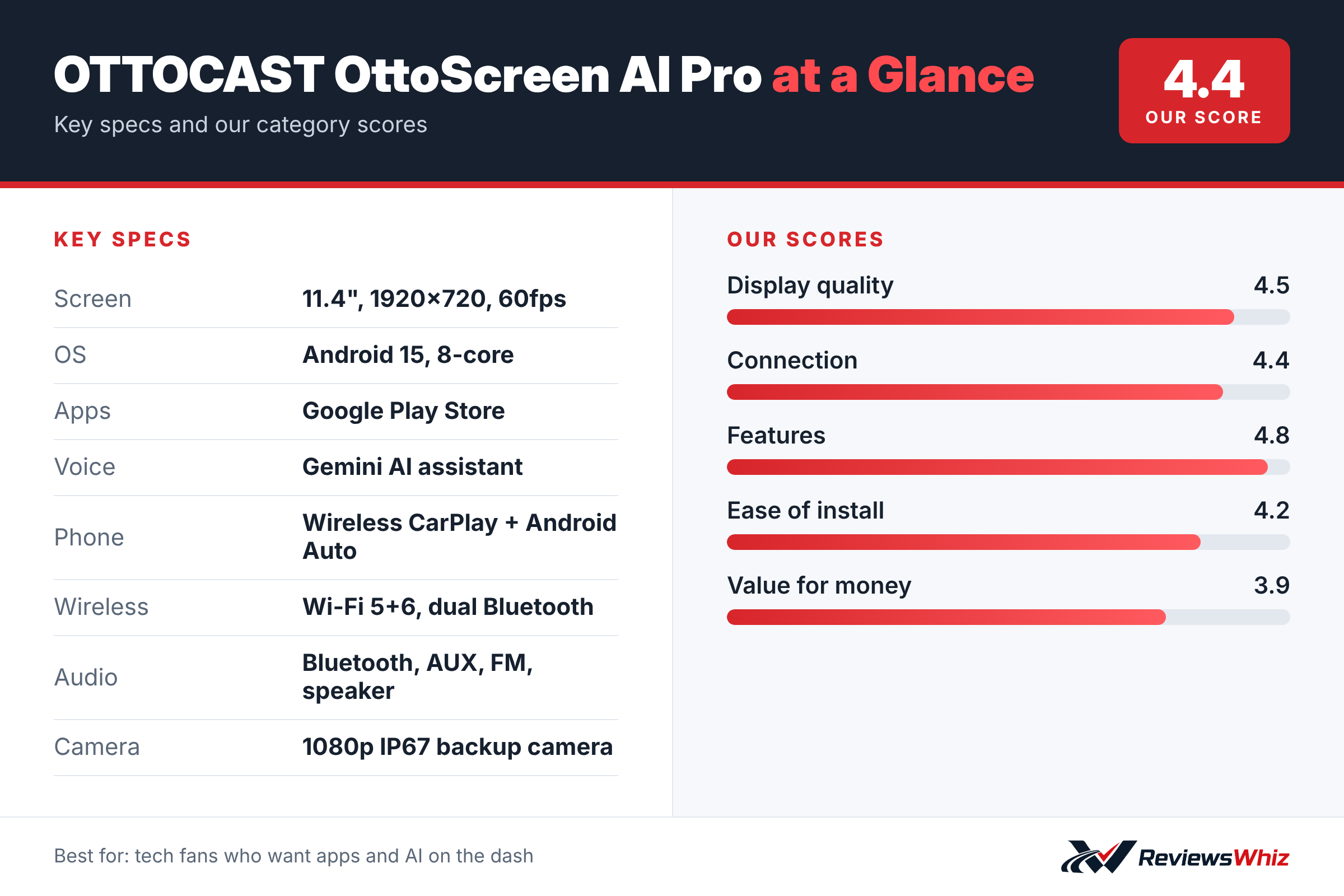
OTTOCAST OttoScreen AI Pro Key Specifications
| Screen | 11.4", 1920×720, 60fps |
| OS | Android 15, 8-core |
| Apps | Google Play Store |
| Voice | Gemini AI assistant |
| Phone | Wireless CarPlay + Android Auto |
| Wireless | Wi-Fi 5+6, dual Bluetooth |
| Audio | Bluetooth, AUX, FM, speaker |
| Camera | 1080p IP67 backup camera |
Android 15 and AI
An 8-core Android 15 system runs Google Play apps such as Spotify and Netflix without your phone. Gemini AI voice control with custom wake words handles navigation, music and calls hands-free.
CarPlay and Android Auto
Wireless CarPlay and Android Auto run over dual Wi-Fi 5 and 6 and dual Bluetooth. Ottocast says it resumes your last route and playlist automatically.
Audio and Camera
Audio mixing keeps Bluetooth music playing while directions speak. Output works over Bluetooth, AUX, FM or the speaker. A 1080p IP67 backup camera with guidelines is included.
Who the OttoScreen AI Pro Is For
The OttoScreen AI Pro is a portable 11.4-inch screen that runs Android 15 and supports wireless CarPlay and Android Auto. It is for drivers who want more than CarPlay: the Google Play Store lets you install apps directly on the screen, and the Gemini AI assistant handles voice requests. It suits older cars and trucks without CarPlay, RV owners and tech-minded drivers who want a single dashboard hub.
If you only want CarPlay, a simpler and cheaper screen will do.
How to Install It
- Mount the screen on the dashboard where it does not block vents or your view.
- Power it from the 12V socket.
- Connect audio by Bluetooth, AUX, FM or the built-in speaker.
- Run the 1080p backup camera cable to the rear and mount the IP67 camera.
- Pair your phone for CarPlay or Android Auto, or sign in to Google Play.
OttoScreen AI Pro vs Other Screens
| Model | Main strength | Trade-off | Best for |
|---|---|---|---|
| OTTOCAST OttoScreen AI Pro | Android 15, Play Store, Gemini | Expensive, more complex | Tech-focused drivers |
| OTTOCAST ScreenFlow | Simpler, smooth screen | No Play Store | CarPlay-focused users |
| Carpuride W903 Plus | Lower price | Fewer features | Value |
| Carpuride 11.26-inch | Large screen, camera | Fewer apps | Budget big screen |
Android 15 and AI Features
With a full Android system and an eight-core processor, the screen can run navigation apps, music services and other tools directly, even without a phone connected. Gemini can answer questions, set destinations and control functions by voice. Most apps need an internet connection, so plan to use a phone hotspot or a vehicle Wi-Fi hotspot.
Use video apps only when parked, for safety and legal reasons.
Audio Tips
AUX gives the cleanest audio; Bluetooth works if your car supports it; FM is a fallback that may pick up static in cities. Pick an empty FM frequency to reduce noise.
Who Should Choose Something Else
If you only need CarPlay or Android Auto, the ScreenFlow or a Carpuride screen is cheaper and easier. If your car already has wired CarPlay, a wireless adapter is the most affordable upgrade.
Who Should Buy the OTTOCAST OttoScreen AI Pro?
Buy it if you want a smart, app-capable screen for an older car.
Skip it if you only need CarPlay. The OTTOCAST ScreenFlow costs much less.
Alternatives to Consider
- OTTOCAST ScreenFlow: Cheaper, streaming apps.
- Carpuride W903 Plus: Android with Google Play.
- Carpuride 11.26-inch: Large, mid-price.
Final Verdict
The OTTOCAST OttoScreen AI Pro is one of the most capable portable screens. If you want apps and AI on the dash, it delivers.
Helpful Free Car Tools
- Car Phone Charger Speed Calculator: Time to charge a phone from car USB ports.
- Browse all free car tools and calculators
Related Reviews
- Ottocast ScreenFlow review
- Carpuride 11.26-inch CarPlay Screen review
- See all Dash Cams & Electronics reviews
Frequently Asked Questions
Does the OttoScreen AI Pro run Android apps?
Yes, with Google Play on Android 15.
Does it have voice control?
Yes, a Gemini AI assistant.
Does it support CarPlay?
Yes, wireless CarPlay and Android Auto.
Is a backup camera included?
Yes, 1080p.
Can it stream video?
Yes, through a phone hotspot, for use while parked.
Does the OttoScreen AI Pro need a phone?
No. It runs Android 15 and can use apps on its own, though most apps need an internet connection.
Does it support CarPlay and Android Auto?
Yes, wirelessly.
Can I install apps?
Yes, from the Google Play Store.
What is the Gemini assistant?
Google's AI assistant, which lets you use voice commands for questions, navigation and settings.
Is a backup camera included?
Yes, a 1080p IP67 backup camera.
How does audio reach my speakers?
Through Bluetooth, AUX, FM transmitter or the built-in speaker.
How we evaluated: this review is based on the manufacturer’s published specifications, the product’s feature set, and how it compares with competing products in the same price range. Product details and images are provided by Amazon and may change. Prices and availability are accurate as of the time shown on Amazon and are subject to change.