
ThinkCar Thinkdiag 2 Review: Bidirectional Bluetooth Scanner With CAN FD
Affiliate disclosure: ReviewsWhiz is reader-supported. When you buy through links on this page, we may earn a commission from Amazon at no extra cost to you. Learn more.
The ThinkCar Thinkdiag 2 is a Bluetooth dongle that turns your phone into a full-system scan tool with bidirectional tests and CAN FD support. It is an upgrade of the original Thinkdiag.
In this Thinkdiag 2 review, we look at what it offers and what to watch out for.
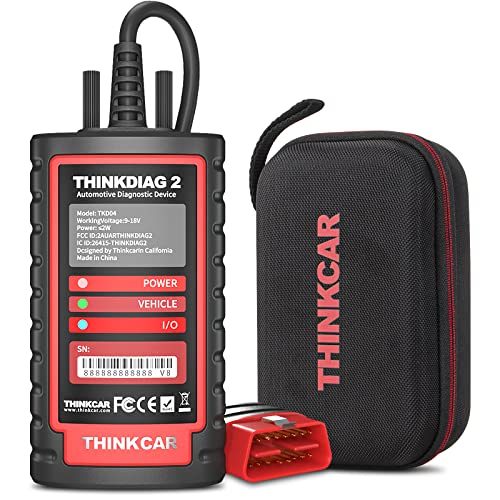
ThinkCar Thinkdiag 2
4.4 / 5 ReviewsWhiz Score- Full-system diagnostics with bidirectional tests
- 15+ maintenance functions and ECU coding
- CAN FD and FCA AutoAuth support
✅ Pros
- Powerful for the price
- CAN FD for newer vehicles
- Bidirectional active tests
- 15+ reset functions
- Small and portable
❌ Cons
- Uses your phone as the screen
- Software access terms vary, check before buying
- Learning curve for advanced functions
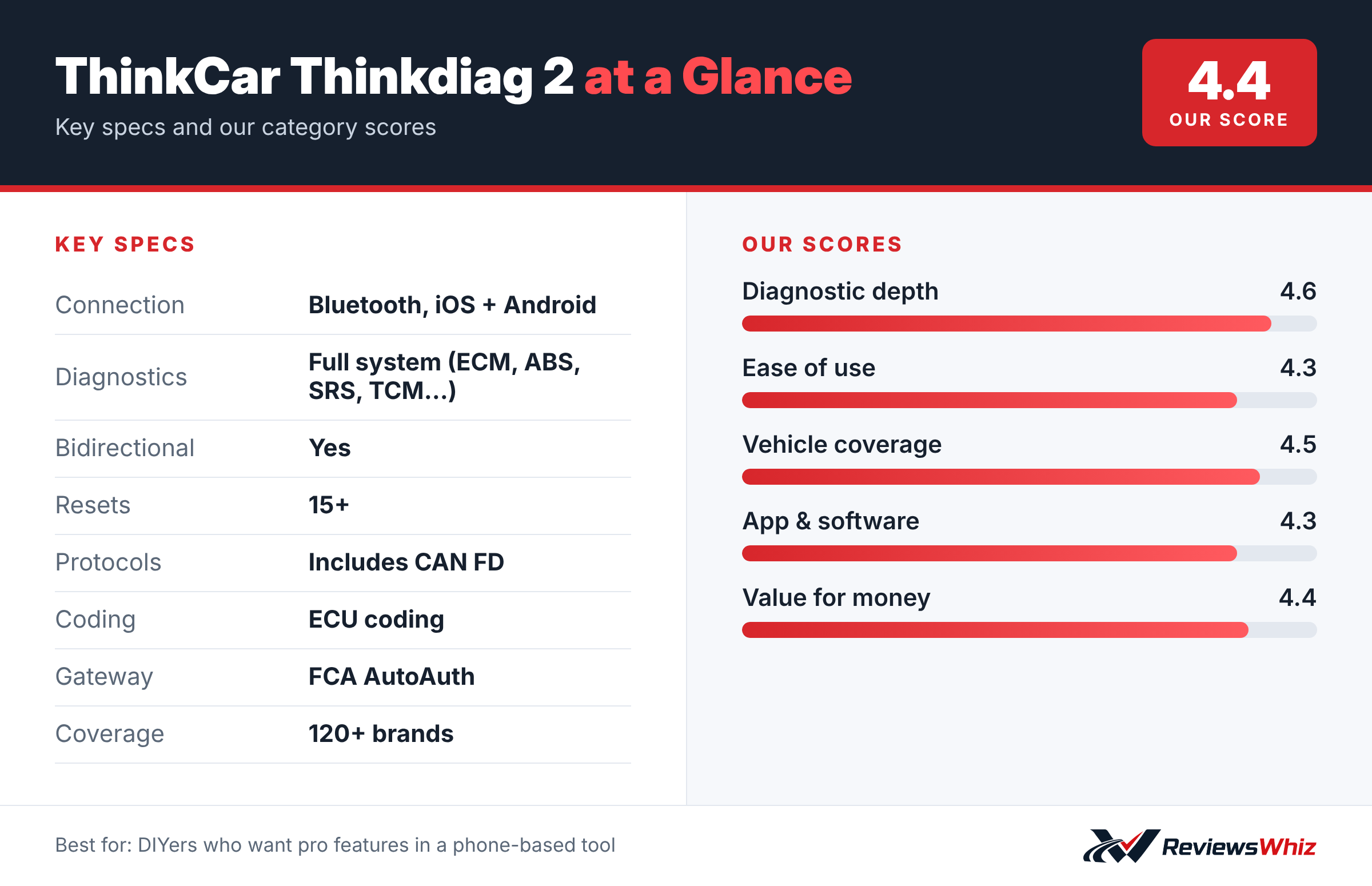
ThinkCar Thinkdiag 2 Key Specifications
| Connection | Bluetooth, iOS + Android |
| Diagnostics | Full system (ECM, ABS, SRS, TCM…) |
| Bidirectional | Yes |
| Resets | 15+ |
| Protocols | Includes CAN FD |
| Coding | ECU coding |
| Gateway | FCA AutoAuth |
| Coverage | 120+ brands |
Full-System Diagnostics
Thinkdiag 2 can diagnose ECM, ABS, SRS, TCM, EPB and other systems on supported vehicles. The newly added CAN FD protocol improves coverage on newer cars.
Bidirectional Tests
You can send commands from your phone to the vehicle’s ECU to test components, which helps locate problems faster.
Maintenance Functions
A dedicated menu covers more than 15 common special functions, along with full OBD2 functions such as O2 sensor tests and code clearing. Auto-VIN identifies most vehicles automatically.
How the Thinkdiag 2 Works
The Thinkdiag 2 is a small Bluetooth dongle that turns your phone into a full-system scan tool. Plug it into the OBD2 port, download the ThinkDiag app and pair it. The app identifies your car and lets you scan all available systems, including engine, transmission, ABS, airbags and body modules on supported vehicles.
Its bidirectional tests and ECU coding features are usually found in more expensive tablets.
Getting Started
- Plug in the dongle with the ignition off.
- Download and register the ThinkDiag app.
- Pair the dongle and identify the car.
- Run a full system scan.
Bidirectional Tests and Coding
Bidirectional tests let you command parts to operate, such as turning on fans, cycling the ABS pump or testing injectors. ECU coding lets you configure modules after replacement on supported vehicles. These features save time and help confirm repairs.
Thinkdiag 2 vs Other App-Based Scanners
| Model | Main strength | Trade-off | Best for |
|---|---|---|---|
| ThinkCar Thinkdiag 2 | Bidirectional, coding, CAN FD | Software terms vary | Advanced DIY on a budget |
| Topdon TopScan Lite | AI repair help | Subscription for some features | Budget DIY |
| Autel MaxiAP AP200 | Service functions | Paid brand add-ons | One or two brands |
| XTool D7S | Tablet with coding | Higher price | Advanced users |
Maintenance Functions
- Oil reset.
- Electronic parking brake service.
- Steering angle sensor calibration.
- Battery registration.
- Throttle relearn.
- DPF regeneration on supported diesels.
Software Access
ThinkCar’s software access terms vary by package and region. Some packages include all brands for a set period, after which renewal fees apply. Check exactly what is included before buying.
Who It Is For
The Thinkdiag 2 suits DIYers who want advanced features without buying a tablet. If you prefer a dedicated screen, a tablet scanner may be easier.
Tips
- Use a large phone or tablet for easier reading.
- Keep the car on a battery charger during coding.
- Read instructions before each test.
Value
For advanced features at a low upfront price, the Thinkdiag 2 is one of the best values, as long as you understand the software terms.
Getting the Best From a Phone-Based Tool
Because the Thinkdiag 2 uses your phone as its screen, a phone with a larger display makes live data and menus easier to read. Some owners use a cheap Android tablet dedicated to the car. Keep the phone charged during long sessions, and stay within Bluetooth range when running tests. Before coding or relearn procedures, connect a battery charger to the car so voltage stays steady.
CAN FD and Newer Vehicles
CAN FD is a faster communication protocol used on many newer vehicles, including some recent GM models. Tools without CAN FD support cannot communicate properly with these cars. The Thinkdiag 2’s CAN FD support makes it more future-proof than many older adapters.
FCA AutoAuth
Chrysler, Dodge, Jeep and Ram vehicles from about 2018 on have a secure gateway that blocks some functions from unregistered tools. The Thinkdiag 2 supports AutoAuth, which lets you unlock access with a registered account.
Who Should Buy the ThinkCar Thinkdiag 2?
Buy it if you want advanced diagnostics on your phone at a mid-range price.
Skip it if you prefer a dedicated tablet. The Topdon AD800BT 2 includes a screen and lifetime updates.
Alternatives to Consider
- Topdon TopScan Lite: Cheaper phone-based option.
- Autel MaxiAP AP200: Full-system Bluetooth dongle.
- XTool D7S: Tablet with ECU coding.
Final Verdict
The ThinkCar Thinkdiag 2 packs a lot of capability into a small dongle. If you are comfortable using your phone as a scan tool, it is strong value.
Helpful Free Car Tools
- VIN Decoder: Make, model, year and specs from a VIN.
- Browse all free car tools and calculators
Related Reviews
Frequently Asked Questions
Is the Thinkdiag 2 bidirectional?
Yes.
Does it support CAN FD?
Yes.
How many reset functions does it have?
More than 15.
Does it work with iPhone?
Yes, iOS and Android.
Does it support FCA AutoAuth?
Yes.
Does the Thinkdiag 2 need a subscription?
Access depends on the package you buy. Some include all vehicle brands and functions for a set period, after which renewal fees apply. Check exactly what is included and for how long before buying.
Can the Thinkdiag 2 do ECU coding?
Yes, on supported vehicles. It can perform coding after replacing some modules and parts. Coverage varies by make and model, so check ThinkCar's list for your car.
Does it work on iPhone and Android?
Yes. The ThinkDiag app is available for both iOS and Android. A phone or tablet with a larger screen makes it easier to read menus and live data.
Is the Thinkdiag 2 good for beginners?
Basic code reading is easy, but advanced features like bidirectional tests and coding take some learning. Beginners should start with scans and simple resets before moving to more advanced functions.
How we evaluated: this review is based on the manufacturer’s published specifications, the product’s feature set, and how it compares with competing products in the same price range. Product details and images are provided by Amazon and may change. Prices and availability are accurate as of the time shown on Amazon and are subject to change.