
Launch X431 PRO3 V+ Elite Review: A Pro Scan Tool With J2534
Affiliate disclosure: ReviewsWhiz is reader-supported. When you buy through links on this page, we may earn a commission from Amazon at no extra cost to you. Learn more.
The Launch X431 PRO3 V+ Elite is a professional-grade scan tool. Its biggest selling point is built-in J2534 pass-thru support, which lets it work as an OEM programming device for supported brands.
In this review, we cover what it can do, who it is for and whether the high price makes sense.

Launch X431 PRO3 V+ Elite
4.6 / 5 ReviewsWhiz Score- J2534 pass-thru for OEM-level programming
- 3000+ active tests and 60+ resets
- CAN FD, DoIP and topology mapping
✅ Pros
- J2534 support adds big value for shops
- Huge 200+ brand coverage, including trucks and EVs
- Topology map shows module status at a glance
- Fast hardware and large 10.1-inch screen
- 5-year warranty
❌ Cons
- Very expensive for DIY use
- Updates after 2 years cost extra
- Steep learning curve
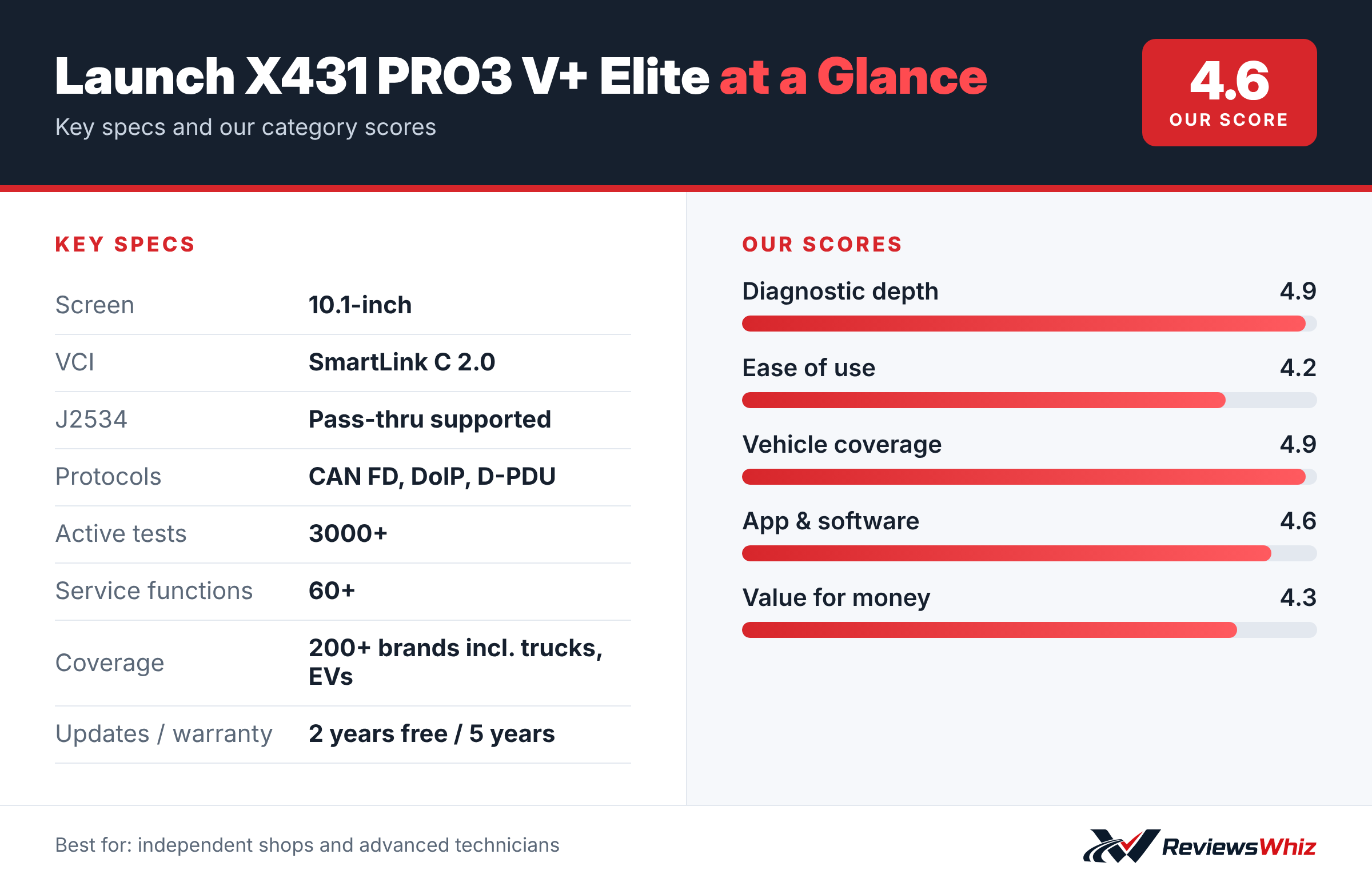
Launch X431 PRO3 V+ Elite Key Specifications
| Screen | 10.1-inch |
| VCI | SmartLink C 2.0 |
| J2534 | Pass-thru supported |
| Protocols | CAN FD, DoIP, D-PDU |
| Active tests | 3000+ |
| Service functions | 60+ |
| Coverage | 200+ brands incl. trucks, EVs |
| Updates / warranty | 2 years free / 5 years |
J2534 and Programming
The SmartLink C 2.0 VCI works as a J2534 pass-thru device, which lets you use OEM software for ECU programming on supported brands such as Toyota, Honda, VW, BMW and Ford. Launch says this saves the cost of a separate J2534 tool.
Bidirectional Tests and Resets
As a full bidirectional tool, it can command A/C clutches, windows, doors, mirrors and more. You also get more than 60 service resets.
Topology Mapping
Dynamic topology mapping displays all vehicle modules and their status visually, which speeds up diagnosis on complex vehicles.
Coverage and Hardware
It supports 200+ brands, including passenger cars, commercial vehicles and EVs, with CAN FD, DoIP and D-PDU protocols. It runs Android 10 on a 2.0GHz quad-core CPU, with a 6300mAh battery and a 10.1-inch screen.
Who Needs a Tool Like the X431 PRO3 V+ Elite
The PRO3 V+ Elite is a professional diagnostic tablet aimed at independent repair shops, mobile mechanics and very serious enthusiasts. Its J2534 pass-thru support means it can be used with manufacturer software for module programming on supported vehicles, a job that usually requires a dealer.
For most DIY owners, that level of capability is more than needed. But for anyone who works on many vehicles, including trucks and EVs, it can replace several tools.
Getting Started
Charge the 10.1-inch tablet and connect it to Wi-Fi. Register it with Launch to activate the two years of included updates. Plug the SmartLink C 2.0 VCI into the vehicle’s OBD2 port and pair it. Run an Auto Scan to see all modules and their codes, and use the topology map to view how modules connect.
Plan time to learn the interface. Spending a few evenings practicing on your own car makes real jobs much smoother.
- Update the tool before the first job.
- Use a battery maintainer during programming and long procedures.
- Save reports for every vehicle you scan.
- Read each function’s instructions before starting.
Understanding J2534 and Programming
J2534 is a standard that lets aftermarket tools act as a pass-thru device for manufacturer software. With the right subscription from the automaker, you can program or flash modules such as the engine or transmission control unit. That is needed after some repairs or to install software updates the manufacturer releases.
Programming carries risk if power drops or the process is interrupted, so it should be done carefully with stable power and a solid internet connection.
PRO3 V+ Elite vs Other Pro Tablets
| Model | Main strength | Trade-off | Best for |
|---|---|---|---|
| Launch X431 PRO3 V+ Elite | J2534, 60+ services, topology map | Expensive, learning curve | Shops and mobile techs |
| Autel MaxiCheck MX900 | Strong all-rounder with CAN FD and DoIP | Fewer pro features | Advanced DIY |
| XTool D7S | Lower price, good coverage | Fewer extras | Budget pro use |
| Topdon AD800BT 2 | Affordable bidirectional | Narrower coverage | Entry pro scanning |
Common Jobs It Handles
- All-system scans with topology mapping.
- Bidirectional tests on fans, pumps, valves and actuators.
- Over 60 service functions, including EPB, SAS, BMS and injector coding.
- Diagnostics on many trucks and EVs as well as cars.
- Module programming through J2534 on supported vehicles.
Updates and Long-Term Costs
The tool includes two years of free updates and a five-year warranty, which is generous. After two years, updates require a paid subscription. Shops usually keep it current to support new vehicles; home users may update less often.
Is It Worth It?
For a professional or someone who runs a side business repairing cars, the PRO3 V+ Elite can pay for itself quickly. For a DIYer with one or two cars, a mid-range tool like the Autel MX900 or MK808S offers most of the practical features at a lower price.
Hardware and Build Quality
The 10.1-inch screen makes live data and topology maps easy to read, and the rugged tablet is designed for shop use. The SmartLink C 2.0 VCI connects wirelessly and supports modern protocols including CAN FD, DoIP and D-PDU, which keeps it ready for many newer vehicles. Launch backs the hardware with a five-year warranty, which is unusually long for this category.
Tips for New Owners
- Practice on your own car before working on customer vehicles.
- Keep the tablet updated during the free update period.
- Learn the topology map, which speeds up diagnosis on complex cars.
- Use stable power and internet during any programming.
- Keep notes on procedures for vehicles you see often.
Who Should Buy the Launch X431 PRO3 V+ Elite?
Buy it if you run a shop or do advanced repairs and coding on many brands.
Skip it if you are a home DIYer. The Autel MK808S or MX900 offers plenty for far less.
Alternatives to Consider
- Autel MaxiCheck MX900: Strong bidirectional tool at a lower price.
- XTool D7S: ECU coding and bidirectional tests for less.
- Topdon AD800BT 2: Bluetooth bidirectional scanner for DIYers.
Final Verdict
The Launch X431 PRO3 V+ Elite is a serious tool for serious work. J2534, coding and broad coverage make it a strong value for shops. For home use, it is more than most people need.
Helpful Free Car Tools
- VIN Decoder: Make, model, year and specs from a VIN.
- Browse all free car tools and calculators
Related Reviews
Frequently Asked Questions
Does the Launch X431 PRO3 V+ Elite support J2534?
Yes, through the SmartLink C 2.0 VCI.
How many reset functions does it have?
More than 60.
Does it support CAN FD?
Yes, plus DoIP and D-PDU.
How long are updates free?
Two years, according to the listing.
Is it good for DIY users?
It is powerful but expensive. Most DIYers will be happy with a cheaper tool.
How we evaluated: this review is based on the manufacturer’s published specifications, the product’s feature set, and how it compares with competing products in the same price range. Product details and images are provided by Amazon and may change. Prices and availability are accurate as of the time shown on Amazon and are subject to change.