
Autel MaxiCheck MX900 Review: The Upgrade From the MK808S
Affiliate disclosure: ReviewsWhiz is reader-supported. When you buy through links on this page, we may earn a commission from Amazon at no extra cost to you. Learn more.
The Autel MaxiCheck MX900 is the newer, larger replacement for the MK808S. It adds an 8-inch screen, more service functions and support for the CAN FD and DoIP protocols used by many newer vehicles.
In this Autel MX900 review, we look at what the upgrade gets you and whether it is worth the extra money.

Autel MaxiCheck MX900
4.6 / 5 ReviewsWhiz Score- 3000+ bidirectional active tests
- 40+ service, reset and calibration functions
- CAN FD and DoIP for newer vehicles
✅ Pros
- Bigger 8-inch screen
- CAN FD and DoIP support
- 40+ service functions
- Fast hardware
- Auto VIN and license plate scan
❌ Cons
- Expensive for casual DIYers
- Large tool to store
- Updates may require a subscription after the included period
Autel MaxiCheck MX900 Key Specifications
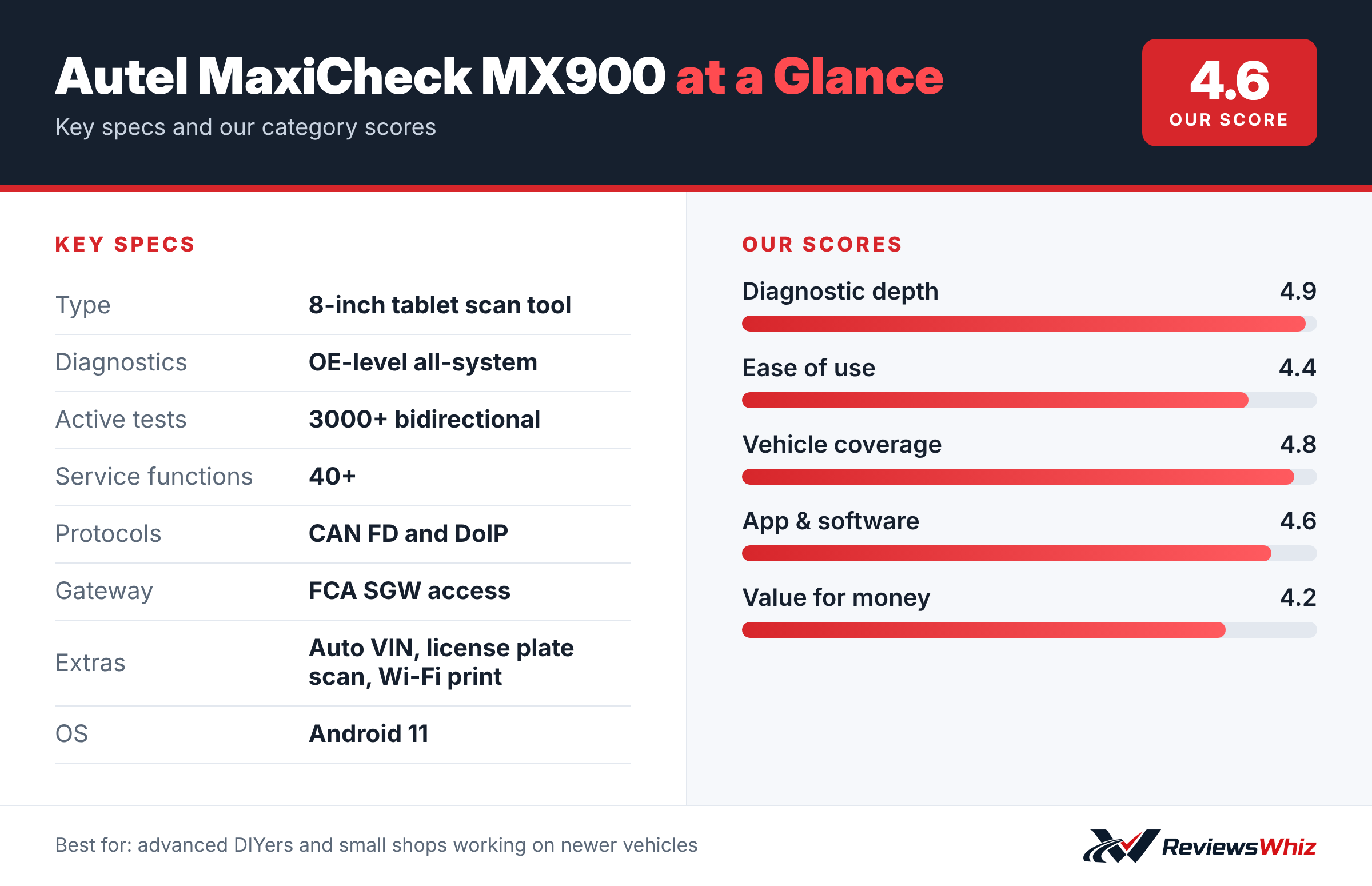
| Type | 8-inch tablet scan tool |
| Diagnostics | OE-level all-system |
| Active tests | 3000+ bidirectional |
| Service functions | 40+ |
| Protocols | CAN FD and DoIP |
| Gateway | FCA SGW access |
| Extras | Auto VIN, license plate scan, Wi-Fi print |
| OS | Android 11 |
What Is New vs the MK808S
The MX900 has a larger 8-inch display, more service functions (40+ vs 28+) and support for CAN FD and DoIP protocols. Those protocols are used on many newer GM and other vehicles, so the MX900 is more future-proof.
Bidirectional Tests
Like the MK808S, it can run more than 3,000 active tests, letting you command components such as fans, pumps, lights and windows to confirm whether they work.
Service Functions
You get more than 40 resets, calibrations and initializations, such as ABS bleeding, EPB, BMS, oil reset, SAS, throttle adaptation and more, across 150+ makes.
Smart Features
Camera license plate scan, auto VIN, Auto Scan 2.0, Wi-Fi printing of pre- and post-scan reports and Autel Cloud make the workflow faster for shops.
Who the MX900 Is For
The MX900 is a professional-grade tablet scan tool built for advanced DIYers and small shops. It offers OE-level diagnostics on all systems, bidirectional active tests and more than 40 service functions. If you regularly work on several makes, do brake jobs, battery replacements, injector coding or key-related tasks, this kind of tool can replace multiple cheaper scanners.
Casual owners who only want to read a check engine code will not use most of what the MX900 offers.
Getting Started
Charge the tablet, connect to Wi-Fi and register the tool with Autel to activate updates. Plug the VCI into the car’s OBD2 port and let Auto VIN or the license plate scan identify the vehicle. From there, an Auto Scan shows every module and its stored codes in a single view.
Autel’s interface is consistent across its tablets, so if you have used an MK808S or similar tool, you will feel at home quickly.
- Update the software before the first job.
- Run an Auto Scan to get an overview of all modules.
- Save or print a report before clearing codes.
- Use a battery maintainer during long procedures.
Modern Protocols: CAN FD and DoIP
Newer vehicles, including many recent GM and other models, use faster communication protocols called CAN FD and DoIP. Older scan tools cannot talk to these cars properly. The MX900’s support for both means it is ready for many newer vehicles, which is a key reason to choose it over older tablets.
MX900 vs Other Pro Tablets
| Model | Main strength | Trade-off | Best for |
|---|---|---|---|
| Autel MaxiCheck MX900 | CAN FD, DoIP, 40+ services, active tests | Higher price | Advanced DIY and small shops |
| Autel MaxiCOM MK808S | Lower price, similar workflow | Fewer modern protocols | Most DIY work |
| Launch X431 PRO3 V+ Elite | Broad coverage, many functions | Different interface | Shops used to Launch tools |
| Topdon AD800BT 2 | Lower cost | Fewer advanced tests | Budget all-system scans |
Common Jobs It Handles
- All-system scans and code clearing.
- Active tests on fans, pumps, lights and actuators.
- Electronic parking brake service.
- Battery registration and steering angle calibration.
- Injector coding and throttle relearns.
- FCA secure gateway access with an AutoAuth account.
Long-Term Costs
Like most professional scan tools, the MX900 includes a period of free updates, then offers a paid update subscription. The tool still works without updates, but newer cars and functions need them. For home users, updating every couple of years may be enough; shops usually keep it current.
Tips for Using a Professional Tablet
- Read each service function’s instructions fully before starting.
- Keep a stable power supply connected during coding or relearns.
- Save diagnostic reports so you can track a car’s history.
- Use the Wi-Fi printing feature to give customers printed reports.
- Join Autel’s user community for tips and vehicle-specific advice.
Is It Worth It for DIY Use?
If you maintain several modern cars, do your own brakes, batteries and electronics, and want to avoid dealer visits for programming-related jobs, the MX900 can pay for itself. If you work on one older car and mostly read codes, the MX900 is more than you need, and a handheld scanner or the MK808S will save money.
Hardware and Build
The 8-inch tablet runs Android 11 and has a rugged case designed for workshop use. Wi-Fi lets it download updates and print reports, and the larger screen makes it easier to read live data graphs.
What Is in the Box
The MX900 kit typically includes the tablet, a VCI or main cable for the OBD2 port, a power adapter, a USB cable and a carry case. Everything stores neatly in the case, which helps keep the kit organized in a home garage or shop.
Who Should Buy the Autel MaxiCheck MX900?
Buy it if you work on newer vehicles that need CAN FD or DoIP, or you want the bigger screen and extra services.
Skip it if you mostly work on older cars. The Autel MK808S offers similar core features for less.
Alternatives to Consider
- Autel MaxiCOM MK808S: The 7-inch predecessor at a lower price.
- Launch X431 PRO3 V+ Elite: A pro-level tablet with J2534 support.
- Topdon AD800BT 2: A cheaper Bluetooth bidirectional scanner.
Final Verdict
The Autel MaxiCheck MX900 is a powerful, future-ready scan tool. If you work on newer vehicles or run a small shop, its CAN FD support and extra services justify the price. Casual DIYers can save with the MK808S.
Helpful Free Car Tools
Related Reviews
Frequently Asked Questions
Is the Autel MX900 bidirectional?
Yes, with more than 3,000 active tests.
Does the MX900 support CAN FD?
Yes. It supports CAN FD and DoIP protocols.
How many service functions does it have?
More than 40.
What is the difference between the MX900 and MK808S?
The MX900 has an 8-inch screen, more services and CAN FD/DoIP support.
Who is the MX900 for?
Advanced DIYers and small shops.
How we evaluated: this review is based on the manufacturer’s published specifications, the product’s feature set, and how it compares with competing products in the same price range. Product details and images are provided by Amazon and may change. Prices and availability are accurate as of the time shown on Amazon and are subject to change.