
Garmin BC 50 Review: A Wireless Backup Camera for Garmin Navigators
Affiliate disclosure: ReviewsWhiz is reader-supported. When you buy through links on this page, we may earn a commission from Amazon at no extra cost to you. Learn more.
The Garmin BC 50 is a wireless backup camera that shows its picture on a compatible Garmin navigator, so you do not need a separate monitor.
In this Garmin BC 50 review, we look at range, image quality and compatibility.

Garmin BC 50
4.2 / 5 ReviewsWhiz Score- Pairs with Garmin navigators
- Wide 160° view
- Long 50-foot range
✅ Pros
- No extra monitor
- Wide view
- Long range for RVs
- Rugged IPX7 housing
- Trusted brand
❌ Cons
- Needs a compatible Garmin navigator
- 720p is modest
- Night vision version costs more
Garmin BC 50 Key Specifications
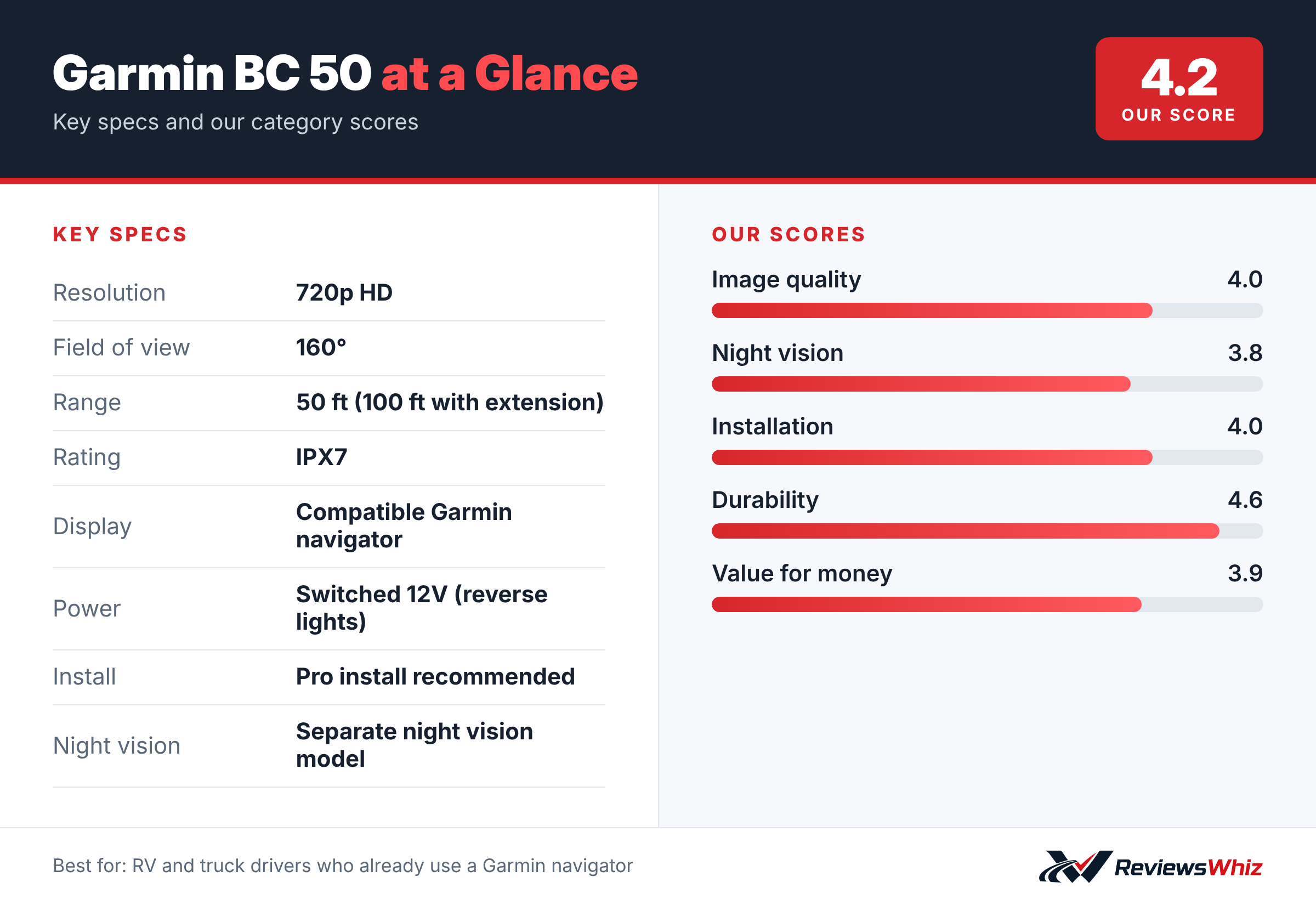
| Resolution | 720p HD |
| Field of view | 160° |
| Range | 50 ft (100 ft with extension) |
| Rating | IPX7 |
| Display | Compatible Garmin navigator |
| Power | Switched 12V (reverse lights) |
| Install | Pro install recommended |
| Night vision | Separate night vision model |
Picture
The BC 50 records 720p with a 160° field of view, which shows a wide area behind the vehicle. A separate BC 50 with Night Vision model is available for darker conditions.
Range
A 50-foot range suits RVs, semis and trailers. An optional 50-foot extension cable extends it up to 100 feet.
Installation
It needs a switched 12V source such as the reverse lights, and Garmin recommends professional installation. It only displays on compatible Garmin navigators.
Who the Garmin BC 50 Is For
The BC 50 is a wireless backup camera designed to work with compatible Garmin navigators, such as Garmin’s RV and truck navigation units. It suits RV owners, truck drivers and anyone who already uses a Garmin navigator and wants backup video on the same screen. Using one display for both navigation and the rear view reduces dashboard clutter.
It does not work on its own without a compatible Garmin device.
How to Install It
- Check that your Garmin navigator is compatible.
- Mount the camera on the rear of the vehicle.
- Wire the camera to switched 12V power, such as the reverse lights or marker lights.
- Pair it with the navigator.
- Test the picture and range.
Garmin recommends professional installation, especially on large RVs and trailers.
BC 50 vs Other Wireless Backup Cameras
| Model | Main strength | Trade-off | Best for |
|---|---|---|---|
| Garmin BC 50 | Works with Garmin navigators | Needs Garmin device, 720p | Garmin users |
| AUTO-VOX Solar Wireless | Solar power, own monitor | Magnet needs steel | RVs without Garmin |
| Haloview BT7 | Own monitor, multi-camera | Separate screen | Multiple cameras |
| Furrion Vision S | RV pre-wire compatible | Price | Pre-wired RVs |
Range and Picture
Garmin rates the range at 50 feet, extendable to 100 feet with an extension cable. The 160-degree lens shows a wide area behind the vehicle. A separate night vision version is available for better low-light viewing. At 720p, the picture is clear enough for backing up, though not as sharp as some newer cameras.
Weather Resistance
An IPX7 rating protects the camera against rain and washing.
Who Should Choose Something Else
If you do not own a compatible Garmin navigator, a camera with its own monitor, such as the AUTO-VOX Solar Wireless, is a simpler choice.
Using It With an RV or Trailer
On an RV, mount the BC 50 high on the rear wall, centered, and angle it down so you can see the bumper edge and the ground behind. That gives a clear view when reversing into campsites and helps when changing lanes on the highway. On a travel trailer, mount it on the back of the trailer and wire it to the running lights so it is on whenever you tow. Because it shows video on your Garmin navigator, you can switch between the map and the camera with a tap, which keeps the dashboard tidy.
Tips
- Clean the lens before each trip.
- Check the signal at full length before driving.
- Use the extension cable on long rigs.
- Seal wiring connections against moisture.
Who Should Buy the Garmin BC 50?
Buy it if you already own a compatible Garmin navigator.
Skip it if you do not have a Garmin unit. The AUTO-VOX solar camera includes its own monitor.
Alternatives to Consider
- AUTO-VOX Solar Wireless: Monitor included.
- Haloview BT7: Large RV kit.
- Furrion Vision S: RV pre-wire friendly.
Final Verdict
The Garmin BC 50 is a tough, wide-view camera for Garmin owners. It is a clean way to add a backup view without another screen.
Helpful Free Car Tools
Related Reviews
- Auto-Vox 5-inch Wireless Backup Camera review
- Auto-Vox Solar Wireless Backup Camera review
- See all Dash Cams & Electronics reviews
Frequently Asked Questions
Does the Garmin BC 50 need a Garmin navigator?
Yes, it displays on compatible Garmin navigators.
What is the range?
50 feet, up to 100 with an extension.
Is it waterproof?
IPX7 water resistant.
What resolution is it?
720p HD.
Does it have night vision?
A separate night vision model is available.
Does the Garmin BC 50 need a Garmin navigator?
Yes. It displays video on compatible Garmin navigators.
What is the range?
About 50 feet, or up to 100 feet with an extension cable.
Is it waterproof?
It is rated IPX7.
Does it have night vision?
A separate night vision model is available.
How is it powered?
From switched 12V power, such as the reverse or marker lights.
What resolution is it?
720p HD.
How we evaluated: this review is based on the manufacturer’s published specifications, the product’s feature set, and how it compares with competing products in the same price range. Product details and images are provided by Amazon and may change. Prices and availability are accurate as of the time shown on Amazon and are subject to change.