
BlackVue Elite 9 Review: True 4K + 2K With Instant Boot
Affiliate disclosure: ReviewsWhiz is reader-supported. When you buy through links on this page, we may earn a commission from Amazon at no extra cost to you. Learn more.
The BlackVue Elite 9 is BlackVue’s premium front and rear dash cam. It records true 4K at the front and true 2K at the rear, boots in under a second and uses very little power in parking mode.
In this BlackVue Elite 9 review, we look at what you get for the premium.

BlackVue Elite 9
4.6 / 5 ReviewsWhiz Score- True 4K front and 2K rear with STARVIS 2
- Boots and records in under 1 second
- Parking mode draws under 1mA
✅ Pros
- Excellent video quality
- Instant boot catches early incidents
- Ultra-low-power parking
- Hardwire cable included
- Free 5GB cloud slot
❌ Cons
- Expensive
- No screen
- Cloud LTE needs extra hardware
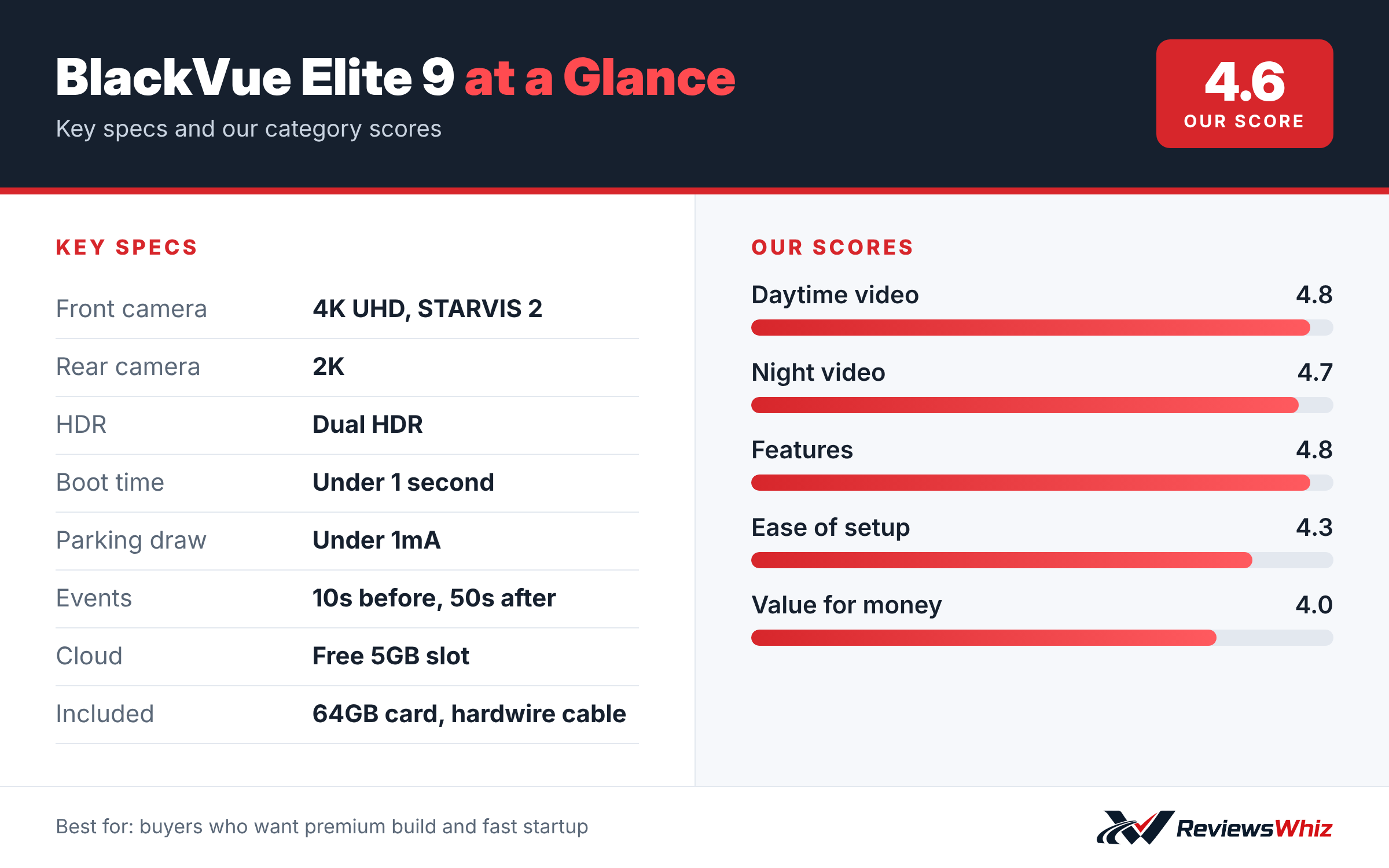
BlackVue Elite 9 Key Specifications
| Front camera | 4K UHD, STARVIS 2 |
| Rear camera | 2K |
| HDR | Dual HDR |
| Boot time | Under 1 second |
| Parking draw | Under 1mA |
| Events | 10s before, 50s after |
| Cloud | Free 5GB slot |
| Included | 64GB card, hardwire cable |
Video Quality
STARVIS 2 sensors, dual HDR and BlackVue’s image tuning with F1.7 multi-layer lenses produce sharp 4K front and 2K rear footage.
Instant Boot
The Elite 9 powers on and records in under one second, so it can capture incidents that happen as soon as you start the engine.
Parking Mode
In parking mode it draws less than 1mA for weeks, preserving your battery. Events are recorded from 10 seconds before to 50 seconds after.
Cloud and Wi-Fi
Built-in Wi-Fi gives fast access without a subscription, and users get a free 5GB cloud slot for automatic event backup when the cloud service is active.
Installing the BlackVue Elite 9
The Elite 9 includes a 4K front camera, a 2K rear camera, a 64GB card and a hardwire cable, so you can set up a complete system with parking mode out of the box. Mount the front camera behind the mirror and route the rear cable under the headliner and trim to the back window. Connect the hardwire cable to your fuse box with add-a-fuse taps.
Use the BlackVue app to set up Wi-Fi, check camera angles and connect to BlackVue Cloud.
- Use the included hardwire cable for parking mode.
- Set the low-voltage cutoff to protect the battery.
- Check both views in the app.
- Register for the free cloud slot.
Who It Is For
The Elite 9 suits drivers who want top-tier image quality, instant recording and efficient parking mode. It appeals to commuters, people who park on the street and anyone who wants a premium, discreet camera.
Elite 9 vs Other Premium Dash Cams
| Model | Main strength | Trade-off | Best for |
|---|---|---|---|
| BlackVue Elite 9 | Instant boot, low parking draw, 4K and 2K | Expensive, no screen | Premium parking protection |
| BlackVue DR970X LTE Plus II | Built-in LTE | Data plan | Remote monitoring |
| Thinkware U3000 PRO | Radar parking | Price | Long parking |
| VIOFO A229 Pro | Great value | Fewer premium features | Most drivers |
Instant Boot
The Elite 9 starts recording in under a second, so it catches events that happen right as you start the car or pull out of a parking spot. Many dash cams take several seconds to boot.
Ultra-Low Parking Draw
In parking mode, the Elite 9 draws less than 1mA while waiting for an event. That means it can monitor the car for much longer without draining the battery. When an event is detected, it saves 10 seconds before and 50 seconds after.
Cloud
BlackVue includes a free 5GB cloud slot. Cloud features like remote alerts need an internet connection, such as an in-car hotspot or BlackVue’s LTE module.
Final Thoughts
The Elite 9 is one of the most advanced dash cams available for drivers who want premium quality and parking protection.
Settings and Memory Card Tips
- The included 64GB card is a good start; upgrade to 256GB for longer history.
- Set the parking mode to impact and motion for the best coverage.
- Lower the G-sensor sensitivity while driving.
- Update firmware through the BlackVue app.
Who Should Buy the BlackVue Elite 9?
Buy it if you want premium quality and the best parking efficiency.
Skip it if you want strong value. The VIOFO A229 Pro offers similar resolution for much less.
Alternatives to Consider
- BlackVue DR970X LTE Plus II: Built-in LTE.
- Thinkware U3000 PRO: Radar parking.
- VIOFO A229 Pro: Budget 4K + 2K.
Final Verdict
The BlackVue Elite 9 is a top-tier dash cam with excellent video and very efficient parking mode. It is pricey, but it delivers premium performance.
Helpful Free Car Tools
- Dash Cam SD Card Recording Time Calculator: Hours of video by card size, resolution and channels.
- Dash Cam Field of View Calculator: Road width covered at a distance.
- Browse all free car tools and calculators
Related Reviews
Frequently Asked Questions
What resolution does the BlackVue Elite 9 record?
4K front and 2K rear.
How fast does it boot?
In under one second.
How much power does parking mode use?
Under 1mA.
Is a memory card included?
Yes, 64GB.
Does it include a hardwire cable?
Yes.
Does the BlackVue Elite 9 include a memory card?
Yes. A 64GB microSD card is included, along with a hardwire cable for parking mode.
How fast does it start recording?
BlackVue says it boots in under one second, so it starts recording almost immediately.
Does it have LTE?
Not built in. Cloud features need an in-car hotspot or BlackVue's separate LTE module.
How much power does parking mode use?
Under 1mA while waiting for an event, which helps protect your car battery during long parking periods.
Does it have a screen?
No. You use the BlackVue app on your phone to view footage and change settings.
What resolution is the rear camera?
The rear camera records 2K, which gives clear footage behind the car.
How we evaluated: this review is based on the manufacturer’s published specifications, the product’s feature set, and how it compares with competing products in the same price range. Product details and images are provided by Amazon and may change. Prices and availability are accurate as of the time shown on Amazon and are subject to change.